Who Cares Where Waldo Is. Locating macOS Users Without Their Consent
Black Hat Asia 2025 · Day 1 · Briefings
Overview
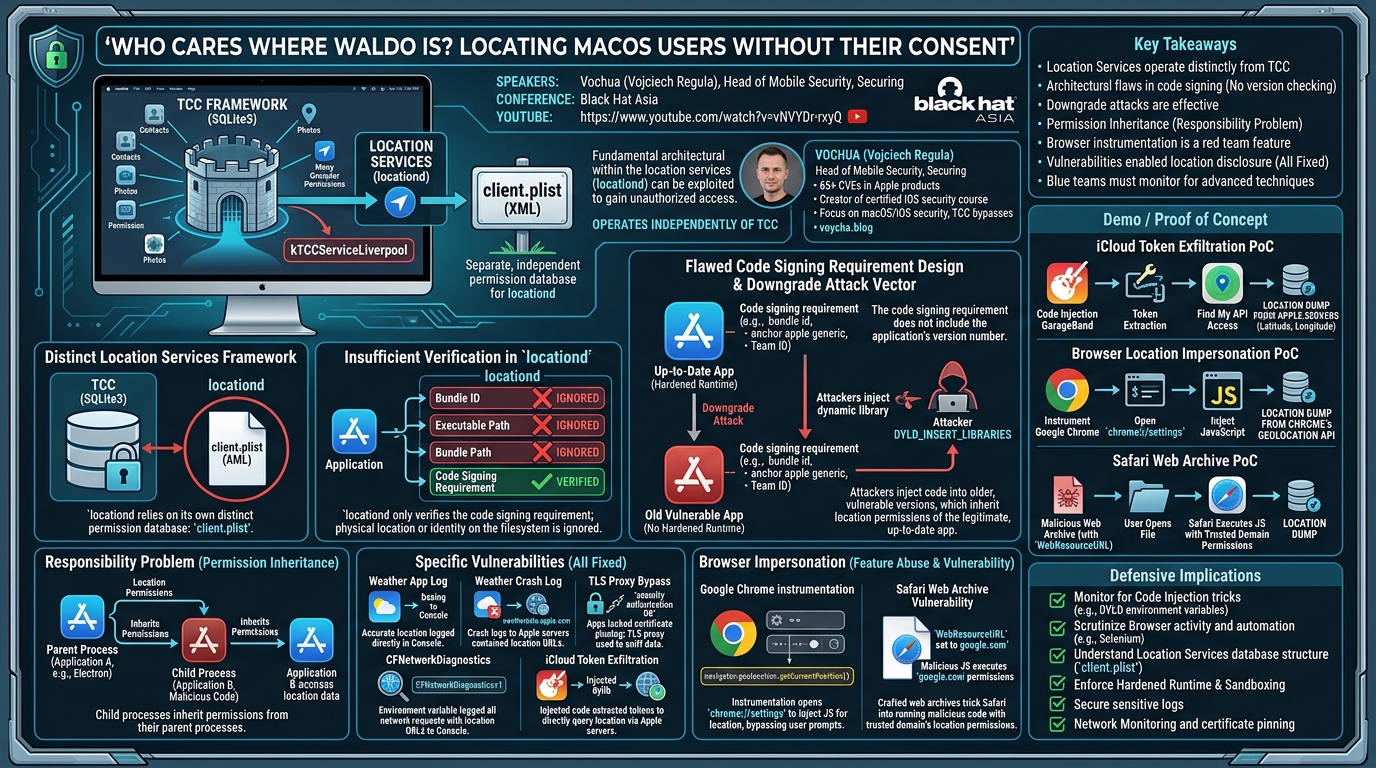
This talk, presented by Vochua (Vojciech Regula) at Black Hat Asia, delves into the intricate and often overlooked security landscape of macOS location services. Building upon his extensive prior research on bypassing Apple's Transparency, Consent, and Control (TCC) framework, Vochua isolates and scrutinizes the distinct mechanisms governing location permissions. The core thesis is that, despite Apple's robust privacy efforts, fundamental architectural flaws within the location services daemon (locationd) and its interaction with code signing requirements can be exploited to gain unauthorized access to a user's precise location.
Key moments
- 0:00 Talk introduction and focus on macOS location services
- 2:40 Understanding macOS System Integrity Protection (SIP)
- 3:50 Core principles of TCC privacy framework
- 6:55 How TCC stores permissions in SQLite databases
- 7:35 Transforming binary code signing requirements into human-readable form
- 8:40 Location services daemon separate from TCC framework
Who Cares Where Waldo Is. Locating macOS Users Without Their Consent
Speakers: Vochua, Head of Mobile Security, Securing
Conference: Black Hat Asia
YouTube: https://www.youtube.com/watch?v=vNVYDr-rxyQ
Overview
This talk, presented by Vochua (Vojciech Regula) at Black Hat Asia, delves into the intricate and often overlooked security landscape of macOS location services. Building upon his extensive prior research on bypassing Apple's Transparency, Consent, and Control (TCC) framework, Vochua isolates and scrutinizes the distinct mechanisms governing location permissions. The core thesis is that, despite Apple's robust privacy efforts, fundamental architectural flaws within the location services daemon (locationd) and its interaction with code signing requirements can be exploited to gain unauthorized access to a user's precise location.
The presentation systematically uncovers these vulnerabilities, ranging from subtle information disclosures to sophisticated code injection and impersonation techniques. It highlights that the locationd framework operates independently of the primary TCC database, relying on its own client.plist and exhibiting critical weaknesses, particularly concerning the verification of application identity and integrity. This research is critical for both offensive security practitioners seeking novel ways to exfiltrate sensitive user data and defensive teams aiming to bolster their macOS environments against such sophisticated attacks.
Vochua's work is significant because it moves beyond typical TCC bypasses to expose a parallel, less understood attack surface. By demonstrating how trusted applications with existing location permissions can be leveraged or impersonated, he reveals that even in a hardened macOS environment, a user's location can be compromised without their explicit consent. The talk not only details historical vulnerabilities, all of which have been responsibly disclosed and fixed by Apple, but also outlines "features" that can be abused in red teaming scenarios, providing a comprehensive guide for understanding and mitigating these persistent threats.
Background
▶ Watch: Talk introduction and focus on macOS location services (0:00)
Apple's macOS operating system is built with a strong emphasis on user privacy, primarily enforced through mechanisms like System Integrity Protection (SIP) and the Transparency, Consent, and Control (TCC) framework. SIP, often referred to as "rootless," is a kernel-level protection that restricts even root users from modifying critical system directories and files, effectively sandboxing the entire operating system. TCC, on the other hand, is designed to ensure that applications explicitly obtain user consent before accessing sensitive data or system resources, such as contacts, photos, microphone, or camera. This framework is intended to be unbypassable, even with escalated privileges.
From macOS Ventura onwards, TCC has evolved to provide bidirectional sandboxing for applications. This means that not only are applications restricted from accessing external resources, but external applications are also restricted from accessing data stored within a sandboxed app's container. TCC permissions are stored in SQLite3 databases, with a global database and individual databases for each user, allowing granular control over application access. Key entries in these databases include the service (e.g., kTCCServiceMicrophone), client (the application's bundle ID), auth_value (accepted or denied), and crucially, code signing requirements. These requirements, often stored in a binary format, are essential for tccd (the TCC daemon) to verify the authenticity and integrity of the requesting application. Decoded, they specify criteria like the application's bundle identifier, whether it's signed by an Apple-issued certificate (anchor apple generic), and its Team ID (certificate leaf subject organization unit).
However, Vochua's research highlights a critical architectural divergence: macOS location services operate under a separate framework. While a kTCCServiceLiverpool service string exists in the TCC database, it is not actually respected by the system for location permissions. Instead, the locationd daemon, responsible for managing location access, relies on its own distinct permission database: client.plist. This file is an XML-based property list, a fundamentally different format from TCC's SQLite3 database, creating a separate attack surface for parsing and manipulation.
For an application to legitimately request location access, particularly if it is sandboxed (like those from the App Store), it must possess the com.apple.security.personal-information.location entitlement and include an NSLocationUsageDescription entry in its Info.plist file, explaining to the user why location is needed. Unsandboxed applications, however, are not subject to these requirements, offering a simpler path for red teamers. The standard Objective-C code for requesting location involves calling CLLocationManager methods, allowing for "When In Use," "Always," or "Temporary Full Accuracy" authorization. The existence of a separate daemon, database, and permission model for location services forms the bedrock of the vulnerabilities and bypasses explored in this talk.
Key Findings
▶ Watch: Core principles of TCC privacy framework (3:50)
Vochua's central discovery revolves around a series of architectural and implementation flaws within macOS location services that collectively undermine its security model. The primary findings are:
- Distinct Location Services Framework: Unlike most privacy-sensitive services protected by TCC and its SQLite3 database, location services are managed by the
locationddaemon, which consults its ownclient.plistXML database. This fundamental separation means TCC's robust protections do not directly apply to location permissions.
- Insufficient Verification in
locationd: Theclient.plistdatabase stores critical information about applications granted location access, including theirbundle identifier,executable path,bundle path, andcode signing requirement. However, Vochua demonstrated thatlocationdonly verifies thecode signing requirement. Thebundle identifier,executable path, andbundle pathare entirely ignored during authorization checks. This is a critical flaw, as it means an application's physical location or apparent identity on the filesystem does not impact its ability to obtain location data if its code signature matches a previously authorized application.
- Flawed Code Signing Requirement Design: While the
code signing requirementis the only verified component, its design has a significant architectural weakness: it does not include the application's version number. The requirement typically checks thebundle id(which can be impersonated),anchor apple generic(meaning signed by an Apple-issued certificate, obtainable with a paid developer account), and thecertificate leaf subject organization unit(the Team ID, which is harder to fake). The omission of version data is pivotal.
- Downgrade Attack Vector: Due to the lack of version verification in the code signing requirement, Vochua identified a potent downgrade attack. An attacker can take an older, vulnerable version of an application (especially one without Hardened Runtime enabled, which blocks code injections), inject their own dynamic library, and execute arbitrary code within the context of the privileged application. Because the code signing requirement remains unchanged between versions, the injected, older application will inherit the location permissions of the legitimate, up-to-date version, granting unauthorized location access.
- Responsibility Problem (Permission Inheritance): Vochua reiterated the "responsibility problem" he previously detailed at Defcon. If a privileged application (Application A) spawns another application (Application B), Application B inherits the permissions of Application A. This means an attacker could exploit a vulnerability in a privileged application to spawn their malicious code, which would then inherit location access. His
electronizertool, which targeted Electron applications, demonstrated this vulnerability.
- Specific Vulnerabilities (All Fixed):
- Weather App Log Disclosure: Accurate user location was found to be directly logged in the console by the macOS Weather app and its widget.
- Weather App Crash Log Disclosure: When the Weather app crashed due to a broken route to
weatherdata.apple.com, the crash logs contained the URL, which included precise location data. - TLS Proxy Bypass (Find My, Maps, Weather): These applications lacked certificate pinning. An attacker could set up a TLS proxy, and by using the built-in
security authorization DBcommand, could suppress the macOS prompt for adding a new trusted certificate. This allowed sniffing of location data from these apps. - CFNetworkDiagnostics Environment Variable: Setting the
CFNetworkDiagnosticsenvironment variable to1caused theCFNetworkframework (used by many Objective-C applications) to log all network requests, including URLs containing location data, to the console. - iCloud Token Exfiltration (GarageBand, iMovie): Both GarageBand and iMovie were vulnerable to code injection and possessed the private
iCloud account accessentitlement. By injecting code, Vochua could extract iCloud tokens, which could then be used to authenticate with Apple's Find My service and retrieve the user's location directly from Apple servers.
- Browser Impersonation (Feature Abuse and Vulnerability):
- Google Chrome Instrumentation: Browsers often have location permissions. Vochua demonstrated that for red teaming, an attacker could instrument Google Chrome (a "feature," not a vulnerability in this context) to open a special URL (e.g.,
chrome://settings) and inject JavaScript to callnavigator.geolocation.getCurrentPosition(), thereby obtaining location. - Safari Web Archive Vulnerability: A specific vulnerability (now fixed) allowed attackers to craft malicious web archives (essentially zip files containing cached HTML and a URL). By specifying a trusted domain (like
google.com) in the web archive'sWebResourceURL, Safari would execute injected JavaScript to dump location, impersonating the trusted domain's access.
These findings collectively paint a picture of a complex and sometimes fragmented privacy architecture on macOS, where the intent of strong privacy controls can be undermined by specific implementation details and architectural oversights.
Technical Deep Dive
▶ Watch: How TCC stores permissions in SQLite databases (6:55)
The technical core of Vochua's research lies in understanding the distinct mechanisms of macOS location services and the vulnerabilities arising from their design.
The locationd daemon, responsible for managing location permissions, stores its configuration in client.plist, an XML property list located in a user's library directory. This is a crucial distinction from the TCC framework, which uses SQLite3 databases. When an application requests location access, locationd consults client.plist to determine if permission has been granted.
A typical entry in client.plist for an application, such as Firefox, would contain:
bundle identifier: A string (e.g.,org.mozilla.firefox).executable path: The full path to the application's executable.bundle path: The full path to the application's bundle directory.requirement: The code signing requirement string, similar to those found in TCC databases.
Vochua's key finding here is that locationd does not verify the bundle identifier, executable path, or bundle path against the actual application requesting location. This was demonstrated by an experiment: copying an authorized Firefox application to a different temporary directory (/private/tmp/Firefox). Both instances, despite having different file paths, were granted location access, as confirmed by locationd logs (client authorized for location starting short). This means that an attacker doesn't need to modify the original application's directory to impersonate it; merely having a copy with the correct code signature is sufficient. This further implies that even sandboxed applications, whose directories are protected, could theoretically be impersonated if their code signing requirement can be met elsewhere.
The only component locationd truly checks is the code signing requirement. This requirement is a complex string that typically includes:
bundle id "org.mozilla.firefox": The application's bundle identifier. As Vochua points out, bundle IDs are just strings and can be chosen by developers. An attacker can sign their malicious application with the target's bundle ID.and anchor apple generic: This signifies that the application has been signed by a certificate issued by Apple. While this sounds secure, an attacker can obtain such a certificate by purchasing a paid Apple developer account.and certificate leaf subject organization unit = "Team ID": This is the application's unique Team ID, which is harder to fake without compromising the legitimate developer's account.
The critical flaw in this code signing requirement is its omission of the application's version number. This architectural oversight enables downgrade attacks. An attacker can acquire an older version of a target application that has known vulnerabilities, such as lacking Hardened Runtime enforcement. Hardened Runtime is a security feature that prevents code injection (e.g., via DYLD_INSERT_LIBRARIES). If an older version of an application doesn't have it enabled, an attacker can inject a dynamic library into it.
Vochua illustrated this with a scenario: an up-to-date application with Hardened Runtime, an old application without Hardened Runtime, and the same old application with an injected dynamic library. Using the codesign tool (codesign -dv --entitlements - /path/to/app), he showed that macOS recognizes all three as having the exact same code signing requirement. Therefore, if the original application had location permissions, the injected, older version will also inherit those permissions, allowing the attacker's injected code to access the user's location. This is a fundamental architectural problem, not a zero-day, and has persisted for years.
Beyond downgrade attacks, the responsibility problem further complicates macOS security. If a parent process (Application A) with certain permissions spawns a child process (Application B), the child process inherits the parent's permissions. This was the basis for Vochua's electronizer tool, which exploited Electron applications that often spawn child processes with inherited privileges.
For non-accurate location data, Vochua mentioned traditional techniques like IP address, system time zone, and Apple Locale. He specifically noted that accessing Wi-Fi SSIDs for location purposes has been blocked in recent macOS versions, with airport -s output being redacted and Objective-C calls failing, indicating Apple has likely introduced a new, private entitlement to prevent this.
The talk also detailed specific vulnerabilities, all of which have been fixed:
- Weather App Logging: The Weather app and widget directly logged accurate user location to the console.
- Weather App Crash Logs: Crash logs from
weatherdata.apple.comcontained location-revealing URLs. - TLS Proxy and
security authorization DB: Applications like Find My, Maps, and Weather lacked certificate pinning. An attacker could set up a TLS proxy and, critically, use the commandsecurity authorization DB update com.apple.trust.settings.add -s allowto suppress the macOS prompt for adding a new trusted root certificate. This allowed the proxy to intercept and decrypt TLS traffic, revealing location data. CFNetworkDiagnosticsEnvironment Variable: SettingCFNetworkDiagnostics=1as an environment variable (e.g.,CFNetworkDiagnostics=1 /Applications/Safari.app/Contents/MacOS/Safari) forced theCFNetworkframework, widely used by Objective-C applications, to log all network requests to the console. This included URLs containing location data.- GarageBand/iMovie iCloud Token Exfiltration: Both applications were vulnerable to code injection and held the
com.apple.private.icloud.account-accessentitlement. By injecting a dynamic library, Vochua could extract iCloud tokens. These tokens could then be used to authenticate with Apple's Find My service via its API, directly querying Apple's servers for the user's location.
These technical details underscore the complexity of achieving robust privacy, even in a system like macOS, when architectural decisions and implementation details create subtle yet powerful bypasses.
Demo / Proof of Concept
▶ Watch: Transforming binary code signing requirements into human-readable form (7:35)
Vochua presented several compelling demonstrations and proofs of concept to illustrate the vulnerabilities and bypass techniques.
- iCloud Token Exfiltration from GarageBand/iMovie:
This demo showcased the end-to-end impact of code injection into privileged applications. Vochua explained how he leveraged the code injection vulnerability in applications like GarageBand or iMovie (which, at the time, had the com.apple.private.icloud.account-access entitlement). The core of the PoC involved:
- Code Injection: Injecting a malicious dynamic library into the target application.
- Token Extraction: The injected code would then extract iCloud tokens from the application's process memory or keychain.
- Find My API Access: With the extracted iCloud tokens, an attacker could programmatically interact with Apple's Find My service API. The demo showed a script where one of these tokens was passed, refreshing a Find My session in the background.
- Location Dump: The script then queried Apple's servers via the Find My API, and the user's precise location (latitude and longitude) was dumped directly from Apple servers to the console. This demonstrated a complete bypass, leveraging an application's internal entitlements to access a highly sensitive external service.
- Impersonating Browser Location Services Permissions (Google Chrome):
This PoC highlighted a technique Vochua classified as a "feature, not a vulnerability" for red teaming engagements. It demonstrated how to access location via a browser that already has permissions, without burning a zero-day:
- Target: A modern version of Google Chrome with existing location services access (common for users of Google Maps, dating apps, etc.).
- Instrumentation: The technique involved instrumenting the browser to execute arbitrary JavaScript code.
- Special URL: A special, non-user-facing URL like
chrome://settingswas opened. This avoids triggering any additional user prompts or security warnings that might arise from opening a suspicious external URL. - JavaScript Injection: Within the context of
chrome://settings, a simple JavaScript snippet was executed:
- Location Retrieval: This JavaScript directly calls the browser's geolocation API, which then accesses the system's location services. Since Chrome already had permission, the location was immediately dumped to the console, demonstrating unauthorized access from the user's perspective (as they didn't explicitly grant it to the injected script).
- Safari Web Archive Vulnerability:
This demo showcased a specific, now-fixed vulnerability in Safari that allowed location exfiltration via malicious web archives:
- Pre-requisite: Safari had location services granted to a trusted domain, such as Google Maps.
- Malicious Web Archive: The attacker crafted a web archive, which is essentially a
.webarchivefile. These are structured as zip files containing: content.html: An HTML file with a malicious JavaScript payload. In the demo, this was a simple script similar to the Chrome example, callingnavigator.geolocation.getCurrentPosition().WebResourceURL: A crucial entry within the web archive's metadata that specifies the domain for which Safari should believe the content was cached. The attacker set this to a trusted domain likegoogle.com.- Execution: When the user opened this malicious
.webarchivefile, Safari would render thecontent.htmlscript. Because theWebResourceURLwas set togoogle.com, Safari would execute the JavaScript with the permissions associated withgoogle.com. - Location Dump: Since
google.com(via Google Maps) typically has location access, the injected JavaScript successfully called the geolocation API, and the user's location was dumped. This demonstrated a powerful impersonation attack where Safari was tricked into running attacker-controlled code with trusted domain permissions.
These demonstrations effectively highlighted the practical implications of the architectural and implementation flaws Vochua uncovered, providing clear examples of how macOS users' location data could be compromised.
Defensive Implications
▶ Watch: Location services daemon separate from TCC framework (8:40)
Vochua's research provides critical insights for both security vendors and blue teams responsible for defending macOS environments. The architectural weaknesses and specific vulnerabilities uncovered necessitate a multi-faceted defensive strategy.
- Enforce Hardened Runtime and Sandboxing: For developers, enabling Hardened Runtime is paramount. This macOS security feature prevents code injection techniques (e.g., via
DYLD_INSERT_LIBRARIES) that are central to downgrade attacks. All applications, especially those handling sensitive data or having broad entitlements, should be properly sandboxed to minimize their attack surface and prevent unauthorized access to their containers. Apple has since fixed many of the vulnerabilities by enforcing these measures more strictly and patching specific flaws.
- Monitor for Code Injection: Blue teams should implement robust detection mechanisms for code injection tricks. This includes monitoring for unusual process behavior, unexpected dynamic library loads, and the presence of environment variables like
DYLD_INSERT_LIBRARIESbeing set by non-standard processes. Tools that analyze process memory and loaded modules can help identify injected code.
- Scrutinize Browser Activity: Given the "feature" of browser instrumentation and the Safari web archive vulnerability, monitoring browser activity is crucial. Blue teams should look for:
- Selenium or Third-Party Plugins: Detecting the loading of automation frameworks like Selenium or suspicious third-party browser plugins could indicate attempts to instrument browsers for data exfiltration.
- Unusual JavaScript Execution: While challenging, anomalous JavaScript execution in trusted browser contexts (especially if not originating from user interaction with known web applications) could be a red flag.
- Web Archive Analysis: Educate users about the risks of opening untrusted
.webarchivefiles. Security tools should be configured to scan or block suspicious web archives.
- Understand Location Services Database: Defenders must understand that macOS location services operate on
client.plist, distinct from the TCC SQLite3 databases. While direct modification ofclient.plistis challenging due to SIP and file permissions, awareness of its structure and thelocationddaemon's behavior is vital for forensic analysis and understanding potential compromises.
- Address the Responsibility Problem: The issue of permission inheritance from parent to child processes means that compromising a privileged application can lead to broader system access. Blue teams should:
- Process Monitoring: Implement detailed process monitoring to identify instances where privileged applications spawn unexpected child processes, especially those that then attempt to access sensitive resources like location.
- Application Whitelisting: Restrict which applications can launch other applications, particularly those with high privileges.
- Network Monitoring and Certificate Pinning:
- TLS Proxy Detection: Monitor network traffic for suspicious TLS proxy activity. While the
security authorization DBcommand can bypass the prompt for adding trusted certificates, the act of adding certificates or unusual certificate warnings should still be investigated. - Developer Action: Developers should implement certificate pinning in their applications (as Apple has done for Find My, Maps, and Weather post-disclosure). This ensures applications only trust specific, pre-defined server certificates, making TLS interception significantly harder.
- Secure Sensitive Logs: Developers must be meticulous about what information is written to application logs, crash logs, and console output. As demonstrated by the Weather app vulnerabilities, sensitive data like user location should never be logged in an unencrypted or easily accessible format.
- Regular Patching and Updates: While Vochua's talk focused on fixed vulnerabilities, the underlying architectural issues (like the lack of version checking in code signing requirements) highlight the importance of applying macOS security updates promptly. Updates often include patches for specific vulnerabilities and improvements to core security frameworks.
- User Education: Educating users about the importance of granting location permissions judiciously, being wary of untrusted files (like web archives), and understanding the implications of system prompts can form a crucial layer of defense.
By addressing these points, organizations can significantly enhance their ability to detect, prevent, and respond to attempts to compromise macOS location services, moving beyond superficial security measures to tackle deeper architectural weaknesses.
Key Takeaways
- Location Services operate distinctly from TCC: macOS location permissions are managed by the
locationddaemon, using an XML-basedclient.plistdatabase, completely separate from the TCC framework's SQLite3 databases. This creates a unique attack surface. - Architectural Flaws in Code Signing Verification: The
locationddaemon only verifies thecode signing requirementstring, ignoringbundle identifier,executable path, andbundle path. Crucially, thecode signing requirementitself lacks a version number, enabling potent downgrade attacks. - Downgrade Attacks are Effective: Attackers can inject code into older, unhardened versions of applications (whose code signing requirements remain identical to newer versions) to inherit existing location permissions, even for sandboxed apps.
- Permission Inheritance (Responsibility Problem): Child processes inherit permissions from their parent processes. Exploiting a privileged application to spawn malicious code can grant unauthorized location access.
- Browser Instrumentation is a Red Team "Feature": Browsers with existing location permissions can be instrumented (e.g., via JavaScript injection in Chrome's internal settings pages) to obtain location data without triggering new user prompts, serving as a powerful red teaming technique.
- Vulnerabilities Enabled Location Disclosure: Historical vulnerabilities (all fixed) in core Apple applications like Weather, Find My, GarageBand, and iMovie allowed precise location exfiltration through log disclosures, TLS proxy bypasses (due to lack of certificate pinning),
CFNetworkDiagnosticsabuse, and iCloud token theft via code injection. - Blue Teams Must Monitor for Advanced Techniques: Defenders need to focus on detecting code injection, monitoring browser instrumentation (e.g., Selenium), scrutinizing process spawning, and understanding the nuances of macOS's fragmented privacy frameworks to counter these persistent threats effectively.
About the Speaker(s)
Vochua (Vojciech Regula) is a distinguished expert in mobile security, currently serving as the Head of Mobile Security at Securing. His extensive experience is particularly focused on the intricate security landscapes of macOS and iOS application security. Vochua is a prolific researcher, known for documenting his findings on voycha.blog, and has a remarkable track record with over 65 registered CVEs in Apple products, highlighting his deep understanding of Apple's ecosystem vulnerabilities.
He is also an educator, having authored a certified iOS application security engineer course tailored for developers and pentesters. This Black Hat Asia talk is a continuation of his impactful research, following previous Black Hat presentations where he detailed methods for bypassing macOS's TCC framework. Vochua's work consistently aims to uncover fundamental architectural weaknesses, providing invaluable insights for both offensive and defensive security communities.
Reviews
Dr. Zero (Offensive Security Researcher) — MUST SEE
Vochua's talk on macOS location services is a sharp, no-nonsense dissection of a critical yet often misunderstood privacy component. By meticulously isolating locationd from TCC, he exposes fundamental architectural flaws, particularly the omission of versioning in code signing requirements that enables persistent downgrade attacks. This isn't just a list of CVEs; it's a deep dive into how Apple's privacy model can be subtly undermined, offering invaluable insights for anyone serious about macOS security, from red teams leveraging browser instrumentation to blue teams hardening their environments.
Heather Calloway (CISO) — STRONG ACCEPT
This presentation by Vochua uncovers a critical architectural divergence in macOS location services, operating independently of the robust TCC framework. The core issue lies in locationd's flawed verification of code signing requirements, specifically the omission of version numbers, which enables potent downgrade attacks and undermines the integrity of application permissions. While the specific vulnerabilities detailed are now fixed, the research highlights a fundamental institutional accountability gap in platform security design, demanding that security leaders re-evaluate how they manage and govern sensitive data access on macOS endpoints and address the enduring 'responsibility…