Think Inside the Box: In-the-Wild Abuse of Windows Sandbox in Targeted Attacks
Black Hat Asia 2025 · Day 1 · Briefings
Overview
In a revealing presentation at Black Hat Asia, Hiakih Har, a Staff Engineer at Trend Micro, unveiled the first observed instance of threat actors leveraging Windows Sandbox for defense evasion in real-world targeted attacks. The talk, titled "Think Inside the Box," meticulously detailed how the China-aligned espionage group Earth Kasha (part of the broader APT10 umbrella) exploited this built-in Windows virtualization feature to circumvent endpoint detection and response (EDR) and endpoint protection platform (EPP) solutions. This marks a significant evolution in adversary tactics, moving beyond traditional virtual machine or container abuse to exploit a readily available, often overlooked, operating system component.
Key moments
- 0:00 Introduction and clarifying talk's scope (anti-EDR with sandbox)
- 1:18 Introducing Earth Kasha, China-aligned espionage threat actor
- 4:07 Recent campaign overview: spear phishing to NukeDoor installation
- 5:15 Reviewing Windows Sandbox basics and key features
- 6:19 Configuring Windows Sandbox using the WSB file
- 7:46 Endpoint security (EDR/EPB) visibility inside Windows Sandbox
- 8:50 Real-world abuse overview: NukeDoor infection chain via Sandbox
Think Inside the Box: In-the-Wild Abuse of Windows Sandbox in Targeted Attacks
Speakers: Hiakih Har, Staff Engineer, Trend Micro
Conference: Black Hat Asia
YouTube: https://www.youtube.com/watch?v=YFa_Cs_hSUM
Overview
In a revealing presentation at Black Hat Asia, Hiakih Har, a Staff Engineer at Trend Micro, unveiled the first observed instance of threat actors leveraging Windows Sandbox for defense evasion in real-world targeted attacks. The talk, titled "Think Inside the Box," meticulously detailed how the China-aligned espionage group Earth Kasha (part of the broader APT10 umbrella) exploited this built-in Windows virtualization feature to circumvent endpoint detection and response (EDR) and endpoint protection platform (EPP) solutions. This marks a significant evolution in adversary tactics, moving beyond traditional virtual machine or container abuse to exploit a readily available, often overlooked, operating system component.
The core premise of the abuse hinges on the inherent design of Windows Sandbox: an isolated, disposable environment where host security products are not installed. This creates a blind spot for defenders, allowing adversaries to execute malicious payloads, establish persistence, and potentially exfiltrate sensitive data without triggering EDR or EPP alerts. Har's research provides critical insights into these novel techniques, offering a blueprint for defenders to identify and mitigate similar threats, and underscoring the constant need for cybersecurity professionals to anticipate and prepare for cutting-edge adversary tradecraft.
This talk is particularly significant because it highlights a shift in how sophisticated threat actors approach evasion. Rather than relying on complex custom anti-analysis techniques, they are now "thinking inside the box" by weaponizing legitimate, built-in operating system features. The detailed technical analysis presented by Har serves as a crucial warning to organizations, especially those in government, research, and critical infrastructure, who are prime targets for groups like Earth Kasha.
Background
▶ Watch: Introduction and clarifying talk's scope (anti-EDR with sandbox) (0:00)
The threat actor behind this campaign, Earth Kasha, is a China-aligned, espionage-motivated group active in East Asia since at least 2017. They operate under the umbrella of APT10, a larger and more diverse threat actor group known for both espionage and financially motivated campaigns. Earth Kasha, however, has consistently focused on espionage, primarily targeting governments, political organizations, research institutes, think tanks, and individual researchers in Japan and Taiwan, with some observed victims in India.
Earth Kasha has a long history of adapting its tactics, techniques, and procedures (TTPs). Their campaigns evolved from spear-phishing using custom backdoors in 2017, to adopting the LoadInfo backdoor in 2019. In 2023, they shifted their initial access methods to exploiting public-facing applications like SSL VPNs and file storage servers, expanding their target scope to include Taiwan and India, and incorporating a new backdoor called NukeDoor. The latest campaign, observed from 2024 and continuing into 2025, sees them reverting to spear-phishing, delivering malicious droppers via OneDrive links, and re-introducing the NukeDoor backdoor, notably leveraging Windows Sandbox for evasion.
Windows Sandbox itself is a legitimate and powerful feature introduced by Microsoft. It provides an isolated, temporary desktop environment for safely running untrusted Windows applications. Key features include:
- Battery Included: No need for separate VM software or VHD downloads.
- Disposable: Each execution starts with a clean slate; no persistence by design.
- Lightweight: Launches within seconds, designed for ease of use.
- Configurable: Settings can be defined using a WSB file (XML-formatted configuration). This file allows control over aspects like Networking (enable/disable network access), Mapped Folders (sharing host folders with read/write permissions), and Logon Command (executing scripts upon sandbox startup).
The critical vulnerability, from a security perspective, lies in the fact that host-based security solutions like EPPs and EDRs are not installed or active within the Windows Sandbox environment. While virtualization technology abuse for defense evasion isn't an entirely new concept—Project Zero and Deep Instinct have previously discussed the theoretical possibilities of abusing containers—the observed use of Windows Sandbox in a real-world, targeted attack by a sophisticated threat actor like Earth Kasha marks a novel and significant development. This makes the sandbox a perfect environment for adversaries to execute malicious code undetected by endpoint security software.
Key Findings
▶ Watch: Recent campaign overview: spear phishing to NukeDoor installation (4:07)
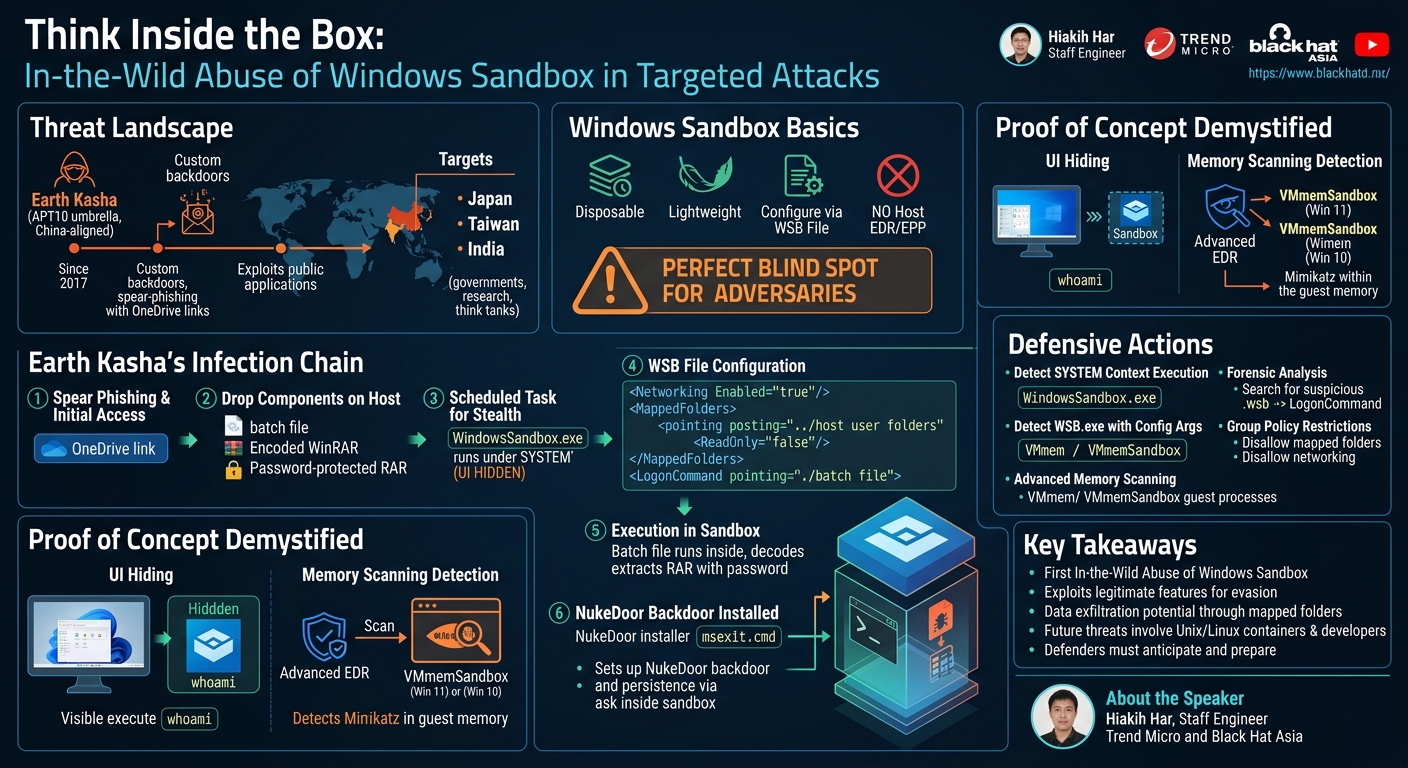
The central discovery of this research is the first observed in-the-wild abuse of Windows Sandbox by the Earth Kasha threat actor for defense evasion. This technique allows them to execute their NukeDoor backdoor and its associated components in an environment effectively blind to host-based EDR and EPP solutions. The specific TTPs employed by Earth Kasha demonstrate a sophisticated understanding of Windows Sandbox's architecture and configuration options.
Key findings include:
- UI Hiding via SYSTEM Account Execution: Earth Kasha leveraged the ability to launch Windows Sandbox as a scheduled task under the SYSTEM account. Because Windows Sandbox is fundamentally a desktop application, running it under a user context different from the currently logged-in user (especially SYSTEM) ensures that its graphical user interface (UI) remains hidden, providing stealth for the malicious operations within.
- Read/Write Mapped Folders for Data Access: The adversaries configured the Windows Sandbox environment via a WSB file to map host user folders (e.g., Documents, Downloads) with read/write permissions. This crucial step allows the NukeDoor backdoor, once active within the sandbox, to potentially access and exfiltrate sensitive data directly from the host machine, bridging the isolation barrier of the sandbox for malicious purposes.
- In-Sandbox Payload Extraction and Execution: To further evade detection on the host, the final-stage NukeDoor payload and its installer scripts were compressed within a password-protected RAR archive. This archive was dropped on the host, but its contents were only extracted within the Windows Sandbox environment after the sandbox was launched, using a decoded WinRAR command-line tool (
msiex.exe) and a hardcoded password. This ensures that the sensitive payload components are not directly exposed to host EDRs before execution. - Novel Entry Point for Fileless & Hidden UI Execution: The research also highlighted a newly introduced command-line tool, WSB.exe, available since Windows 11 version 24H2. This tool supports an
execcommand and, more critically, aconfigargument that allows defining inline sandbox configurations. This feature enables fully fileless execution of Windows Sandbox and can hide its UI even within the current user session, eliminating the need to launch it under a different user context like SYSTEM for stealth. This represents a significant new avenue for abuse that defenders must monitor.
These findings collectively illustrate a well-crafted evasion strategy that capitalizes on a legitimate Windows feature, presenting a challenging detection scenario for traditional endpoint security products.
Technical Deep Dive
▶ Watch: Reviewing Windows Sandbox basics and key features (5:15)
The infection chain observed in this Earth Kasha campaign is multi-staged, culminating in the installation of the NukeDoor backdoor within a stealthily launched Windows Sandbox environment.
The initial access phase typically begins with spear-phishing emails containing a OneDrive link. This link leads to the download of a ZIP file, which in turn contains a malicious dropper identified as Roaming Mouse. Upon execution, Roaming Mouse establishes a first-stage backdoor on the victim's system, allowing the adversary to conduct initial reconnaissance. If the machine is deemed valuable, the attackers proceed to deploy the second-stage payload, NukeDoor, utilizing Windows Sandbox for evasion.
Here's a step-by-step breakdown of the Windows Sandbox abuse:
- Dropping Components on the Host:
After initial compromise via the first-stage backdoor, the adversary drops three key components onto the host machine:
- A batch file (e.g.,
execute.bat). - An encoded file, typically named
.p_file_msexit.txt, which is a base64-encoded version of a command-line WinRAR utility. - A password-protected RAR archive containing the NukeDoor backdoor components and its installer script.
- Scheduled Task for Stealthy Sandbox Launch:
The adversary registers the Windows Sandbox application (WindowsSandbox.exe) as a scheduled task. Crucially, this task is configured to run under the SYSTEM account. This is a core trick for evasion; since Windows Sandbox is a desktop application, launching it under the SYSTEM context prevents its UI from being visible to the currently logged-in user, ensuring the malicious activity remains hidden. The scheduled task's XML configuration explicitly shows Principal id="SYSTEM" and Application pointing to WindowsSandbox.exe.
- WSB File Configuration:
A custom WSB file (e.g., sandbox.wsb) is created and used to configure the specific behavior of the Windows Sandbox instance. This XML file contains several critical settings:
<Networking Enabled="true"/>: This enables network access within the sandbox, which is essential for the NukeDoor backdoor to communicate with its command-and-control (C2) server.<MappedFolders>: This section defines shared folders between the host and the sandbox. A particularly dangerous configuration seen was mapping the host's user profile directory (e.g.,C:\Users\current_user) withReadOnly="false". This grants the sandbox read-write permissions to arbitrary data within the user's folders, including potentially sensitive documents, downloads, and other personal files. This bypasses the isolation for data access.<LogonCommand>: This specifies a command to execute immediately upon the Windows Sandbox starting up. In this campaign, theLogonCommandpoints to the initial batch file (execute.bat) dropped on the host, which then executes within the sandbox.
- Execution of the Batch File within the Sandbox:
Once the Windows Sandbox starts and the LogonCommand is triggered, the batch file (execute.bat) begins its operations inside the isolated environment:
- It decodes the
.p_file_msexit.txtfile using thecertutil -decodecommand. The decoded output is saved asmsiex.exe, which is in fact a legitimate WinRAR command-line tool. - Using the newly decoded
msiex.exeand a hardcoded password (e.g., "password"), the batch file extracts the contents of the password-protected RAR archive. This archive contains the NukeDoor payload components and an installer script, typically namedmsexit.cmd. - Finally, the batch file executes the
msexit.cmdscript.
- NukeDoor Installation within the Sandbox:
The msexit.cmd script, now running within the sandbox, acts as the installer for the NukeDoor backdoor. Its primary functions include:
- Renaming and moving the extracted NukeDoor components to specific directories within the sandbox file system.
- Registering the NukeDoor loader as a scheduled task within the sandbox environment. This establishes persistence for NukeDoor, ensuring it restarts with the sandbox if it's not manually stopped.
Through this elaborate chain of events, Earth Kasha successfully installs and executes the NukeDoor backdoor exclusively within the Windows Sandbox. This allows the malware to operate in an environment devoid of host-based EDR/EPP monitoring, communicate with its C2, and potentially access sensitive host data via the mapped folders, all while remaining largely invisible to conventional security solutions.
Demo / Proof of Concept
▶ Watch: Endpoint security (EDR/EPB) visibility inside Windows Sandbox (7:46)
While the talk didn't feature a live, real-time "demo" in the traditional sense, Hiakih Har presented several compelling proofs of concept and investigative findings that illustrate the mechanisms of abuse and potential detection strategies.
One key demonstration focused on the UI hiding technique. Har explained and showed how a simple WSB file configured to execute a whoami command and write its output to a shared folder, when launched via a scheduled task under the SYSTEM account, would result in no visible Windows Sandbox UI appearing on the user's desktop. This visually confirmed the adversary's method for stealthy execution, validating that the sandbox operates in the background without user awareness.
Furthermore, Har highlighted the potential for memory scanning as a detection mechanism. He demonstrated that even though EDRs are not present inside the sandbox, the memory space of the guest sandbox is exposed to the host through specific processes. For Windows 10, this process is named VMmem, and for Windows 11, it is VMmemSandbox. Har successfully showed that by scanning the VMmemSandbox process from the host, it was possible to detect the execution of a tool like Mimikatz within the sandbox environment. This indicates that advanced EDRs with memory scanning capabilities could potentially identify malicious activities even within the isolated sandbox.
A forward-looking proof of concept also addressed the newly introduced WSB.exe command-line tool in Windows 11 version 24H2. Har demonstrated how the wsb.exe start --config argument, combined with an inline XML configuration for a LogonCommand, could achieve both fileless execution and a hidden UI even in the current user session. This eliminates the need for the SYSTEM account trick to hide the UI, presenting an even more stealthy option for future adversaries and emphasizing the need for defenders to monitor this new command-line utility.
Defensive Implications
▶ Watch: Real-world abuse overview: NukeDoor infection chain via Sandbox (8:50)
The in-the-wild abuse of Windows Sandbox by Earth Kasha presents significant challenges for defenders but also opens new avenues for detection and mitigation. Har outlined several strategies to counter these advanced TTPs:
Detection Strategies
- Process Monitoring for Suspicious Sandbox Execution:
- SYSTEM Context Execution: Defenders should implement robust monitoring for
WindowsSandbox.exebeing launched under the SYSTEM account context. As Har noted, "No one wants to execute a Windows sandbox with the system privilege" for legitimate purposes. This is a strong indicator of malicious intent to hide the UI. A Sigma rule could look forImage: C:\Windows\System32\WindowsSandbox.exewhereUser: NT AUTHORITY\SYSTEM. - WSB.exe with Config Arguments: For Windows 11 (version 24H2 and later), monitoring
WSB.exeexecutions that include the--configargument and specifically define aLogonCommandis crucial. While Har categorized this as a "low" severity alert due to potential legitimate uses, it warrants investigation, especially when combined with other suspicious activities. This new entry point allows for fileless and hidden UI execution even in the current user session.
- Memory Scanning of Sandbox Processes:
- VMmem/VMmemSandbox Analysis: Advanced EDRs or memory forensics tools capable of scanning the memory space of
VMmem(Windows 10) orVMmemSandbox(Windows 11) processes on the host can effectively detect malicious activities occurring within the isolated sandbox. Since the guest sandbox's memory is exposed through these host processes, memory signatures for known malware (e.g., Mimikatz, NukeDoor components) can be applied. This provides a critical "last line of defense" even if initial execution within the sandbox is missed.
- WSB File Analysis and Artifacts:
- While not explicitly detailed as a real-time detection, forensic analysis should include searching for suspicious
.wsbfiles on the host, especially those withNetworking Enabled="true"andMappedFoldersconfigured withReadOnly="false"to user directories. The presence of such configurations, particularly when associated with scheduled tasks or unusual parent processes, can indicate malicious activity.
Prevention and Mitigation Strategies
- Group Policy Restrictions:
- Although there is no direct group policy to entirely disallow the execution of Windows Sandbox, organizations can implement policies to restrict its most dangerous features. Specifically, group policy settings can be configured to:
- Disallow mapped folders: This prevents the sandbox from accessing or writing to host machine directories, severely limiting data exfiltration capabilities.
- Disallow networking capabilities: This can prevent malware within the sandbox from communicating with C2 servers, effectively sandboxing it from external interaction.
- While these are not "perfect solutions" as Har noted, they significantly raise the bar for adversaries and can contain the impact of a sandbox compromise.
- Enhanced User Education and Awareness:
- Given that initial access often relies on spear-phishing, continuous security awareness training for all employees, especially those in high-value target roles (e.g., researchers, government officials), is paramount. This should include recognizing sophisticated phishing attempts, malicious OneDrive links, and suspicious attachments.
Future Considerations for Defenders
Har emphasized that this type of TTP is likely to increase and expand to other virtualization technologies:
- Unix/Linux Containers: These systems are even more "container-friendly," making them prime targets. Defenders must extend their monitoring strategies to detect suspicious usage of Docker, Podman, and other containerization platforms in their environments.
- Developer Targeting: Developers, who frequently use containers and virtualization in their daily workflows, are becoming attractive targets. Har cited the BBIT attack and the Contagious Interview campaign by North Korean actors, where developers were coerced into executing malicious Docker projects or container images on their desktops. Organizations must secure developer workstations and educate developers about the risks associated with untrusted container images or projects.
In conclusion, defenders need to think "outside the box" when adversaries are thinking "inside the box." This requires moving beyond traditional endpoint monitoring to include deeper analysis of operating system features, virtualization processes, and memory spaces, while also adapting to the evolving landscape of containerized environments.
Key Takeaways
- Novel Evasion TTP: Earth Kasha is the first observed threat actor to actively abuse Windows Sandbox in the wild for EDR/EPP evasion, highlighting a new frontier in adversary techniques.
- Stealth and Data Exfiltration: The core abuse relies on executing Windows Sandbox under the SYSTEM account for UI hiding and configuring read/write mapped folders in the WSB file for potential data exfiltration from the host.
- In-Sandbox Payload Delivery: Adversaries drop encrypted payloads on the host, but only extract and execute them within the sandbox, using legitimate tools like
certutiland a decoded WinRAR command-line utility, to bypass host-based detection. - New Stealth Vectors: The introduction of
WSB.exewith a--configargument in Windows 11 24H2 allows for fully fileless execution and hidden UI even in the current user session, presenting an even more potent evasion technique for future threats. - Actionable Detection Strategies: Defenders can detect this abuse by monitoring
WindowsSandbox.exeexecution under theSYSTEMcontext, scrutinizingWSB.exeusage withconfigarguments, and leveraging memory scanning capabilities ofVMmemorVMmemSandboxprocesses on the host. - Mitigation through Group Policy: While full prevention is difficult, Group Policies can be used to disallow network access and folder mapping for Windows Sandbox, significantly limiting its utility for malicious actors.
- Broader Container Abuse: This trend is likely to extend to Unix/Linux containers, with developers being increasingly targeted, necessitating enhanced monitoring and security awareness around all containerized environments.
About the Speaker(s)
Hiakih Har is a Staff Engineer at Trend Micro, bringing over a decade of experience in the cybersecurity industry. His expertise spans critical areas including cyber threat intelligence, in-depth malware analysis, and incident response. Har is a seasoned presenter at various cybersecurity conferences, and his presentation at Black Hat Asia marked his debut at the prestigious event, fulfilling a long-held professional aspiration. His deep technical knowledge and extensive experience in tracking sophisticated threat actors like Earth Kasha make his insights invaluable to the security community.
Reviews
Dr. Zero (Offensive Security Researcher) — MUST SEE
Dr. Har's presentation on Earth Kasha's novel abuse of Windows Sandbox for EDR evasion is a critical, must-see piece of research. This is the first observed in-the-wild exploitation of a built-in OS virtualization feature by a sophisticated actor, demonstrating a significant shift in evasion tactics. The detailed breakdown of TTPs—including SYSTEM account execution, mapped folders for exfiltration, and the new WSB.exe vectors—provides immediate, actionable intelligence for defenders, highlighting a blind spot that demands urgent attention and adaptation in monitoring strategies.
Heather Calloway (CISO) — MUST SEE
This Black Hat presentation by Hiakih Har is a critical must-see for security leaders, detailing the first in-the-wild abuse of Windows Sandbox by the Earth Kasha APT for defense evasion. It exposes a significant blind spot in traditional EDR/EPP coverage, demonstrating how adversaries weaponize legitimate OS features to operate undetected, exfiltrate data, and maintain stealthy persistence. The talk provides clear, actionable intelligence on how to detect and mitigate this novel TTP, forcing a necessary re-evaluation of endpoint security strategies and risk ownership at the executive level.