Finding & exploiting local attacks on 1Password Mac desktop app
J. Hoffman, C. Morgan
DEF CON 32 Main Stage · Day 1 · Main Stage
Overview
This talk, presented by Colby Morgan and Jeffrey Hoffman, offensive security engineers at Robin Hood, delves into their research on identifying and exploiting local vulnerabilities within the 1Password for Mac desktop application. Their primary objective was to uncover methods for local attackers to dump sensitive vault contents, recognizing that credential exfiltration is a top priority for advanced persistent threats (APTs) and red teams upon gaining initial endpoint access. The research highlights the critical importance of understanding the local security model of applications that safeguard high-value data, even when traditional remote exploitation vectors are well-defended.
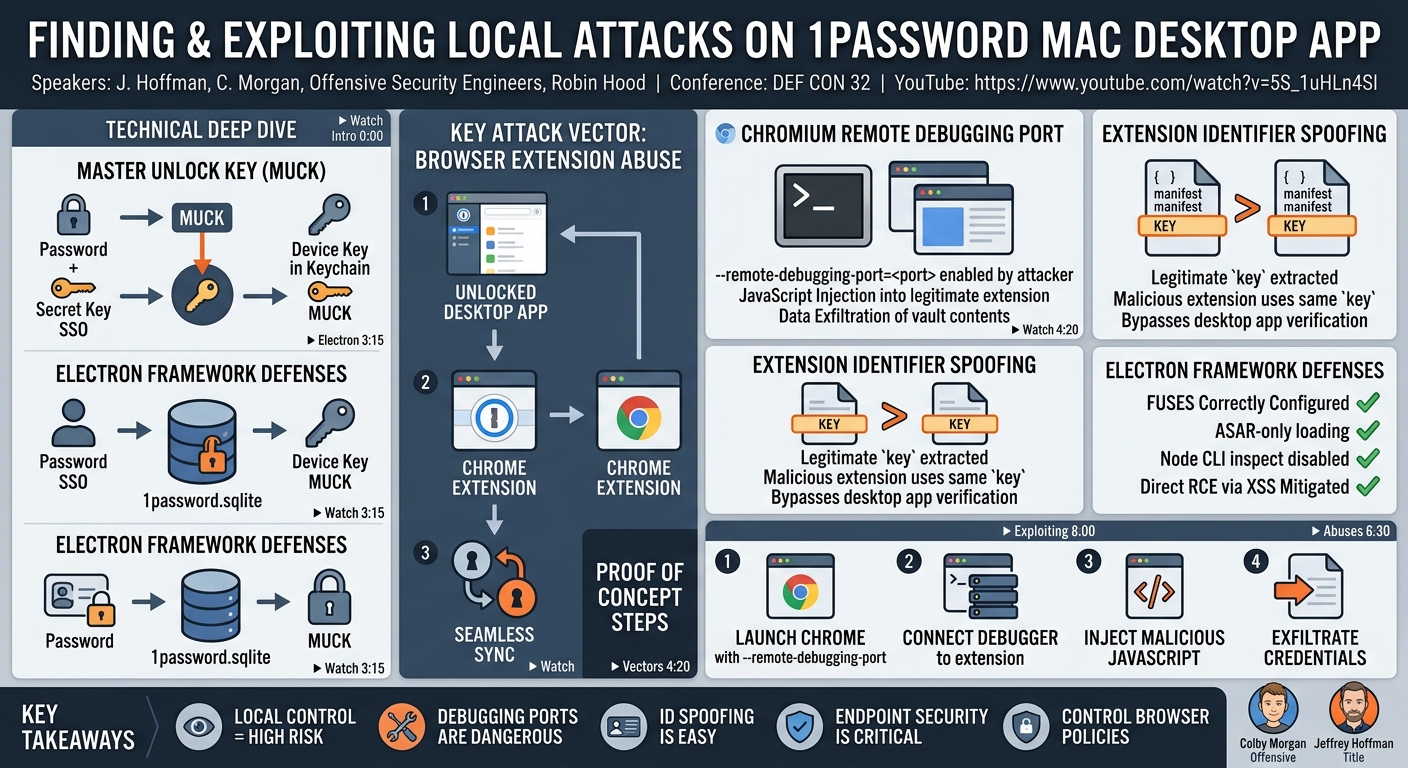
Key moments
- 0:00 Introduction and goal: local 1Password Mac attacks
- 1:15 1Password local security model and Master Unlock Key
- 3:15 Initial analysis of Electron framework and security fuses
- 4:20 Key attack vectors: SSH agent, CLI, browser extension
- 4:55 Browser extension's automatic syncing behavior discovery
- 6:00 Exploiting browser extension via Chrome remote debugging
- 6:30 Attack abuses Chrome/extensions, not 1Password vulnerability
Finding & exploiting local attacks on 1Password Mac desktop app
Speakers: J. Hoffman, C. Morgan, Offensive Security Engineers, Robin Hood
Conference: DEF CON 32
YouTube: https://www.youtube.com/watch?v=5S_1uHLn4SI
Overview
This talk, presented by Colby Morgan and Jeffrey Hoffman, offensive security engineers at Robin Hood, delves into their research on identifying and exploiting local vulnerabilities within the 1Password for Mac desktop application. Their primary objective was to uncover methods for local attackers to dump sensitive vault contents, recognizing that credential exfiltration is a top priority for advanced persistent threats (APTs) and red teams upon gaining initial endpoint access. The research highlights the critical importance of understanding the local security model of applications that safeguard high-value data, even when traditional remote exploitation vectors are well-defended.
The speakers systematically explored various components of the 1Password Mac app, from its underlying Electron framework to its browser extension integration. While 1Password demonstrated robust defenses against many common Electron-based attacks, the researchers uncovered a powerful local attack vector leveraging Chromium's remote debugging capabilities and the inherent trust model between the 1Password desktop app and its browser extension. This talk not only exposes specific weaknesses but also offers a broader perspective on the nuanced challenges of securing applications against determined local adversaries who possess significant control over the target machine.
The findings underscore a fundamental principle in endpoint security: even with strong encryption and architectural safeguards, the local attack surface remains a persistent concern. The ability of a local attacker to manipulate browser processes and spoof trusted components reveals that "full control over the machine" often translates into practical pathways to sensitive data, even if direct decryption of storage files is not immediately feasible. The research provides valuable insights for both application developers striving to enhance local security boundaries and defenders aiming to protect critical credentials from sophisticated local threats.
Background
▶ Watch: Introduction and goal: local 1Password Mac attacks (0:00)
1Password is a widely used password manager, storing some of the most sensitive user credentials, including cloud credentials, browser cookies, API keys, and more. For an attacker who has gained local access to a machine, these credentials represent a high-value target, potentially allowing for persistent access or lateral movement even if initial access to the endpoint is lost. A key component of 1Password's local storage is the 1password.sqlite file, an encrypted SQLite database containing the vault contents. While the file itself is encrypted, the challenge for attackers lies in obtaining the decryption key.
The local security model of 1Password on Mac relies on a Master Unlock Key (MUCK), now referred to as an Account Unlock Key. This key is derived differently depending on the user's authentication method. For users logging in with a traditional password, the MUCK is generated by cryptographically combining the user's password with a locally stored secret key. For users leveraging Single Sign-On (SSO), the process involves authenticating to receive a device key, which is then stored in the Mac Keychain. This device key is subsequently used to decrypt a credential bundle received from 1Password's API, which contains the MUCK. In both scenarios, the MUCK is the "keys to the kingdom," enabling the decryption of the 1password.sqlite database. Malware on a macOS machine, without a System Integrity Protection (SIP) bypass or arbitrary process injection, is generally prevented from directly accessing the MUCK in the SSO case without unrestricted Keychain access, or the password and local secret key in the non-SSO case. The full decryption process, once the MUCK is obtained, is complex but has been publicly documented and code-shared by security researchers like David Schtz (aka Darth Null).
The researchers began their investigation by examining prior Mac-specific CVEs related to 1Password, which confirmed that local attacks and security boundaries were relevant areas of focus. They then turned their attention to Electron, the framework upon which 1Password is built. Electron, being a Chromium and Node.js-based framework, has a well-defined attack surface, typically involving XSS vulnerabilities leading to Remote Code Execution (RCE). However, 1Password is not an application that frequently processes user-controlled content, limiting traditional XSS attack vectors. Furthermore, Electron incorporates security features known as fuses, which control specific application behaviors. The speakers noted that 1Password had correctly configured all relevant Electron fuses, such as only load app from ASAR (preventing proxying and JavaScript injection into the app's core) and enable node CLI inspect arguments (disabling the remote debugging port for the Electron app itself). This robust configuration of Electron fuses meant that direct exploitation of the Electron framework for RCE was not a viable path for the local attackers. This led them to investigate other interaction points of the application, particularly those enabled by default.
Key Findings
▶ Watch: Initial analysis of Electron framework and security fuses (3:15)
Despite 1Password's strong defenses within its Electron framework, the researchers identified several potential local attack vectors that could lead to vault exfiltration. These included the SSH agent, the CLI (Command Line Interface), and the browser extension. While the SSH agent and CLI were disabled by default, the browser extension was enabled by default, presenting a more accessible target for a local attacker.
The primary and most significant finding revolved around exploiting the browser extension's seamless syncing behavior in conjunction with Chromium's remote debugging port and the ability to spoof extension identifiers. The researchers observed that once the 1Password desktop app is unlocked, clicking the browser extension initiates a seamless sync of all passwords without requiring reauthentication. This behavior became the focal point of their attack strategy.
Their key findings can be summarized as:
- Abuse of Chromium's Remote Debugging Port: While 1Password's Electron app correctly disabled its own remote debugging port via fuses, standard Chromium-based browsers (like Chrome) cannot disable this feature. A local attacker can launch Chrome with the
--remote-debugging-portflag, enabling programmatic interaction with browser tabs and extensions. - JavaScript Injection for Data Exfiltration: By leveraging the remote debugging port, attackers could connect a debugger to Chrome, identify the legitimate 1Password browser extension's JavaScript, modify it to force immediate syncing of all vault contents, and then inject this malicious JavaScript directly into the running extension page. This allowed for the exfiltration of decrypted vault data.
- Extension Identifier Spoofing: To overcome challenges posed by managed Chrome policies (which might prevent loading unpacked extensions or only allow-list specific extension IDs), the researchers discovered that they could spoof the legitimate 1Password extension's identifier. Google's browser extension security FAQ explicitly states that the extension ID is derived from the
keyentry in themanifest.jsonfile. By extracting thekeyfrom the legitimate extension and inserting it into their own malicious extension'smanifest.json, they could create an extension that the 1Password desktop app would recognize as legitimate, circumventing verification checks. - Circumventing Managed Chrome Policies (Partial Success / Unclear Resolution): The talk acknowledged challenges with managed Chrome policies that prevent loading unpacked extensions via the
--load-extensionflag and disallow extensions by default, only allow-listing some. While the transcript's repetition makes the full resolution unclear, the ability to spoof the ID and inject via remote debugging suggests alternative pathways were effective, even if directly loading a malicious unpacked extension was blocked by policy. The emphasis remained on the remote debugging port as a primary vector for injection into an already running and legitimate extension.
These findings collectively demonstrate that even a well-secured application like 1Password can have its security model circumvented by a local attacker who can manipulate the environment it interacts with, specifically the browser.
Technical Deep Dive
▶ Watch: Key attack vectors: SSH agent, CLI, browser extension (4:20)
The technical foundation of 1Password's local security, as discussed, centers around the Master Unlock Key (MUCK), also known as the Account Unlock Key. This key is paramount as it enables the decryption of the 1password.sqlite database, which stores the user's encrypted vault contents. For traditional password users, the MUCK is a cryptographic derivation from their master password and a locally stored secret key. In SSO environments, the MUCK is contained within a credential bundle, decrypted by a device key stored securely in the macOS Keychain. The speakers acknowledged the complexity of the full decryption process once the MUCK is obtained, referencing the detailed blog post and code by David Schtz (Darth Null) as instrumental to their research.
The initial phase of the research involved a thorough examination of Electron, the framework underpinning the 1Password Mac app. Electron, being a combination of Chromium and Node.js, presents a known attack surface. Common attack patterns involve achieving Cross-Site Scripting (XSS) to escalate to Remote Code Execution (RCE). However, the researchers found that 1Password had diligently secured its Electron application by correctly configuring Electron fuses. These fuses are crucial security settings that control various behaviors. For instance, the only load app from ASAR fuse, if disabled, could allow an attacker to proxy the application and inject malicious JavaScript. Similarly, the enable node CLI inspect arguments fuse, if enabled, would expose the Electron app's remote debugging port. 1Password had correctly enabled the former and disabled the latter, effectively mitigating direct attacks against the Electron app's core via these vectors. This meant that traditional Electron-based RCE was not a viable path for the local attackers.
With direct Electron exploitation deemed infeasible, the focus shifted to the 1Password browser extension. The critical observation was that the extension, when the desktop app was unlocked, could seamlessly sync all vault contents without requiring reauthentication. This "auto-sync" behavior, while convenient for users, represented a significant opportunity for an attacker.
The core of the technical attack relied on Chromium's remote debugging port. While Electron applications can disable their own remote debugging capabilities, standard Chromium-based browsers like Google Chrome cannot. This is an inherent feature of the browser. A local attacker, having control over the machine, can launch Chrome with the --remote-debugging-port=<port_number> command-line flag. This flag opens a debugging interface, typically on port 9222, which allows external tools (like a Chromium debugger) to inspect and manipulate browser processes, including running extensions.
The attack sequence proceeded as follows:
- Identify Extension JavaScript: The researchers identified the specific JavaScript responsible for the syncing behavior within the legitimate 1Password browser extension. This involved opening the extension's page in Chrome, accessing the developer console, and observing log messages related to
native core– a native messaging host that facilitates communication between the browser extension and the desktop application. - Modify JavaScript: The identified JavaScript code was then "beautified" (made readable) and modified. The modification's goal was to force the extension to immediately initiate the full vault syncing process and then exfiltrate the decrypted credentials to an attacker-controlled endpoint.
- Inject Modified JavaScript: Using the exposed remote debugging port, the attacker connected a Chromium debugger to the running Chrome instance. From this debugger, they could inject their modified JavaScript directly into the legitimate 1Password extension's active page context. This effectively hijacked the extension's functionality, making it perform the desired syncing and exfiltration without the user's explicit interaction or knowledge, beyond the initial unlocking of the 1Password desktop app.
Further technical hurdles included managed Chrome policies that might prevent the loading of "unpacked" extensions (extensions loaded directly from disk via the --load-extension flag) or disallow extensions by default, only permitting those on an allow-list. To bypass the verification performed by the 1Password desktop app, which checks if the connection is coming from the legitimate extension's identifier, the researchers leveraged extension identifier spoofing. Google's own documentation on browser extension security acknowledges that the extension ID is derived from the key entry in the manifest.json file. By obtaining the key value from the legitimate 1Password extension's manifest.json and embedding it into their own malicious extension's manifest.json, they could ensure that their spoofed extension would present the exact same identifier, thereby fooling the desktop app's verification process. This allowed the malicious extension to establish a trusted connection and receive the synced vault data.
While the transcript mentions the challenges of managed Chrome policies preventing --load-extension, the primary attack path described (injecting via remote debugging into the legitimate running extension) provides a way around this, as it doesn't require loading a new, unpacked extension directly. The spoofing of the extension ID would be more relevant if the goal was to load a completely separate malicious extension and have it interact with the 1Password app as if it were legitimate, potentially in environments where the remote debugging port is unavailable or restricted. However, the core finding was the remote debugging port's power for live injection.
Demo / Proof of Concept
▶ Watch: Exploiting browser extension via Chrome remote debugging (6:00)
The talk outlined a clear Proof of Concept (PoC) demonstrating the ability to extract passwords from 1Password via the browser extension. While a live demonstration wasn't explicitly described in the provided transcript, the detailed steps constitute a practical PoC.
The core of the demonstration would involve:
- Prerequisite: The target macOS machine has 1Password for Mac installed, and the user has logged in and unlocked the application. The 1Password browser extension for Chrome is also installed and active.
- Attacker Action - Launching Chrome with Debugging: The attacker, with local access, would launch Google Chrome from the command line using the
--remote-debugging-port=9222flag (or any other available port). This exposes the browser's debugging interface. - Attacker Action - Identifying and Modifying JavaScript: The attacker would then connect to this debugging port using a Chromium debugger (e.g., Chrome's built-in developer tools or a dedicated debugging client). They would navigate to the 1Password extension's active page/context within the debugger. From there, they would identify the JavaScript code responsible for handling the "sync" operation with the desktop app. This code would be "beautified" for readability.
- Attacker Action - Injecting Malicious JavaScript: The identified JavaScript would be modified to include additional functionality:
- Force an immediate, full sync of all vault items from the 1Password desktop app.
- After syncing, extract the decrypted password data.
- Exfiltrate this data to an attacker-controlled server (e.g., via an AJAX request or WebSocket connection).
The modified JavaScript would then be injected directly into the running context of the legitimate 1Password browser extension via the remote debugging interface.
- Outcome: Upon successful injection, the legitimate 1Password extension, now executing the attacker's code, would seamlessly sync the vault contents from the unlocked desktop app and exfiltrate the sensitive data, all without further user interaction or reauthentication.
An additional demonstration could involve the extension identifier spoofing:
- Prerequisite: Obtain the
manifest.jsonfile from the legitimate 1Password browser extension. - Attacker Action - Creating a Malicious Extension: Create a new, malicious Chrome extension.
- Attacker Action - Spoofing the ID: Copy the
keyfield from the legitimate 1Password extension'smanifest.jsoninto the malicious extension'smanifest.json. This ensures both extensions will have the same identifier. - Attacker Action - Loading the Malicious Extension: Attempt to load this malicious extension (potentially via
--load-extensionif managed policies allow, or through other means). - Outcome: The 1Password desktop app would treat the malicious extension as if it were the legitimate one, allowing it to communicate and potentially receive synced data, thereby bypassing the app's extension verification process. This aspect is particularly relevant in scenarios where direct JavaScript injection via remote debugging is not feasible, but installing a new, spoofed extension is.
The speakers emphasized that these attacks primarily abuse how Chrome and its extensions function, rather than exploiting a direct vulnerability in 1Password's core logic or encryption, highlighting the broader ecosystem challenges in local security.
Defensive Implications
▶ Watch: Attack abuses Chrome/extensions, not 1Password vulnerability (6:30)
The research presented by Colby Morgan and Jeffrey Hoffman offers several critical defensive implications for both 1Password as an application developer and for organizations and individual users relying on such sensitive applications.
- Endpoint Security is Paramount: The fundamental premise of these attacks is that the adversary has achieved local control over the machine. This reinforces that robust endpoint detection and response (EDR) solutions, antivirus software, and strict access controls are the primary lines of defense. If an attacker cannot gain initial local access, these subsequent attacks are largely moot.
- Restrict Remote Debugging: The most direct implication for organizations is to implement policies that restrict or prevent the use of Chromium's remote debugging port (
--remote-debugging-port). This is a powerful feature intended for developers but can be severely abused by local attackers. Group Policies (for enterprise environments) or equivalent configuration management tools should enforce that browsers do not launch with this flag enabled, especially for production machines. While developers need this functionality, it should be isolated to development environments. - Monitor Browser Extension Loading and Behavior: Organizations should have strong policies regarding browser extensions. This includes:
- Disallowing unpacked extensions by default.
- Allow-listing only approved extensions, preventing users from installing arbitrary extensions.
- Monitoring for suspicious browser launches with flags like
--remote-debugging-portor--load-extension. Endpoint security tools should flag these activities. - Auditing
manifest.jsonfiles for unusualkeyentries or unexpected modifications, although this is harder to scale.
- Strengthen Communication Channel Verification: While 1Password performed verification of extension IDs, the ease of spoofing via the
manifest.jsonkeyfield suggests that reliance solely on this mechanism is insufficient. Developers of applications that communicate with browser extensions should explore more robust, cryptographically strong, and dynamic verification mechanisms that are harder to static copy or spoof. This could involve dynamic session keys, challenge-response protocols, or client certificates that are not easily extractable from a static file. - User Awareness of Local Security: Users should be educated on the risks of local access. If a machine is compromised, even robust applications like 1Password can be vulnerable. This underscores the importance of strong operating system security, timely patching, and vigilance against malware.
- Re-evaluate "Local Attacker" Threat Model: The talk highlights that "full control over the machine" is not a blanket statement to dismiss all security boundaries. Applications like 1Password explicitly aim to create meaningful security boundaries even against local attackers (e.g., requiring the MUCK, storing secrets in Keychain). Developers should continuously re-evaluate these boundaries against new local attack techniques, particularly those leveraging browser features that are hard to disable.
- 1Password's Existing Defenses: It's important to note that 1Password had correctly implemented many defenses, such as securing its Electron fuses, which prevented direct exploitation of the app's core. This demonstrates a commitment to security and means that attackers had to find more indirect methods, leveraging the broader ecosystem. Defenders should ensure similar diligence in their own applications' configurations.
In summary, while 1Password exhibited strong internal security, the attacks demonstrated how a local adversary can leverage the broader ecosystem (specifically browser features) to circumvent these defenses. The key takeaway for defenders is to focus on preventing local access in the first place, and failing that, to severely restrict powerful debugging features and closely monitor browser and extension behavior.
Key Takeaways
- Local Attackers Pose Unique Threats: Even with strong encryption and application-specific security, local attackers with control over a machine can bypass security boundaries by manipulating the surrounding environment, such as the web browser.
- Chromium's Remote Debugging Port is a High-Risk Feature: The
--remote-debugging-portflag, while useful for development, can be abused by local attackers to inject malicious JavaScript into legitimate browser extensions and exfiltrate sensitive data. - Extension ID Spoofing is Achievable: Browser extension identifiers, derived from the
keyfield inmanifest.json, can be easily spoofed, allowing malicious extensions to impersonate legitimate ones and bypass application-level verification checks. - 1Password's Core Defenses Were Robust: 1Password correctly configured Electron fuses, preventing direct exploitation of its Electron application, forcing attackers to look for vulnerabilities in its interaction with other components.
- Endpoint Security is the First Line of Defense: Preventing initial local access to a machine is paramount. Strong EDR, antivirus, and strict access controls are critical to mitigate these types of attacks.
- Organizations Must Control Browser Configuration: Implementing policies to disable or restrict remote debugging ports and to manage approved browser extensions is crucial for enterprise security.
About the Speaker(s)
Colby Morgan and Jeffrey Hoffman are both offensive security engineers at Robin Hood. Their work involves identifying and researching vulnerabilities, often through methods employed by red teams and advanced persistent threats. This talk at DEF CON 32 showcased their practical research into local attack vectors against a widely used and sensitive application, demonstrating their expertise in endpoint security, application analysis, and practical exploitation techniques.
Reviews
Dr. Zero (Offensive Security Researcher) — STRONG ACCEPT
This talk by Colby Morgan and Jeffrey Hoffman presents a meticulously researched local attack against the 1Password for Mac application. It demonstrates how, despite 1Password's robust internal defenses like correctly configured Electron fuses, a determined local adversary can leverage inherent browser functionalities such as Chromium's remote debugging port and extension ID spoofing to exfiltrate sensitive vault data. The research highlights critical blind spots in the local security model, particularly at the intersection of applications and their browser extensions, offering invaluable, actionable insights for both application developers and enterprise defenders on how to protect…
Heather Calloway (CISO) — STRONG ACCEPT
This research on 1Password for Mac effectively demonstrates how a sophisticated local attacker can circumvent robust application-level security by exploiting the browser ecosystem, specifically Chromium's remote debugging capabilities and extension ID spoofing. While 1Password's core defenses were well-configured, the talk exposes a critical pathway for credential exfiltration once local endpoint access is achieved. It provides clear, actionable insights for security leaders and defenders on managing the risk posed by high-value applications interacting with less-controlled browser environments, emphasizing the need for stringent endpoint and browser configuration policies.