IC vulnerabilities - Jarno Niemelä
Jarno Niemelä (Principal Researcher · VitScure)
Disobey 2026 · Main Stage
Overview
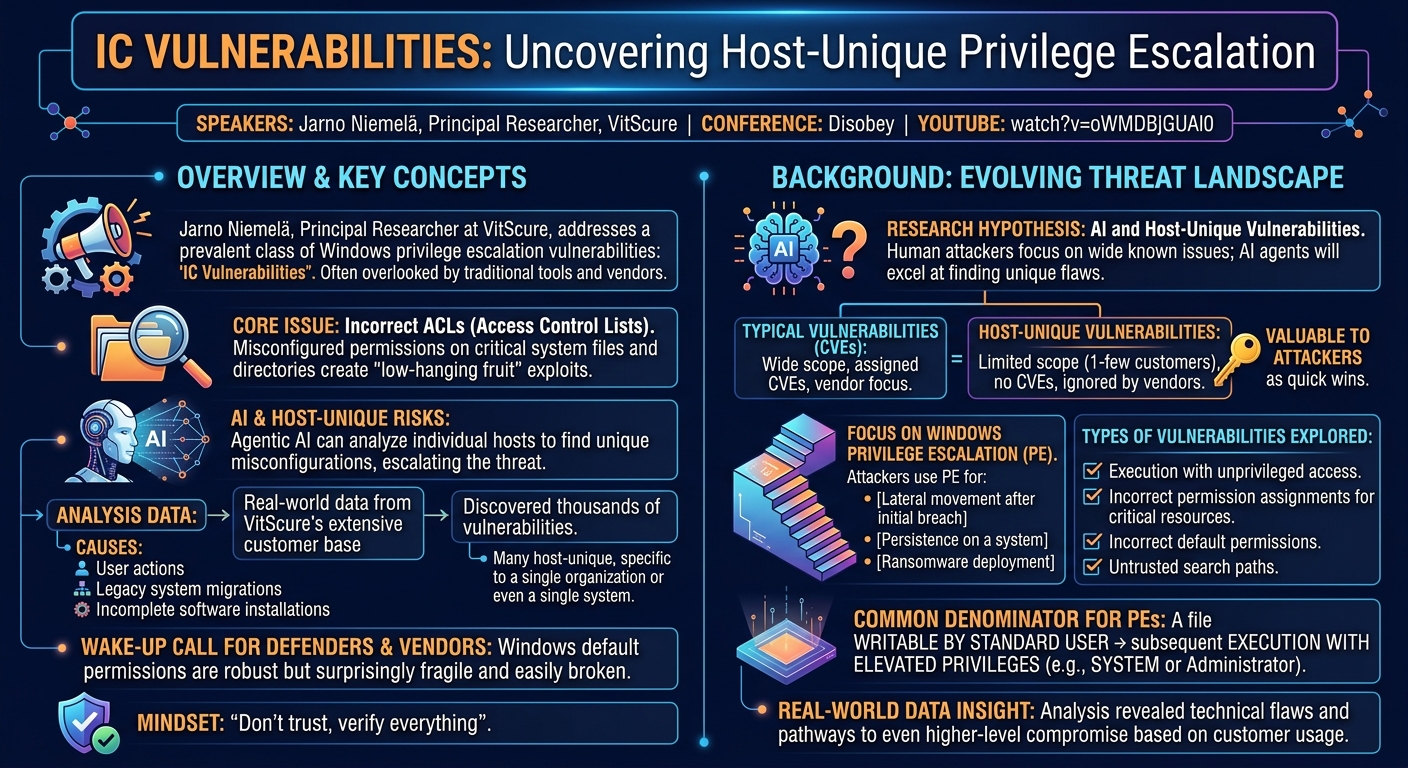
Jarno Niemelä, a Principal Researcher at VitScure (the former F-Secure business side), delivered a compelling talk at Disobey on a class of Windows privilege escalation vulnerabilities that often go undetected by traditional security tools and are overlooked by vendors. His presentation, titled "IC vulnerabilities," delves into the pervasive issue of incorrect Access Control List (ACL) configurations on critical system files and directories, leading to "low-hanging fruit" exploits for attackers. Niemelä posits that these vulnerabilities, while seemingly simple, represent a significant threat, especially with the rise of agentic AI capable of analyzing individual hosts for unique misconfigurations.
Key moments
- 2:00 Research hypothesis: AI and host-unique vulnerabilities
- 3:35 Thousands of unique, unrecognized vulnerabilities discovered
- 4:50 Focus: Windows privilege escalation vulnerabilities
- 6:00 Achieving domain admin from local privilege escalation
- 7:00 Example: Firmware/driver update software vulnerabilities
- 8:00 Windows UAC is utterly and horribly broken
- 10:00 Critical advice: Never run anything as a local admin
IC vulnerabilities - Jarno Niemelä
Speakers: Jarno Niemelä, Principal Researcher, VitScure
Conference: Disobey
YouTube: https://www.youtube.com/watch?v=oWMDBJGUAl0
Overview
Jarno Niemelä, a Principal Researcher at VitScure (the former F-Secure business side), delivered a compelling talk at Disobey on a class of Windows privilege escalation vulnerabilities that often go undetected by traditional security tools and are overlooked by vendors. His presentation, titled "IC vulnerabilities," delves into the pervasive issue of incorrect Access Control List (ACL) configurations on critical system files and directories, leading to "low-hanging fruit" exploits for attackers. Niemelä posits that these vulnerabilities, while seemingly simple, represent a significant threat, especially with the rise of agentic AI capable of analyzing individual hosts for unique misconfigurations.
The core of Niemelä's research stems from analyzing real-world data from VitScure's extensive customer base, which exceeds the population of Finland. This unique vantage point allowed his team to discover thousands of vulnerabilities, many of which were specific to a single organization, a handful of hosts, or even just one system. Unlike typical CVE-worthy bugs affecting broad software versions, these "host-unique" vulnerabilities are often the result of user actions, legacy system migrations, or incomplete software installations, making them difficult to report and fix through conventional channels.
Niemelä's talk serves as a critical wake-up call for both defenders and software vendors. He highlights that while Windows default permissions are generally robust, they are surprisingly fragile and can be easily broken. The consequences of these seemingly minor misconfigurations can be severe, potentially allowing local privilege escalation to system-level access, and in unfortunate scenarios, even leading to domain administrator compromise if powerful credentials are used on a vulnerable machine. The presentation underscores the necessity of a "don't trust, verify everything" mindset when it comes to system security.
Background
▶ Watch: Research hypothesis: AI and host-unique vulnerabilities (2:00)
The genesis of Jarno Niemelä's research lies in a hypothesis concerning the evolving landscape of cyberattacks, particularly with the advent of agentic AI. Niemelä predicts that unlike human attackers who often focus on widely known vulnerabilities, AI agents will excel at identifying host-unique vulnerabilities and misconfigurations. These flaws are often ignored by vendors due to their limited scope—affecting only a handful of customers or even a single system—and are consequently not assigned CVEs (Common Vulnerabilities and Exposures). Despite their simplicity, these "low-hanging fruit" are highly valuable to attackers, offering quick wins and efficient exploitation.
Niemelä's focus is squarely on Windows privilege escalation (PE) vulnerabilities. These are critical for attackers in various scenarios, such as moving laterally after an initial breach, persisting on a system, or deploying ransomware. He notes that as Active Directory's role might evolve, the ability to gain privileges on a local system remains paramount. The types of vulnerabilities explored include:
- Execution with unprivileged access.
- Incorrect permission assignments for critical resources.
- Incorrect default permissions.
- Untrusted search paths.
The common denominator for these PEs is a file that can be written by a standard user (or, in worst cases, by Everyone) but is subsequently executed with elevated privileges (e.g., SYSTEM or Administrator). VitScure's analysis of real-world customer data provided invaluable insight, not just into the technical vulnerability itself, but also into how specific customers used the vulnerable software, revealing pathways to even higher-level compromise, such as domain administrator access. A typical scenario involves a vulnerable update component (e.g., for laptop firmware or drivers from vendors like HP or Acer) that starts on user login. If an IT administrator logs into such a machine with domain admin credentials, the attacker, having exploited the local PE, can harvest those powerful credentials.
Niemelä explicitly dismisses User Account Control (UAC) as a reliable defense, labeling it "utterly and horribly broken." He highlights a critical bypass: if a user is a member of the local admin group, they can create a scheduled task set to run with "highest privileges" without any UAC prompt. This is frequently done by legitimate software, making it difficult for EDR solutions to flag as malicious. His unequivocal advice: "don't ever run anything as a local admin," advocating for solutions like "admin by request" or even runas to ensure the logged-in user account does not possess local administrator rights. This stems from the observation that Windows local administrator credentials are fundamentally insecure and will likely remain so.
Key Findings
▶ Watch: Focus: Windows privilege escalation vulnerabilities (4:50)
The central discovery of Niemelä's research is the widespread prevalence of host-unique privilege escalation vulnerabilities within real-world Windows environments. These are not zero-days in the traditional sense, but rather simple misconfigurations or overlooked permission issues that are incredibly effective for attackers. VitScure's analysis revealed thousands of such vulnerabilities across their customer base, with many affecting only a single host or a small cluster of systems, making them largely invisible to conventional vulnerability management processes and difficult to report to vendors.
A significant finding is the widespread disregard for code signing in Windows applications. While code signing is a fundamental security feature, Niemelä observes that "most software don't even check the signatures of the files they run." This allows an attacker to replace a legitimate executable with a malicious one, and the parent process will often execute it without verification. The notable exceptions are cybersecurity products, which tend to be more paranoid about verifying binaries. Furthermore, even if a parent process maintains an exclusive lock on its executable, intermediate processes or Microsoft components often do not.
Niemelä identifies several critical weak spots where signature checks are consistently absent. These include core Microsoft services like svc host.exe and services.exe, as well as common intermediary processes such as cmd.exe and powershell.exe. When a parent application delegates execution to these components (e.g., via OS shell or OS system calls), the intermediary often doesn't verify the integrity or signature of the child process it launches. This creates a powerful vector for attackers to inject and execute arbitrary code, even if the primary application binaries are signed.
The talk categorizes the identified vulnerabilities into several key areas:
- Careless Use of Non-Protected Directories: Many applications, particularly those from smaller vendors or critical business software, store and execute privileged executables from directories with weak default permissions, such as
ProgramDataorTemp. UnlikeProgram Files, which has strong default ACLs,ProgramDatais typically writable byEveryone. A notable example cited is Wondershare Doctor Phone'selevation_service.exe, which was found inProgramDatawithout enforced permissions, allowing an attacker to modify it and gain elevated privileges upon its next execution (this specific bug has since been fixed).
- Installation into Custom Directories: Users, and especially older IT administrators, often install software directly into the root of a drive (e.g.,
C:\) rather than the defaultProgram Filesdirectory. The root of any drive (e.g.,C:\) has no default permissions, meaning any files or directories created there are accessible by everybody. Most software installers fail to enforce proper ACLs in these custom locations, creating widespread vulnerabilities. Niemelä highlights Python 2 and custom Python 3 installations as common examples, where executables are placed in globally writable paths. He notes that while older versions of CCleaner allowed this, newer versions enforce installation intoProgram Files.
- Broken
Program FilesPermissions: Perhaps the most alarming finding is that even the highly protectedProgram Filesdirectory can be compromised. Niemelä initially doubted his team's findings due to the sheer number of reports, but extensive validation confirmed that thousands of hosts exhibited vulnerable files withinProgram Files. The causes for this unexpected degradation of security include:
- Broken backup restoration: Many backup solutions, especially custom scripts or older archivers (like
tarorzip), fail to restore file permissions correctly. - Legacy Windows upgrades: Systems upgraded from older versions like Windows Vista or XP (where default security models were weaker) often carry over these lax permissions.
- Compatibility shims: These can inadvertently weaken security.
- Misconfigured management tools: Errors in configurations from tools like Intune, DCSF, or Puppet can corrupt ACLs.
- "Pseudo malware" system optimizers: These tools often "clean" or "optimize" systems by indiscriminately altering file permissions.
- IT admin actions: Custom scripts or manual misconfigurations by administrators.
The consequence is that on such compromised systems, any application within Program Files or even C:\Windows can become a target for privilege escalation.
- Incomplete Vendor Fixes: When vendors do address permission-related vulnerabilities, their fixes are often minimal, focusing only on specific files. If the containing directory remains user-writable, an attacker can exploit inheritance to revert the permissions of previously fixed files. Niemelä provides an
icaclscommand (icacls "C:\ProgramData\VulnerableDir" /reset /T /C /Q) that can effectively roll back many such fixes, demonstrating how new CVEs can be derived from inadequately patched issues. He also notes that installer fixes don't always update existing vulnerable installations, leaving older machines exposed.
In summary, Niemelä's findings reveal a pervasive landscape of easy-to-exploit privilege escalation vulnerabilities, driven by a combination of developer oversight, user convenience, and system administration practices, all exacerbated by a lack of rigorous permission enforcement.
Technical Deep Dive
▶ Watch: Achieving domain admin from local privilege escalation (6:00)
The technical heart of Niemelä's talk lies in understanding how these privilege escalation vulnerabilities are discovered and exploited. He outlines a methodology, implicitly drawing parallels to an attacker's persistent reconnaissance (what he humorously refers to as an "Adagra" style of patient enumeration), to identify these "low-hanging fruit."
The process begins by assessing the current user's privileges. If the user account is a member of the local administrators group, the path to privilege escalation is straightforward and immediate, bypassing UAC. As Niemelä explains, "if your user is in the local admin group, you can create an scheduled task which has the run level highest which means that it's going to run the task elevated without USA prompt." This method is so reliable that if local admin rights are present, no further steps are needed for PE.
However, if the user is a standard, unprivileged account—a more common and desirable scenario in secure environments—the methodology shifts:
- Process Enumeration: Enumerate all running processes on the host. The focus is on processes running under highly privileged accounts, typically
SYSTEMor theAdministratoraccount (especially if a company uses tools like PsExec for remote administration, which can leave processes running with powerful credentials). - Access Control List (ACL) Inspection: For each identified high-privilege process, inspect the Access Control Lists (ACLs) of its executable file. The goal is to determine if the file's permissions allow modification by the current unprivileged user, or by the
Everyonegroup. This is the core of an "IC vulnerability" – an Incorrect ACL. - Writability Check: Specifically, check if the executable file is writable by the current user's group or by
Everyone. If it is, this presents a direct path to privilege escalation: replace the legitimate executable with a malicious payload, and when the high-privilege process next executes, it will run the attacker's code. - Persistence and Repetition: If no immediate vulnerability is found, the process is repeated with a desired frequency. Many vulnerabilities are transient, appearing only when an administrator logs in, a specific update runs, or a scheduled task executes. "Sooner or later on quite many systems you're going to bound to find something very interesting," Niemelä notes, emphasizing the attacker's patience.
A critical technical detail highlighted is the often-ignored role of code signing in preventing these attacks. While Windows provides mechanisms for digital signatures to verify the integrity and authenticity of executables, Niemelä states that "most software don't even check the signatures of the files they run." This means that an attacker can substitute a legitimate exe with a malicious one, and the parent process, even if it belongs to the same software vendor, will execute the tampered file without complaint. The only consistent exception identified are cybersecurity products, which tend to implement stricter signature validation.
Further complicating matters is the involvement of intermediate processes and core Microsoft services. Even if a vendor's parent process might perform some checks, or maintain an exclusive lock on its primary executable, many applications call out to other programs using generic system libraries. For instance, using OS shell or OS system calls often spawns cmd.exe or powershell.exe as intermediaries. These Microsoft binaries, along with core services like svc host.exe and services.exe, typically "don't check what they are running." This creates a significant blind spot: if an attacker can manipulate the arguments passed to cmd.exe or powershell.exe, or replace a file that services.exe is configured to launch, they can achieve execution without signature verification.
Niemelä elaborated on specific vulnerability categories with technical examples:
- Careless
ProgramDataUse: TheC:\ProgramDatadirectory, unlikeC:\Program Files, has default permissions that grant write access toEveryone. This makes it a prime target for attackers if software installs privileged executables there without explicitly enforcing stricter ACLs. The Wondershare Doctor Phone'selevation_service.exewas a public example where a service executable was found inC:\ProgramDatawith default, insecure permissions. An attacker could replace thisexe, and when the service (running with elevated privileges) started, it would execute the attacker's code.
- Custom Directory Installations: When software is installed into non-standard locations, such as directly under
C:\(e.g.,C:\Python), the operating system does not automatically apply secure permissions. The root of any drive (e.g.,C:\) has no default ACLs, making files and directories created there globally writable. Niemelä noted that Python 2 installations commonly defaulted toC:\Pythonwithout permission enforcement, and custom Python 3 installations often suffer from the same issue. This is a user-driven vulnerability, where software vendors often shirk responsibility, leading to thousands of such exploitable paths.
- Broken
Program FilesPermissions: The most concerning issue is the degradation of ACLs within the supposedly secureC:\Program Filesdirectory. This is not a software bug but a system-level misconfiguration caused by various factors: - Backup Restoration: Many backup and restore processes, especially custom scripts or older archiving utilities, do not preserve NTFS permissions. Restoring
Program Filesfrom such a backup can leave executables with insecure ACLs. - Legacy Upgrades: In-place upgrades from older Windows versions (Vista, XP) to newer ones (7, 8, or early 10) often fail to apply the secure default permissions of the newer OS, retaining the weaker ACLs of the legacy system.
- Configuration Management Errors: Misconfigurations in tools like Intune, DCSF, or Puppet can inadvertently apply incorrect permissions across a fleet of machines.
- System Optimizers: So-called "system optimizers" or "cleaners" can sometimes indiscriminately alter file permissions, leading to unintended security holes.
The result is a system where the fundamental trust in Program Files is eroded, allowing attackers to potentially modify any application's executable.
- ACL Rollback Vulnerabilities: Niemelä highlighted that vendor fixes for permission issues are often "the least changes required." If a parent directory remains user-writable, and only specific files within it are patched with correct ACLs, an attacker can use the
icacls /reset /T /C /Qcommand. This command recursively resets permissions to their inherited state, effectively rolling back the vendor's fix and re-exposing the vulnerability if the parent directory's inheritance is insecure. This demonstrates that a superficial fix often leaves a deeper systemic flaw unaddressed.
Niemelä's technical deep dive provides a stark reminder that security is only as strong as its weakest link, and often that link is a seemingly innocuous file permission.
Demo / Proof of Concept
▶ Watch: Windows UAC is utterly and horribly broken (8:00)
While Jarno Niemelä's talk did not include a live, step-by-step demonstration or a specific Proof of Concept (PoC) code execution, his presentation was built upon the empirical evidence of thousands of real-world vulnerabilities discovered through VitScure's extensive customer data analysis. Instead of a live demo, he presented concrete examples and categories of vulnerabilities that have been successfully identified and, in some cases, fixed by vendors.
For instance, Niemelä cited the Wondershare Doctor Phone's elevation_service.exe as a public example of a privilege escalation vulnerability (now fixed). This case, where an executable with elevated privileges was installed in the ProgramData directory with insecure permissions, serves as a proof of concept in principle. An attacker could replace the elevation_service.exe file with their own malicious payload, and upon the service's next execution, their code would run with SYSTEM privileges.
He also referenced generic scenarios, such as vulnerable update components from vendors like HP and Acer, for which VitScure has secured public CVEs. These examples illustrate the practical impact of these vulnerabilities, where a local privilege escalation could lead to the compromise of domain administrator credentials if an IT professional uses such powerful accounts on an affected machine.
The "Demo / Proof of Concept" in this context is the sheer volume of real-world findings and the detailed methodologies for discovery and exploitation that Niemelä shared, underscoring that these are not theoretical flaws but prevalent, exploitable conditions in active use.
Defensive Implications
▶ Watch: Critical advice: Never run anything as a local admin (10:00)
The implications of Jarno Niemelä's findings are profound for both software vendors and IT security professionals. The overarching message is to adopt a "don't trust anything, verify everything" mindset, particularly concerning file permissions.
For Software Vendors, Niemelä offers clear and actionable advice:
- Enforce Permissions: Never assume default OS permissions are sufficient, especially for files installed outside
Program Files. Explicitly enforce proper permissions on all files, including those inProgramDataorTempdirectories. Crucially, ensure that no software files are writable by normal users or theEveryoneSID (S-1-1-0). - Re-enforce on Updates/Starts: Permissions can be broken by external factors. Vendors should re-enforce correct ACLs not just during initial installation, but also with every software update and ideally every time the software starts. This ensures resilience against system-level permission corruption.
- Avoid
ProgramDatafor Executables: Niemelä strongly advises against installing or running privileged executables fromProgramData. This directory's default permissions are too permissive for critical binaries.
For Defenders and IT Administrators, the guidance is equally critical:
- Eliminate Local Admin Rights: This is perhaps the most fundamental takeaway. Never run anything as a local administrator. Implement solutions like "admin by request" or religiously use
runasto isolate privileged operations. This negates the easiest UAC bypass via scheduled tasks. - Audit File Permissions Regularly: Do not assume
Program FilesorC:\Windowsare inherently secure. Actively audit ACLs on executables and directories, especially those identified as common vectors (e.g.,ProgramData, custom install paths, anything underC:\). - Mind Custom Installation Paths: Avoid installing software directly to the root of a drive (e.g.,
C:\) or other non-standard locations. If custom paths are unavoidable, manually configure and enforce strong ACLs immediately. - "Nuke and Rebuild" Legacy Systems: For systems upgraded from Windows Vista or XP, a "nuke and rebuild" approach is recommended over in-place upgrades. Newer Windows versions (Windows 10 and 11) have better default security, but legacy upgrades can inherit insecure permissions.
- Leverage Windows Store: Where available and verifiable (ensuring the app comes from the legitimate vendor), consider using the Windows Store for company applications. Its permission enforcement model is even stronger than
Program Files, accessible only byTrustedInstaller. - Be Wary of Non-C:
Program Files: IfProgram Filesdirectories exist on other drives (e.g.,D:\Program Files), they are not treated as special by Windows and will not have secure default permissions. These require manual ACL configuration. - Review Backup/Restore Procedures: Ensure that backup and restoration processes correctly preserve and restore NTFS permissions. Custom scripts or older archiving tools often fail to do this, leading to permission degradation.
- Scrutinize Configuration Management: Regularly audit configurations from tools like Intune, DCSF, or Puppet to ensure they are not inadvertently introducing permission errors.
- Beware System Optimizers: Educate users and block the use of "pseudo malware" system optimizers, which can indiscriminately alter system configurations, including permissions.
- Reinstall for Patches: When a vendor fixes a permission-related vulnerability, consider completely removing and reinstalling the software, rather than relying on an in-place update. Older installations might retain vulnerable permissions even after an update.
- Utilize Group Policies: For organizational enforcement, leverage Group Policies to mandate and maintain correct file permissions across the network.
By implementing these defensive strategies, organizations can significantly reduce their exposure to these prevalent, yet often overlooked, privilege escalation vulnerabilities, thereby raising the bar for attackers and making systems more resilient against both human and agentic AI-driven threats.
Key Takeaways
- Host-unique privilege escalations are widespread and easily exploitable: Thousands of simple, often unique, permission-based vulnerabilities exist in real-world Windows environments, frequently missed by traditional scanners and ignored by vendors due to their limited scope.
- Windows default permissions are good but fragile: While fresh Windows installations have robust default ACLs, these are easily broken by legacy upgrades, faulty backup restorations, misconfigured management tools, system optimizers, or manual IT admin actions, even within
Program Files. ProgramDataand custom install paths are major weak spots: Directories likeProgramData(writable byEveryone) and custom installation paths (e.g.,C:\Python) are frequently used by software without proper ACL enforcement, creating straightforward privilege escalation vectors.- Code signing is often ignored, and intermediate processes are vulnerable: Most applications do not verify code signatures, allowing attackers to replace executables. Core Microsoft services (
svc host.exe,services.exe) and intermediary processes (cmd.exe,powershell.exe) also commonly lack signature checks, providing critical execution pathways for malicious code. - Never run as a local administrator and verify everything: Defenders must adopt a "don't trust, verify" mindset for file permissions, especially on
Program Files. Critically, users and IT staff should never operate with local administrator privileges, as UAC is easily bypassed. - Software vendors must proactively enforce permissions: Vendors should explicitly enforce correct ACLs on all their files, including those in
ProgramData, during initial installation and, crucially, with every update or software start, to ensure resilience against system-level permission degradation.
About the Speaker(s)
Jarno Niemelä is a Principal Researcher at VitScure, the business side of the former F-Secure. With a career in cybersecurity spanning since the year 2000, Niemelä describes himself as a "hacker" with extensive experience across various domains. His expertise includes malware handling systems, EDR rule core development, exposure management systems, and vulnerability discovery, the latter being the subject of this talk. He also delves into forensics, attack techniques, red teaming, and describes himself as a "cyber incident reenactor," replicating breaches to gather analysis data. Niemelä's background reflects a deep, practical understanding of both offensive and defensive security strategies.
Reviews
Dr. Zero (Offensive Security Researcher) — STRONG ACCEPT
Niemelä brings real fleet-scale data to a class of vulnerabilities that the industry hand-waves away as 'misconfigurations' — and shows why that's a mistake. The research is grounded in production telemetry from a customer base larger than Finland's population, the technical mechanics are precise, and the framing around agentic AI accelerating exploitation of host-unique flaws is forward-looking without being hand-wavy.
Heather Calloway (CISO) — WEAK
Solid technical research on Windows ACL misconfigurations with real-world data behind it, but the talk never crosses into institutional territory. The defensive guidance is a list of hygiene items, not a risk framework — and no one accountable for enterprise security posture is told what this means for their program.