Debugging Envoy Tunnels: A Deep Dive - Carlos Sanchez & Alexandra Stoica, Adobe
Carlos Sanchez, Alexandra Stoica, Adobe
KubeCon + CloudNativeCon Europe 2025 · Session
Overview
In the increasingly complex landscape of cloud-native applications, Envoy Proxy has emerged as a cornerstone for managing service-to-service communication, load balancing, and edge routing. However, as with any powerful distributed system component, debugging issues within Envoy-powered architectures, especially those leveraging mTLS (mutual Transport Layer Security), can be a formidable challenge. This talk, "Debugging Envoy Tunnels: A Deep Dive," by Carlos Sanchez and Alexandra Stoica from Adobe, provides invaluable insights into common pitfalls encountered when operating Envoy in production and, critically, how to diagnose and resolve them effectively.
Key moments
- 0:00 Introduction to debugging Envoy tunnels
- 1:15 What is Adobe Experience Manager Cloud Service?
- 3:20 Why Adobe needed Envoy: dedicated egress IPs
- 5:55 Demo setup: two Envoys communicating with MTLS
- 7:45 First debugging scenario: 503 errors from curl
- 9:00 How to increase Envoy logging using admin port
- 10:15 Using component-specific logging (e.g., 'connection')
Debugging Envoy Tunnels: A Deep Dive
Speakers: Carlos Sanchez, Principal Scientist, Adobe; Alexandra Stoica, Site Reliability Engineer, Adobe
Conference: KubeCon EU
YouTube: https://www.youtube.com/watch?v=vrG5tBDsdd0
Overview
In the increasingly complex landscape of cloud-native applications, Envoy Proxy has emerged as a cornerstone for managing service-to-service communication, load balancing, and edge routing. However, as with any powerful distributed system component, debugging issues within Envoy-powered architectures, especially those leveraging mTLS (mutual Transport Layer Security), can be a formidable challenge. This talk, "Debugging Envoy Tunnels: A Deep Dive," by Carlos Sanchez and Alexandra Stoica from Adobe, provides invaluable insights into common pitfalls encountered when operating Envoy in production and, critically, how to diagnose and resolve them effectively.
The speakers draw from their extensive experience at Adobe Experience Manager (AEM) Cloud Service, where Envoy is instrumental in meeting stringent customer requirements for private networking and dedicated egress IPs. Their presentation is not merely a theoretical exposition but a practical, demo-driven exploration of real-world debugging scenarios. It aims to equip engineers, whether they use Envoy directly or via a service mesh, with the knowledge and tools to navigate the often-opaque world of Envoy failures, particularly those related to secure tunnel establishment.
The importance of this topic cannot be overstated. As organizations increasingly adopt microservices and embrace zero-trust security models, the reliability and debuggability of components like Envoy, which underpin secure communication, become paramount. This article delves into the core problems, the diagnostic techniques, and the preventative measures discussed, offering a comprehensive guide for anyone working with Envoy in a production environment.
Background
▶ Watch: Introduction to debugging Envoy tunnels (0:00)
Adobe Experience Manager (AEM) is a sophisticated content management system (CMS) that enables enterprises to build, manage, and deliver content at scale. Architecturally, AEM is a distributed Java OSGi application, comprising numerous open-source components from the Apache Software Foundation. A significant aspect of AEM's ecosystem is its vibrant community of extension developers, meaning Adobe runs third-party code on its platform for customers. Historically, customers deployed AEM on-premise or in other cloud setups. However, Adobe launched AEM as a Cloud Service, taking on full responsibility for deployment, scaling, and upgrades, all running on Azure. This cloud service operates at a substantial scale, with over 60 clusters globally, more than 31,000 environments, over 200,000 Kubernetes deployment objects, and exceeding 20,000 namespaces. The geographical distribution is also critical, as content needs to be served as close to end-users as possible, necessitating deployments in almost every available Azure region.
The decision to integrate Envoy Proxy into this large-scale, distributed architecture was driven by specific customer demands that could not be easily met otherwise. Key among these were the requirements for dedicated egress IPs and private connections. Dedicated egress IPs ensure that traffic leaving Adobe's clusters for a specific customer originates from a unique, unshared IP address, a security imperative for many enterprises. Private connections extended this need to direct links with customer data centers or other cloud services, leveraging technologies like V-Net peering, Private Link, ExpressRoute, and Direct Connect via VPNs.
Envoy, an open-source edge and service proxy, was chosen for its robust capabilities in cloud-native environments. Designed to manage service-to-service communication, it automatically handles aspects like retries, circuit breaking, and load balancing. Its native support for TLS certificates simplifies secure communication, and its deep observability features provide critical insights into network traffic. For Adobe, Envoy offered a pragmatic solution to simplify complex networking challenges, specifically by enabling the creation of secure tunnels to provide dedicated egress IPs and private network connectivity, all while maintaining the performance and scalability demanded by AEM Cloud Service. The journey, as the speakers humorously noted, has been as challenging as "debugging a production issue on a Friday at 5 PM."
Key Findings
▶ Watch: Why Adobe needed Envoy: dedicated egress IPs (3:20)
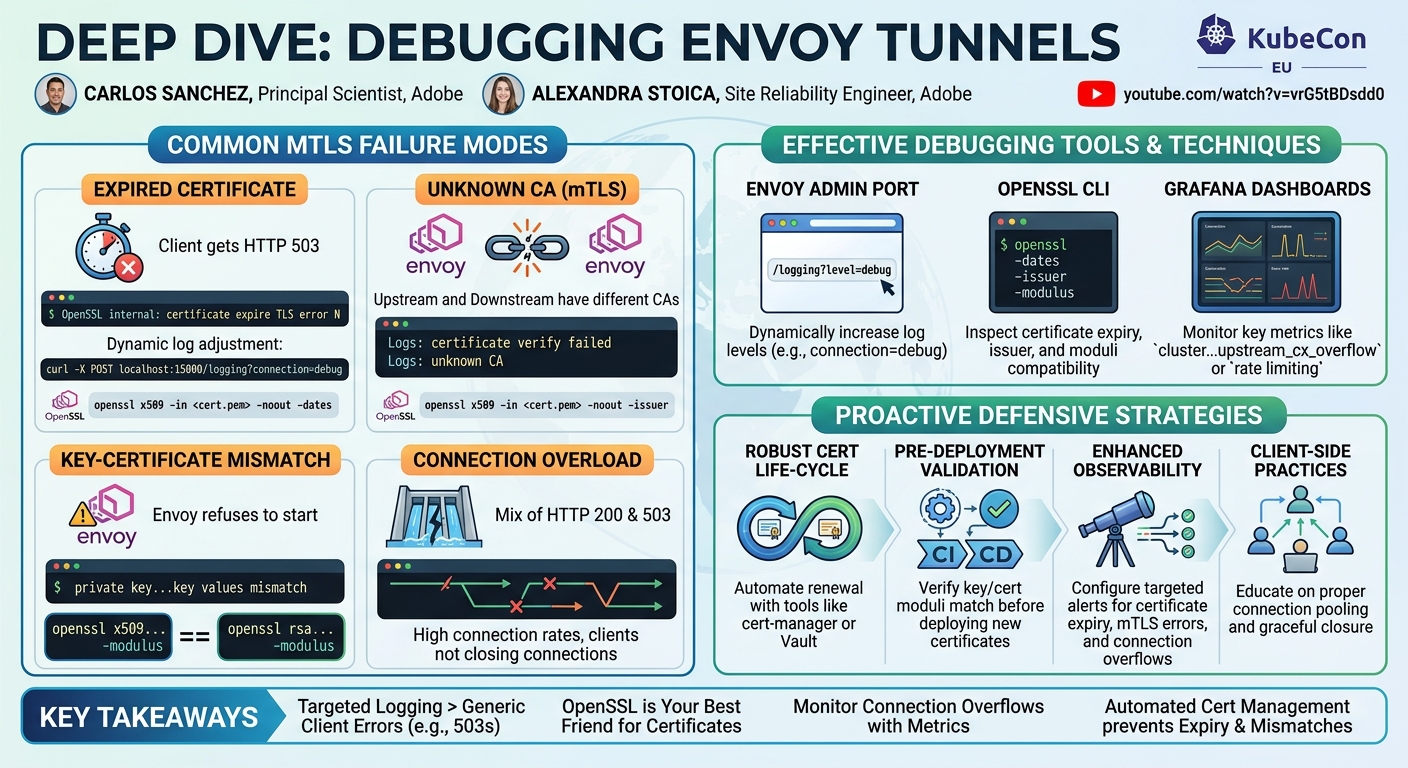
The talk's core contribution lies in identifying and demonstrating common, yet often elusive, failure modes encountered when operating Envoy with mTLS, and crucially, providing practical debugging strategies. These "key findings" are essentially a curated list of real-world problems that Adobe engineers faced and subsequently learned to diagnose. The scenarios presented highlight that while Envoy is powerful, misconfigurations or environmental issues, especially concerning certificates, can lead to seemingly generic errors like HTTP 503s. The main discoveries and contributions can be summarized as follows:
- Certificate Expiry is a Silent Killer: Expired mTLS certificates are a frequent cause of communication failures. Envoy, by default, might not log these as critical errors at
infolevel, making them hard to spot. The key finding is that increasing logging for theconnectioncomponent reveals specificcertificate expire TLS error Nmessages. - Mismatched Certificate Authorities (CAs) Break Trust: When communicating parties (e.g., upstream and downstream Envoys) expect certificates signed by a particular CA but receive one from an unknown or different CA, mTLS fails. The diagnostic clue here is an
unknown CAerror, often after acertificate verify failedmessage, which requires inspecting the certificate chain and issuer details. - Key and Certificate Mismatch Prevents Startup: A critical but less common finding is when an Envoy instance fails to start because its private key does not match its loaded certificate. This often results from deployment race conditions or improper certificate renewal processes. Envoy explicitly logs
private key...key values mismatch, and further investigation requires comparing the moduli of the key and certificate. - Connection Overload Leads to Intermittent Failures: High connection rates or clients failing to properly close connections can exceed Envoy's configured thresholds, leading to connections being dropped or refused. This manifests as a mixture of successful (HTTP 200) and failed (HTTP 503) requests. The finding emphasizes the importance of monitoring Envoy's metrics, specifically overflow or rate limiting statistics, to identify resource exhaustion.
- Targeted Logging and Metrics are Essential: A overarching finding is that generic error messages (e.g., HTTP 503) from the client are insufficient. Effective debugging of Envoy mTLS issues necessitates dynamically adjusting Envoy's log levels for specific components (like
connection) and leveraging its rich metrics ecosystem to pinpoint the root cause. This shifts the debugging paradigm from reactive guesswork to proactive, data-driven investigation.
These findings, demonstrated through live scenarios, underscore the importance of both robust certificate management and comprehensive observability in maintaining the health and security of Envoy-powered microservice architectures.
Technical Deep Dive
▶ Watch: Demo setup: two Envoys communicating with MTLS (5:55)
The talk's technical deep dive revolves around a practical, Docker Compose-based demonstration setup designed to simulate common Envoy mTLS communication failures. The architecture for each scenario is consistent: a client (using curl) attempts to reach a backend service through an Envoy tunnel. This tunnel consists of two Envoy instances: a downstream Envoy that the client connects to, and an upstream Envoy that communicates with the actual service. Crucially, the communication path between the downstream and upstream Envoys is secured using mTLS, with certificates generated by a shared Certificate Authority (CA).
The speakers systematically demonstrated how to debug issues using a combination of command-line tools and Envoy's built-in capabilities:
- Envoy Logging:
- Dynamic Log Level Adjustment: A key debugging technique involves dynamically changing Envoy's log levels at runtime via its admin port. For example, to increase logging for all components to
debug, one can send a request tolocalhost:15000/logging?level=debug. For more targeted debugging, increasing the log level for a specific component, such asconnection, is highly effective:localhost:15000/logging?connection=debug. This reduces noise and highlights relevant messages likeOpenSSL internal: certificate expire TLS error Norcertificate verify failedorunknown CA. - Container Logs: Standard
docker compose logs <service_name>is the first step to check for any startup errors or general runtime issues. For instance, an Envoy refusing to start due to a key/certificate mismatch will logprivate key...key values mismatchhere.
- Certificate Inspection with OpenSSL:
- Checking Expiry Dates: To verify certificate validity, the
openssl x509utility is indispensable. The commandopenssl x509 -in <certificate_file.pem> -noout -datesquickly displays theNot BeforeandNot Afterfields. - Inspecting Subject and Issuer: To diagnose
unknown CAerrors, examining who signed the certificate is crucial.openssl x509 -in <certificate_file.pem> -noout -subject -issuerreveals the certificate's subject (CN, DNS names) and the issuer (the CA that signed it). Mismatches between expected and actual issuers are easily identified. - Verifying Key-Certificate Match: When Envoy reports
key values mismatch, the private key and certificate moduli must be compared. The modulus is a unique identifier derived from the cryptographic components. - To get the certificate modulus:
openssl x509 -in <certificate_file.pem> -noout -modulus - To get the private key modulus:
openssl rsa -in <private_key.pem> -noout -modulus
If these moduli do not match, the key and certificate are incompatible.
- Envoy Metrics and Dashboards:
- For scenarios involving intermittent failures or connection issues, Envoy's extensive metrics are the go-to. The talk demonstrated using a Grafana dashboard to visualize connection counts and other statistics.
- Specifically, monitoring metrics related to connection overflows or rate limiting (depending on how Envoy is configured) can reveal if the proxy is dropping connections due to resource exhaustion. A mixture of 200 and 503 HTTP responses often points to such issues, indicating that some requests succeed while others are dropped due to Envoy's internal limits being hit.
The source code for the demo scenarios, which includes the Docker Compose setup and scripts for certificate generation and debugging, is publicly available on GitHub, allowing attendees and readers to replicate the scenarios and practice these debugging techniques.
Demo / Proof of Concept
▶ Watch: How to increase Envoy logging using admin port (9:00)
The core of the talk was an interactive, quiz-style demonstration featuring several distinct failure scenarios, each designed to highlight a common mTLS debugging challenge in Envoy. The audience was presented with a problem (e.g., curl getting 503 errors) and then asked to vote on the next debugging step.
- Scenario 1: Expired Certificate
- Problem: The client (
curl) received HTTP 503 errors when trying to reach the service. - Initial Debugging: Standard
docker compose logsdid not immediately reveal the issue at defaultinfolog levels. - Diagnostic Step: The speakers demonstrated increasing the log level for the
connectioncomponent on the upstream Envoy todebug(docker compose exec upstream /bin/bash -c "curl -X POST localhost:15000/logging?connection=debug"). - Observation: The logs then clearly showed
OpenSSL internal: certificate expire TLS error N. - Resolution: Using
openssl x509 -in upstream/certs/server.pem -noout -dates, the certificate was identified as expired (e.g., "Not After: Mar 19 00:00:00 2024 GMT").
- Scenario 2: Unknown Certificate Authority (CA)
- Problem: Again,
curlreceived persistent HTTP 503 errors. - Initial Debugging: Increasing logging on the upstream Envoy revealed
certificate verify failed. This was still too generic. - Diagnostic Step: The speakers then increased logging on the downstream Envoy's
connectioncomponent todebug. - Observation: The downstream Envoy logs showed
unknown CA. This indicated that the certificate presented by the upstream Envoy was signed by an authority not trusted by the downstream Envoy (or vice-versa, implying mismatched trust roots or CAs). - Resolution: While not explicitly shown in the limited time, the implied resolution involved inspecting the issuer of both certificates (
openssl x509 -in cert.pem -noout -issuer) and ensuring that both Envoys were configured with the correct trusted CA bundle. The problem was that the certificates were signed by two different CAs.
- Scenario 3: Private Key and Certificate Mismatch
- Problem: The client (
curl) couldn't even connect, indicating a more fundamental issue than an HTTP 503. - Initial Debugging: Checking
docker compose psrevealed that the downstream Envoy container was not running (exited 3 minutes ago). - Diagnostic Step: Inspecting the logs of the failed container (
docker compose logs envoy-downstream). - Observation: The logs clearly stated:
Envoy refuses to start at all because the private key...key values mismatch. This meant the private key provided to Envoy did not correspond to the certificate it was trying to use. - Resolution: The speakers explained that this issue could arise during certificate rotation or race conditions. The fix involves ensuring the correct key-certificate pair is used, verifiable by comparing their moduli using
openssl x509 -in cert.pem -noout -modulusandopenssl rsa -in key.pem -noout -modulus.
- Scenario 4: Connection Overload / Rate Limiting
- Problem: The client observed a mixture of HTTP 200 (success) and HTTP 503 (service unavailable) errors. This intermittent behavior is particularly challenging to debug.
- Initial Debugging: Given the intermittent nature, certificate issues were less likely to be the sole cause.
- Diagnostic Step: The speakers directed attention to Envoy's metrics, specifically a Grafana dashboard showing connection counts and other Envoy statistics.
- Observation: The dashboard would reveal high connection counts, potentially hitting Envoy's configured connection limits, leading to
overfloworrate limitingevents. The 503s were a result of Envoy actively closing or refusing connections when its thresholds were exceeded, often because clients were not closing connections properly. - Resolution: This points to client-side connection management issues or insufficient Envoy resource allocation. Solutions involve optimizing client connection pooling, ensuring proper connection closure, or increasing Envoy's connection limits if the load is legitimate.
These demonstrations collectively provided a robust proof of concept for the effectiveness of targeted logging, openssl utilities, and metric monitoring in unraveling complex mTLS and connection-related issues within Envoy.
Defensive Implications
▶ Watch: Using component-specific logging (e.g., 'connection') (10:15)
The insights gained from debugging Envoy tunnels, particularly in mTLS scenarios, have significant defensive implications for organizations operating cloud-native infrastructure. Proactive measures based on the common failure modes discussed can drastically improve system reliability, security posture, and engineer productivity.
- Robust Certificate Lifecycle Management: The most prominent defensive measure is to implement a comprehensive and automated certificate management system. This includes:
- Automated Renewal: Ensure certificates are automatically renewed well before their expiry dates, integrating with certificate authorities (e.g., Vault, cert-manager) to prevent scenario 1.
- Pre-deployment Validation: Implement hooks or checks in CI/CD pipelines to validate certificate and key pairs (e.g., matching moduli) before deploying them to Envoy instances, preventing scenario 3.
- Centralized CA Management: Standardize the Certificate Authority used across the service mesh to prevent
unknown CAerrors (scenario 2) and ensure consistent trust chains.
- Enhanced Observability and Alerting:
- Targeted Logging Configuration: While
infolevel logging is standard, engineers should be able to dynamically increase log levels for critical Envoy components likeconnectionin production for debugging. More importantly, configure logging to capture specific error messages (e.g.,certificate expire TLS error N,unknown CA) and forward them to a centralized logging system (e.g., Splunk, ELK stack). - Comprehensive Metrics Monitoring: Beyond basic health checks, monitor specific Envoy metrics related to mTLS status, connection counts, and resource utilization. Set up alerts for:
- High rates of
upstream_rq_5xxordownstream_cx_destroy_local_active_rq(indicating connection closure by Envoy). - Increases in
cluster.<name>.circuit_breakers.rq_openorcluster.<name>.upstream_cx_overflow(signaling connection overload, scenario 4). - Certificate expiry dates, with alerts well in advance of actual expiry.
- Client-Side Connection Management Best Practices:
- Educate and enforce best practices for client applications interacting with Envoy. This includes proper connection pooling and ensuring connections are gracefully closed when no longer needed. This mitigates scenario 4, where excessive open connections can overwhelm Envoy.
- Regular Health Checks and Readiness Probes:
- Beyond basic HTTP health checks, ensure readiness probes for Envoy instances validate the full mTLS setup. An Envoy that fails to start due to key/certificate mismatch (scenario 3) should not be considered ready to receive traffic.
- Security Audits and Configuration Review:
- Periodically review Envoy configurations, especially those related to mTLS, to ensure they align with security best practices and organizational policies. Misconfigurations can inadvertently lead to vulnerabilities or operational issues.
By integrating these defensive strategies, organizations can build more resilient and secure service meshes, reducing the likelihood and impact of common Envoy mTLS failures.
Key Takeaways
- Targeted Logging is Crucial for mTLS Debugging: Generic client errors (e.g., HTTP 503) are often insufficient. Dynamically increasing Envoy's log level for specific components, such as
connection, todebugreveals precise mTLS errors likecertificate expire TLS error Norunknown CA. - OpenSSL is Your Best Friend for Certificate Issues: Command-line
opensslutilities are indispensable for inspecting certificates, verifying expiry dates (-dates), checking issuer details (-issuer), and validating private key/certificate matches by comparing their moduli (-modulus). - Certificate Expiry and Mismatched CAs are Common Pitfalls: These two issues frequently cause mTLS failures. Automated certificate rotation and consistent CA usage across the service mesh are critical preventative measures.
- Envoy Metrics Uncover Connection Overload: Intermittent 200/503 errors often indicate that Envoy's connection limits are being hit due to client connection issues or high traffic. Monitoring
overfloworrate limitingmetrics is key to diagnosing such resource exhaustion. - Key-Certificate Mismatch Prevents Startup: An Envoy instance will refuse to start if its private key does not match its loaded certificate, logging an explicit
private key...key values mismatcherror. Proactive validation of certificate pairs during deployment can prevent this. - Proactive Observability is Key: Implementing robust monitoring, logging, and alerting for Envoy's mTLS status and resource utilization is essential for quickly identifying and resolving issues in complex cloud-native environments.
About the Speaker(s)
Alexandra Stoica is a Site Reliability Engineer (SRE) at Adobe. This KubeCon EU talk marked her debut as a speaker at a major conference. Her daily work involves managing cloud infrastructure, automating various processes, and ensuring the smooth operation of Kubernetes environments. She humorously likens her role to "coaching a team of unpredictable gymnasts," drawing on her past experience as a gymnast to balance performance, cost, and scalability in the cloud. She highlights that in tech, unlike gymnastics, when things go wrong, at least "I don't land on my face." Alexandra is a key contributor to the Adobe Experience Manager Cloud Service team.
Carlos Sanchez is a Principal Scientist at Adobe, bringing a wealth of experience in open-source development. He is widely recognized for his pioneering work on the Jenkins Kubernetes plugin, which he started over a decade ago. Carlos has a long history of contributing to and leading open-source projects. At Adobe, he works alongside Alexandra on the Adobe Experience Manager Cloud Service, leveraging his deep technical expertise to tackle complex challenges in distributed systems and cloud infrastructure.
Reviews
Dr. Zero (Offensive Security Researcher) — STRONG ACCEPT
This talk from Adobe's SRE team provides a much-needed deep dive into debugging Envoy mTLS issues, drawing directly from real-world production challenges. It cuts through the typical cloud-native hype to deliver concrete, actionable debugging strategies using specific Envoy log components, openssl, and metrics. The demo-driven approach, tackling common failure modes like certificate expiry, CA mismatches, and connection overloads, makes this highly valuable for anyone running Envoy at scale. It's a pragmatic, no-nonsense guide that will save engineers countless hours.
Heather Calloway (CISO) — STRONG ACCEPT
Sanchez and Stoica deliver a highly practical and credible session on debugging Envoy mTLS failures. While deeply technical, the talk provides invaluable, actionable insights for operators, directly enhancing the reliability and security posture of critical cloud-native infrastructure. It effectively translates complex technical issues into clear diagnostic paths, addressing foundational controls that underpin business resilience and risk management.