The Ultimate Container Challenge: An Interactive Trivia Game on OC... Aurélie Vache & Sherine Khoury
Aurélie Vache, Sherine Khoury
KubeCon + CloudNativeCon Europe 2025 · Session
Overview
This KubeCon EU session, "The Ultimate Container Challenge," transcended a typical presentation by engaging the audience in an interactive trivia game designed to test and deepen their understanding of OCI (Open Container Initiative) containers and their broader ecosystem. Led by Aurélie Vache and Sherine Khoury, the talk leveraged a series of challenging questions, followed by immediate live demonstrations, to demystify complex concepts surrounding container images, registries, and security practices. The format effectively combined education with entertainment, making intricate technical details accessible and memorable.
Key moments
- 0:00 Introduction to the OCI trivia game
- 2:00 Understanding the Open Container Initiative (OCI) standards
- 4:20 OCI vs Docker V2 image format differences
- 6:40 Image compression during push explained with demo
- 10:25 How deleting files with RUN rm affects image size (whiteout)
The Ultimate Container Challenge: An Interactive Trivia Game on OCI Containers
Speakers: Aurélie Vache, Developer Advocate at Sidero Labs; Sherine Khoury, Senior Principal Product Manager at Red Hat
Conference: KubeCon EU
YouTube: https://www.youtube.com/watch?v=QLHQP8-RVwE
Overview
This KubeCon EU session, "The Ultimate Container Challenge," transcended a typical presentation by engaging the audience in an interactive trivia game designed to test and deepen their understanding of OCI (Open Container Initiative) containers and their broader ecosystem. Led by Aurélie Vache and Sherine Khoury, the talk leveraged a series of challenging questions, followed by immediate live demonstrations, to demystify complex concepts surrounding container images, registries, and security practices. The format effectively combined education with entertainment, making intricate technical details accessible and memorable.
The session aimed to highlight the nuances and often misunderstood aspects of container technology, from fundamental differences between OCI and Docker formats to advanced topics like Software Bill of Materials (SBOMs) and image signing. By showcasing how various tools interact with OCI specifications, the speakers underscored the importance of understanding the underlying standards for anyone working with modern containerized applications. This talk is crucial for developers, DevOps engineers, and security professionals seeking to navigate the rapidly evolving container landscape with greater confidence and technical accuracy.
Background
▶ Watch: Introduction to the OCI trivia game (0:00)
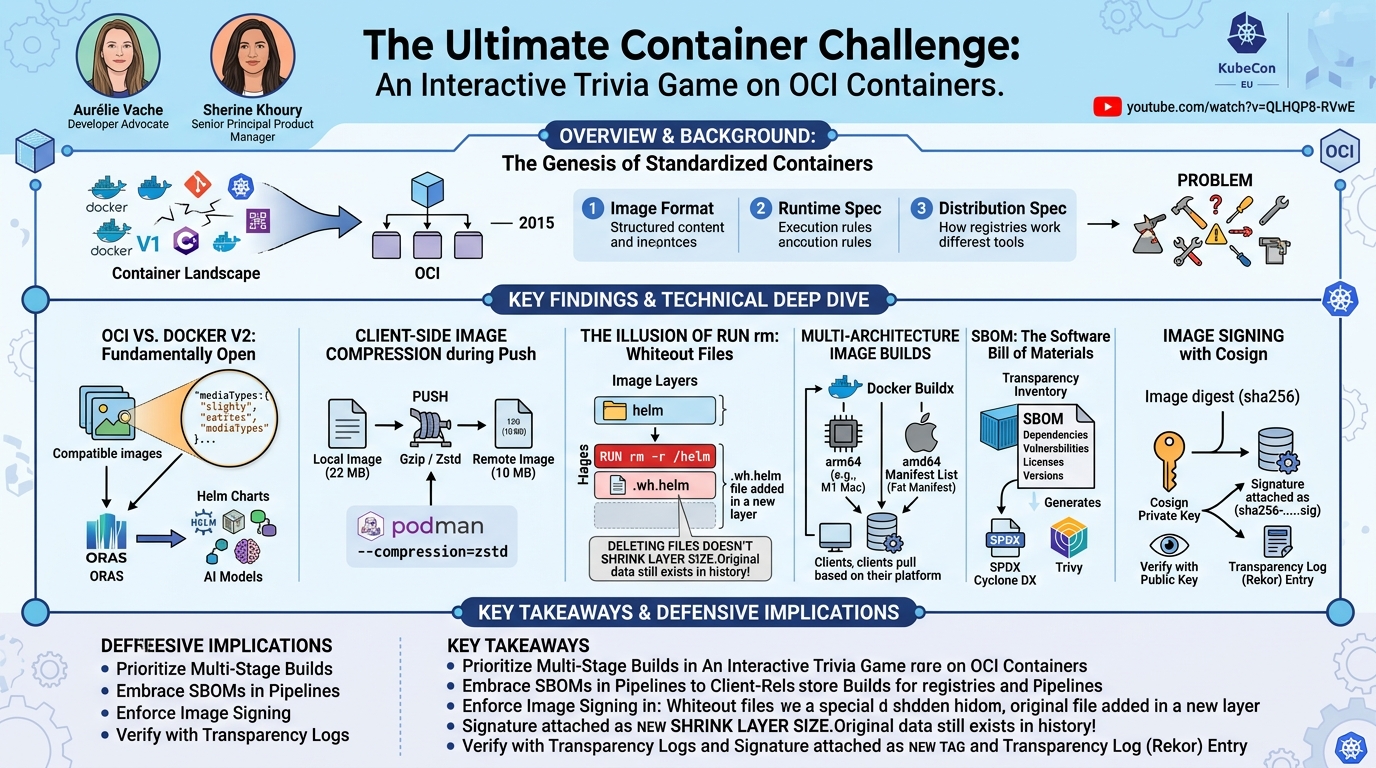
The genesis of OCI lies in the need for standardization within the burgeoning container ecosystem. Prior to its establishment in 2015, Docker held a near-monopoly on container image formats and runtimes, leading to concerns about vendor lock-in and interoperability. Docker's decision to donate its image format and runtime to the newly formed OCI was a pivotal moment, fostering an open governance model around container technology. The OCI now standardizes three core components: the image format (how container images are structured), the runtime specification (how container engines execute containers), and the distribution specification (how images are pushed, pulled, and managed via registries).
Despite this standardization, subtle differences persist between OCI specifications and proprietary implementations or older versions, such as Docker V2. Tools like Docker, Podman, Skopeo, and Crane strive to abstract these differences, but understanding the underlying mechanisms is vital for advanced use cases, troubleshooting, and security. The problem addressed by this talk is the common misconception and lack of deep technical knowledge regarding these foundational elements, which can lead to inefficient practices, unexpected behavior, and security vulnerabilities in containerized environments. The session built upon prior work in container standardization and community efforts to clarify and disseminate knowledge about the OCI ecosystem, extending beyond just runnable containers to include other artifacts like Helm charts and AI models.
Key Findings
▶ Watch: Understanding the Open Container Initiative (OCI) standards (2:00)
The interactive quiz format of the talk revealed several critical insights into the OCI container ecosystem, challenging common assumptions and clarifying nuanced technical details:
- OCI vs. Docker V2: Slightly Different, Fundamentally Open: While Docker V2 and OCI image formats are largely compatible, they possess subtle
mediaTypedifferences. This distinction, though seemingly minor, was crucial in opening the container ecosystem to storing and distributing non-runnable artifacts (like Helm charts and AI models) in registries, leveraging the OCI distribution specification. - Client-Side Image Compression during Push: Container images are not pushed to registries as-is. The client-side tool (e.g., Docker, Podman) compresses image layers before uploading them. This explains why local image sizes often differ significantly from their reported size on a registry, and it highlights the potential for optimizing compression algorithms.
RUN rmCommands Don't Shrink Image Size: UsingRUN rm -rin a Dockerfile or Containerfile does not reduce the size of the underlying image layers. Instead, it adds a small whiteout file (.wh.) in a new layer, which the container runtime interprets to "hide" the specified files or directories. The original content remains in previous layers, impacting image size and potentially security.- Platform-Specific Image Builds by Default: Images built locally are inherently tied to the host machine's platform and architecture (e.g.,
arm64for Apple M-series Macs,amd64for typical Linux servers). Running such an image on a different architecture will fail, necessitating the creation of multi-architecture images for broad compatibility. - SBOMs are Essential for Supply Chain Security: Software Bill of Materials (SBOMs) are critical inventories of all components within a container image, including dependencies, licenses, and potential vulnerabilities. Standardized open-source formats like SPDX and Cyclone DX exist, and tools can generate, view, and attach SBOMs to images in registries.
- Image Signing with Cosign Creates New Tags: When an image is signed using Cosign, the signature is not embedded as an extra layer or modification within the original image. Instead, it creates a new, separate image tag (typically based on the original image's digest) that points to the signature, leveraging the OCI distribution specification's artifact attachment capabilities. This ensures the original image remains immutable.
Technical Deep Dive
▶ Watch: OCI vs Docker V2 image format differences (4:20)
The talk provided a deep dive into the technical underpinnings of OCI containers, using live demonstrations to illustrate each concept.
OCI vs. Docker V2 Image Formats
The core distinction between OCI and Docker V2 image formats lies primarily in their media types. While the content of the layers (the actual filesystem changes) is often identical, the manifest files that describe these layers differ. An OCI image manifest explicitly uses OCI image manifest as its mediaType, along with specific config and layer media types. In contrast, Docker V2 manifests use application/vnd.docker.distribution.manifest.v2+json and similar Docker-specific media types.
This seemingly minor difference in metadata was a strategic move by the OCI to enable greater flexibility. By standardizing the manifest structure and allowing for custom mediaType definitions, OCI paved the way for registries to store and manage non-runnable artifacts alongside traditional container images. For instance, Helm charts now leverage this by defining their own mediaType for chart configurations and layers, allowing them to be pushed to and consumed from container registries (like Docker Hub or Harbor) just like regular images. The speakers demonstrated this by showing how Helm charts and even custom AI models could be pushed to a local registry using ORAS (OCI Registry As Storage), creating their own artifact types. This capability significantly expands the utility of container registries beyond just executable binaries.
Image Compression during Push
A common misconception is that the size of a container image remains constant from local storage to a remote registry. The talk clarified that when a client executes a docker push (or podman push) command, the image layers are compressed locally before being uploaded to the registry. This client-side compression is typically performed using algorithms like gzip. As a result, an image that might be 22 MB locally could appear as 10 MB on Docker Hub or a private Harbor registry.
The speakers demonstrated this by building a simple image and inspecting its local size, then pushing it to both Docker Hub and Harbor, showing the significant size reduction on the registries. Furthermore, they highlighted that users can influence this compression. While Docker's options are somewhat limited (e.g., using --compression-level with zstd if available), Podman offers more explicit control. With Podman, users can specify different compression algorithms, such as zstd (Zstandard), which often provides better compression ratios and speeds for large images compared to gzip. This is achieved through flags like --compression=zstd during the push operation, allowing for fine-grained optimization of registry storage and network transfer.
The Illusion of RUN rm and Whiteout Files
One of the most counter-intuitive aspects of Dockerfile best practices was addressed: the effect of RUN rm -r commands. When a RUN instruction that deletes files or directories is added to a Dockerfile, it does not actually remove those files from the underlying image layers. Instead, it creates a new layer containing a special whiteout file. A whiteout file, typically named .wh.filename or .wh.dirname, is a zero-byte file that signals to the container runtime (e.g., containerd, crio) that a particular file or directory from a previous layer should be treated as deleted or hidden at runtime.
The demo vividly illustrated this by saving an image built with an rm -r command to a local folder (using podman save). Inspecting the individual layers revealed that the "deleted" files (e.g., a helm folder) were still present in their original layers. Only the new layer contained the .wh.helm file. This means that if sensitive data is added in an early layer and then "removed" in a later layer using rm, the sensitive data still exists within the image history. This has significant security implications, as attackers could potentially reconstruct earlier layers to extract sensitive information. The key takeaway for defenders is the necessity of multi-stage builds to ensure that temporary files and build artifacts are never committed to the final image layers, thereby truly reducing the image's attack surface.
Building Multi-Architecture Images
Container images are not universally compatible across different hardware architectures. By default, an image is built for the machine platform and architecture where the build command is executed. For example, building an image on an Apple M1/M2/M3 Mac will produce an arm64 image, which will not run directly on an amd64 Linux server without emulation.
The solution presented is the creation of multi-architecture images. This involves using Docker Buildx, a component that extends Docker's build capabilities to support multiple architectures. The process typically involves:
- Creating a builder instance:
docker buildx create --name mybuilder --use. - Inspecting the builder to see supported platforms:
docker buildx inspect mybuilder. This reveals a list of architectures likelinux/amd64,linux/arm64,linux/riscv64, etc. - Building the image for multiple architectures:
docker buildx build --platform linux/amd64,linux/arm64 -t myimage:multi-arch --push .. The--pushflag is essential as multi-arch images are stored as a manifest list (or fat manifest) in a registry, which points to individual images for each architecture.
The demo showed pushing such an image to Docker Hub, where the UI clearly displays that a single tag (myimage:multi-arch) supports both amd64 and arm64. Tools like Crane (crane manifest) can also be used to inspect these manifest lists directly from the command line, confirming the presence of multiple architecture entries. This capability is vital for applications deployed across diverse environments, from edge devices to cloud servers.
Software Bill of Materials (SBOMs)
Software Bill of Materials (SBOMs) are gaining immense importance in software supply chain security. An SBOM provides a comprehensive, machine-readable inventory of all software components, dependencies, licenses, and versions that make up an application or container image. The talk highlighted two leading open-source formats:
- SPDX (Software Package Data Exchange): Pushed by the Linux Foundation, SPDX is an ISO 5962 certified standard. It is known for being very verbose and comprehensive, making it suitable for detailed compliance and legal requirements.
- Cyclone DX: Driven by OWASP, Cyclone DX is designed for automation and vulnerability scanning. It's often preferred for its more concise nature and suitability for integration into CI/CD pipelines for continuous security monitoring.
While OCI itself doesn't mandate a specific SBOM format, it supports the attachment of SBOMs to images. Various tools can generate SBOMs:
- Trivy: A popular open-source vulnerability scanner that can also generate SBOMs in SPDX or Cyclone DX formats (e.g.,
trivy image --format spdx-json -o sbom.json myimage). - sbom-tool: A utility to view and analyze SBOMs, making the complex JSON output more human-readable.
- Docker Scout: Docker's commercial offering that includes SBOM generation capabilities.
- Podman: With the
--sbom-scannerflag, Podman can also generate SBOMs.
The speakers noted that different tools might produce slightly different SBOMs for the same image, varying in their level of detail and what they choose to include. Crucially, modern registries are starting to support pushing SBOMs alongside images. The ORAS attach command can be used to link an SBOM file to a specific image, specifying an artifact type (e.g., harbor.sbom.v1) so the registry recognizes it as an SBOM. This allows consumers to retrieve the SBOM directly from the registry, enabling automated vulnerability scanning and compliance checks as part of the image consumption process.
Image Signing with Cosign
Ensuring the integrity and authenticity of container images is paramount for supply chain security. Cosign, a tool from the Sigstore project, provides a robust mechanism for signing container images without modifying the original image itself. This immutability is a key design principle.
The signing process with Cosign involves:
- Key Generation:
cosign generate-key-paircreates a public/private key pair. For production, the private key should be securely managed and password-protected. - Image Signing:
cosign sign --annotations conf=kubecon myimage@sha256:digestuses the private key to sign an image, referencing it by its digest (a strong identifier). Crucially, this command performs two actions:
- It pushes the signature as a new image tag to the registry. This tag typically follows a format like
sha256-<digest>.sig, making it discoverable alongside the original image. - It generates a transparency log (T-log) entry for the signature, which is stored on a public, immutable Rekor server. This T-log provides an auditable, tamper-evident record of all signing events.
- Signature Verification:
cosign verify --key cosign.pub myimage@sha256:digestuses the public key to verify the signature against the T-log entry. This confirms that the image has not been tampered with since it was signed and that it was signed by a trusted entity.
The demo showed a private Harbor registry where, after signing, the image entry changed from "unsigned" to having a "signature" and even linked the SBOM that was previously attached. Cosign's approach decouples the signature from the image content, making it a flexible and secure way to establish trust in the container supply chain.
Demo / Proof of Concept
▶ Watch: Image compression during push explained with demo (6:40)
The entire talk was structured around live demonstrations, validating each trivia answer with practical examples.
- OCI vs. Docker Manifest Diff: The speakers pulled the same image in both Docker and OCI formats. They then performed a
diffon their respective manifests, explicitly showing that the only difference was themediaTypefield. They further demonstrated how Helm charts and a custom AI model could be pushed to a registry using ORAS with their own artifact-specificmediaTypes. - Image Compression Live: An image was built (
docker build), its local size measured (e.g., 22 MB). Then, it was pushed (docker push) to Docker Hub and a private Harbor registry. The registry UIs and command-line checks (skopeo inspect) clearly showed a significantly smaller size (e.g., 10 MB), proving client-side compression. They also briefly showed Podman commands to specify different compression algorithms likezstd. RUN rm -rand Whiteout Files: AContainerfile(Podman's Dockerfile equivalent) was used to build an image that first added ahelmfolder and then usedRUN rm -r /helm. The image was then saved locally usingpodman save. By looping through the extracted layers, the speakers demonstrated that thehelmfolder was still present in an earlier layer, while a.wh.helmfile was visible in a subsequent layer, confirming the whiteout mechanism.- Multi-Architecture Image Build: The process began by setting up a
docker buildxbuilder. An image was then built for bothamd64andarm64platforms and pushed to a registry. Thecrane manifestcommand was used to inspect the resulting manifest list, showing entries for both architectures. Finally, the Docker Hub UI for the pushed image tag visually confirmed support for multiple architectures. - SBOM Generation and Attachment: Using Trivy, an SPDX JSON SBOM was generated for a container image. The
sbom-toolwas then used to parse and display this JSON in a more readable format. The demo concluded by usingoras attachto push the generated SBOM to a Harbor registry, specifying a custom artifact type (harbor.sbom.v1), making it discoverable alongside the image. - Image Signing with Cosign: A key pair was generated using
cosign generate-key-pair. An existing OCI artifact (the previously built image) was signed usingcosign sign, including an annotation (conf=kubecon). Thecosign verifycommand was then used to confirm the signature. The private Harbor registry UI was shown, illustrating that the image now displayed a "signature" status, confirming the successful signing and attachment of the signature.
Defensive Implications
▶ Watch: How deleting files with RUN rm affects image size (whiteout) (10:25)
The technical insights from this session carry significant implications for securing containerized environments:
- Prioritize Multi-Stage Builds: The revelation about
RUN rm -rnot truly removing data from layers underscores the critical importance of multi-stage builds. Defenders must ensure build processes always use multi-stage Dockerfiles to minimize the final image's attack surface, preventing sensitive build-time artifacts or temporary files from being included in production images. Tools like Dive can help analyze image layers for unintended content. - Embrace Software Bill of Materials (SBOMs): Integrating SBOM generation (using tools like Trivy, Syft, or CycloneDX CLI) into CI/CD pipelines is no longer optional. SBOMs provide the foundational inventory needed for proactive vulnerability management, license compliance, and rapid response to newly disclosed CVEs. Defenders should leverage registry capabilities to store and retrieve SBOMs alongside images for automated scanning.
- Implement Image Signing and Verification: Adopt Cosign or similar solutions (e.g., Notary) to sign all container images and enforce signature verification at deployment time. This establishes a robust chain of custody, ensuring that only trusted, untampered images from authorized sources are run in production. Leveraging transparency logs (T-logs) like Rekor provides an immutable audit trail for all signing activities.
- Understand OCI Standards and Tooling: A deep understanding of OCI specifications and the nuances of tools like Docker, Podman, Skopeo, Crane, and ORAS is crucial. This knowledge allows defenders to identify misconfigurations, understand how artifacts are stored and managed, and troubleshoot issues effectively. For example, knowing about different compression algorithms can help optimize image transfer times and registry storage.
- Address Multi-Architecture Compatibility: While primarily an operational concern, ensuring images are built for the correct target architectures (using
docker buildx) prevents deployment failures and potential workarounds that could introduce security risks (e.g., running untrusted images). This also ensures consistent security scanning across all architectural variants. - Beware of Hidden Data in Layers: Even if files are "removed" with
RUN rm, their presence in previous layers means they could still be extracted. This reinforces the need for rigorous secrets management, ensuring no sensitive data ever enters a build layer, even temporarily. Use build arguments (ARG) and secrets management tools to inject secrets at runtime, not build time.
Key Takeaways
- OCI vs. Docker: OCI standardizes container formats, enabling ecosystem diversity and the storage of non-runnable artifacts (like Helm charts, AI models) in registries, despite subtle
mediaTypedifferences from Docker V2. - Image Compression: Container image layers are compressed client-side before being pushed to registries, leading to size discrepancies; advanced compression algorithms like
zstdcan be specified for optimization. - Layer Immutability:
RUN rm -rin a Dockerfile does not reduce image size or remove data from previous layers; it merely adds a "whiteout file" to hide content at runtime, necessitating multi-stage builds for true size reduction and security. - Multi-Arch Images: Images are platform-specific by default; use
docker buildxto create multi-architecture images and manifest lists for broad compatibility across diverse environments. - SBOMs are Foundational: Integrate open-source SBOM formats like SPDX and Cyclone DX into CI/CD pipelines for comprehensive software supply chain security, vulnerability management, and license compliance.
- Cosign for Integrity: Leverage Cosign to sign container images, attaching signatures as new image tags and recording them in public transparency logs (Rekor) to ensure image authenticity and integrity without modifying the original image.
About the Speaker(s)
Aurélie Vache is a Developer Advocate at Sidero Labs, specializing in infrastructure and infrastructure as code. Her expertise lies in empowering developers with tools and knowledge to navigate complex cloud-native environments effectively.
Sherine Khoury serves as a Senior Principal Product Manager at Red Hat, where she focuses on the OpenShift stack. With a diverse background across various tech domains, Sherine brings extensive experience in product development and strategy within the cloud-native and containerization space.
Reviews
Dr. Zero (Offensive Security Researcher) — STRONG ACCEPT
This KubeCon session, "The Ultimate Container Challenge," was a refreshing deep dive into the often-misunderstood nuances of OCI containers, packaged as an interactive trivia game. The speakers cut through common misconceptions with precise technical explanations and compelling live demos, revealing critical details about image compression, the true nature of RUN rm commands, multi-architecture builds, SBOMs, and image signing with Cosign. This was no "awareness" session; it delivered actionable insights essential for anyone serious about container security and efficient operations.
Heather Calloway (CISO) — STRONG ACCEPT
This KubeCon session, while presented as an interactive trivia challenge, delivers profoundly critical and actionable technical insights essential for modern container security and supply chain integrity. It effectively demystifies foundational OCI standards, exposes common misconceptions like the true effect of RUN rm on image layers, and champions indispensable security practices such as comprehensive SBOM generation and robust image signing. For any organization leveraging containerized applications, a deep understanding of these elements is not merely technical best practice; it is paramount for mitigating significant supply chain risks, ensuring data integrity, and establishing a…