MacOS Lockdown Mode: A Forensic Deep Dive - Bhargav Rathod
Bhargav Rathod (Security Analyst · Salesforce)
Nullcon Goa 2025 · Main Stage
Overview
Apple's Lockdown Mode, introduced in 2022 with iOS 16 and macOS Ventura, represents a significant leap in consumer-grade security, designed to protect high-risk individuals from sophisticated mercenary spyware attacks. This optional, extreme security feature significantly restricts device functionality, aiming to minimize the attack surface against state-sponsored threats like the notorious Pegasus spyware developed by NSO Group. In his Nullcon talk, Bhargav Rathod, a Security Analyst at Salesforce and an expert in digital forensics and incident response (DFIR), provides an exhaustive forensic deep dive into macOS Lockdown Mode, exploring its activation, observable effects, and the critical artifacts it leaves behind.
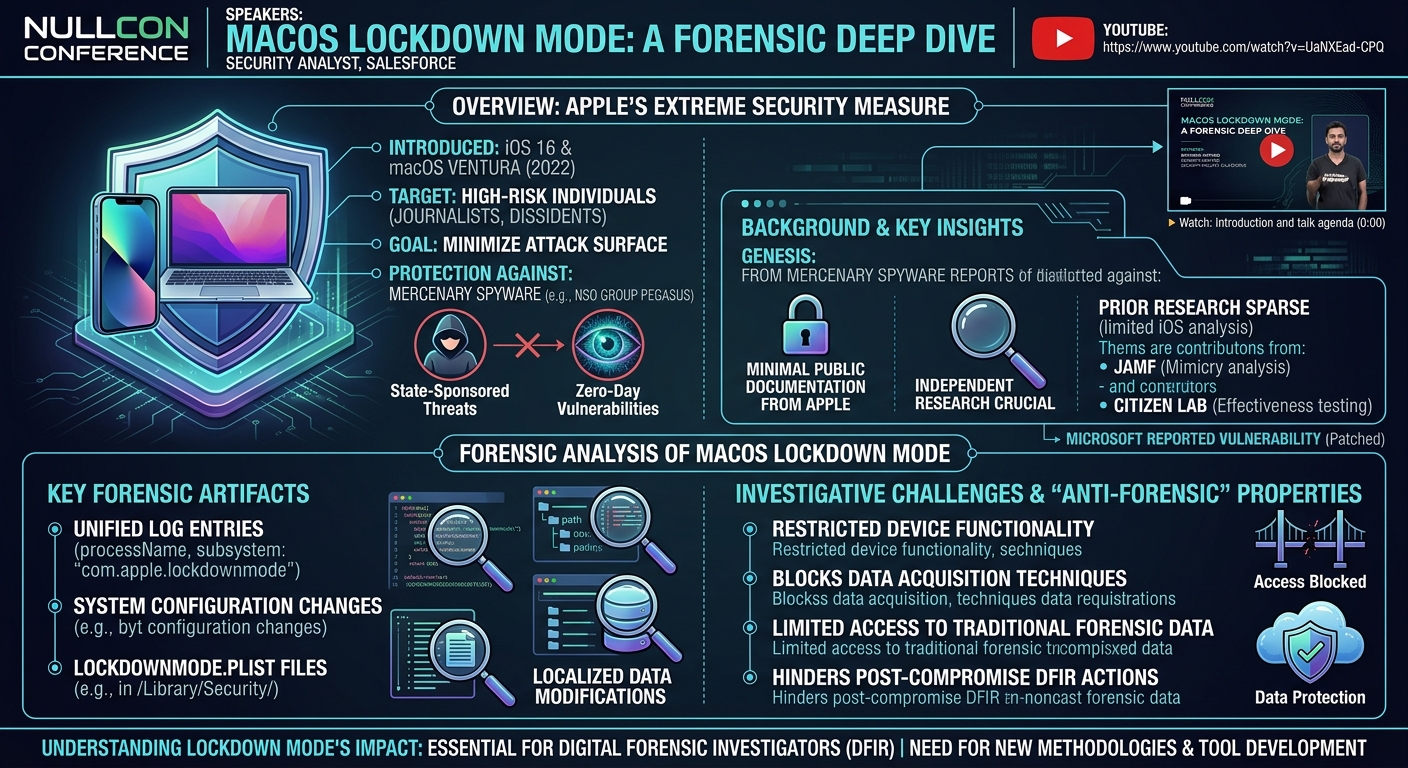
Key moments
- 0:00 Introduction and talk agenda
- 2:10 What is Apple's Lockdown Mode?
- 3:45 Origins: Why Apple introduced Lockdown Mode (Pegasus)
- 5:15 Motivations for researching Lockdown Mode
- 7:59 Features restricted by Lockdown Mode on macOS
- 9:00 Challenges in detecting Lockdown Mode for DFIR
MacOS Lockdown Mode: A Forensic Deep Dive
Speakers: Bhargav Rathod, Security Analyst, Salesforce
Conference: Nullcon
YouTube: https://www.youtube.com/watch?v=UaNXEad-CPQ
Overview
Apple's Lockdown Mode, introduced in 2022 with iOS 16 and macOS Ventura, represents a significant leap in consumer-grade security, designed to protect high-risk individuals from sophisticated mercenary spyware attacks. This optional, extreme security feature significantly restricts device functionality, aiming to minimize the attack surface against state-sponsored threats like the notorious Pegasus spyware developed by NSO Group. In his Nullcon talk, Bhargav Rathod, a Security Analyst at Salesforce and an expert in digital forensics and incident response (DFIR), provides an exhaustive forensic deep dive into macOS Lockdown Mode, exploring its activation, observable effects, and the critical artifacts it leaves behind.
Rathod's research is particularly timely and relevant given the scarcity of public documentation from Apple and the limited prior forensic analysis of Lockdown Mode, especially on macOS. While the feature offers unparalleled protection for its intended users, it simultaneously introduces substantial challenges for digital forensic investigators and law enforcement. This talk sheds light on how Lockdown Mode operates under the hood, detailing the specific system changes, log entries, and disk artifacts that can be leveraged for detection, while also highlighting its inherent "anti-forensic" properties that can impede traditional data acquisition and analysis techniques.
The presentation serves as an essential resource for the DFIR community, providing a foundational understanding of Lockdown Mode's impact on forensic investigations. Rathod not only demystifies the technical intricacies of this cutting-edge security feature but also underscores the urgent need for new methodologies and tool development to navigate the complexities it introduces. His work bridges a crucial gap in the understanding of Apple's advanced security mechanisms and their far-reaching implications for digital forensics.
Background
▶ Watch: Introduction and talk agenda (0:00)
The genesis of Lockdown Mode can be traced back to a growing global concern over mercenary spyware, particularly following widespread reports of tools like Pegasus being used by government agencies to target journalists, dissidents, and human rights activists. These sophisticated exploits often leveraged zero-day vulnerabilities in mobile operating systems, allowing for silent, remote compromise of devices. Apple, recognizing the severe threat posed by such attacks, responded by developing Lockdown Mode as a direct countermeasure. Introduced initially for iOS 16 and subsequently ported to macOS Ventura, iPadOS, and watchOS, it represents Apple's most extreme security offering to date.
Despite its importance, Apple has provided minimal public documentation regarding the technical specifics of Lockdown Mode's implementation, making independent research crucial. Prior to Rathod's work, research into Lockdown Mode was sparse. There was limited analysis on iOS, with notable contributions from organizations like Jamf, which explored the possibility of mimicking Lockdown Mode for user deception, and Citizen Lab, which assessed its effectiveness against certain spyware on iOS. However, detailed forensic research specifically targeting macOS Lockdown Mode was virtually non-existent. Microsoft also publicly reported a vulnerability affecting Lockdown Mode, which Apple subsequently patched, indicating the feature's ongoing development and the continuous cat-and-mouse game with threat actors.
Rathod's motivation for this deep dive stemmed from several factors: the glaring absence of macOS-specific forensic research, Apple's opaque documentation practices, the reported vulnerabilities, and the significant bug bounty ($200,000) offered by Apple for discovering flaws in Lockdown Mode. He recognized that while the feature was designed to protect users, its forensic implications for investigators remained largely unexplored. This gap presented a unique opportunity to provide the DFIR community with the necessary insights to understand and potentially contend with devices operating under this enhanced security posture.
Key Findings
▶ Watch: Origins: Why Apple introduced Lockdown Mode (Pegasus) (3:45)
Bhargav Rathod's research into macOS Lockdown Mode yielded several critical findings, illuminating both its protective capabilities and its profound impact on forensic investigations. The core purpose of Lockdown Mode is to drastically reduce the attack surface by disabling or restricting a wide array of features, thereby making the device a less appealing or accessible target for sophisticated attackers.
The primary discovery was the extensive list of features that become restricted upon activation. These include:
- FaceTime: Blocks incoming calls from unknown contacts.
- Game Center: Disables access and functionality.
- Mail: Restricts certain content processing.
- Messages: Disables specific attachment types and link previews.
- Photos: Restricts shared albums.
- Safari: Disables complex web technologies (e.g., certain fonts, JavaScript features) for untrusted sites, though users can whitelist specific domains.
- Device Management: Prevents the installation of new configuration profiles.
- Background Services: Limits certain background processes.
- WebKit: Enforces stricter rendering policies for web content.
- Connectivity: Significantly restricts AirDrop (making the device undiscoverable) and Bluetooth functionality.
Crucially, Rathod highlighted the significant challenges in detecting whether Lockdown Mode is enabled. Unlike other security features, Apple provides no overt UI indicators such as banners, pop-ups, or control center notifications while the device is in use. Furthermore, detection is impossible on a locked Mac without the user's password, as the system settings are inaccessible. This poses an immediate hurdle for forensic acquisition scenarios where device access is limited.
Despite these challenges, Rathod identified several forensic detection methods, categorized for different investigation contexts:
- Live System Detection: A simple command-line script can query a specific .plist file to determine the mode's status.
- User Interface Indicators: Observable changes within system settings, specific app behaviors (e.g., Game Center failing to load, Safari banners), and notification patterns.
- Disk Artifacts: Specific .plist files located in system and user libraries contain keys and values that reflect Lockdown Mode's state and configured restrictions.
- Apple Unified Logs: Apple's proprietary logging system records numerous events related to the activation, deactivation, and operational effects of Lockdown Mode, including password entries, reboots, and feature restrictions.
- Memory Changes: The presence of the
lockdownmodeDdaemon in memory indicates active Lockdown Mode.
Perhaps the most significant finding from a DFIR perspective is the "anti-forensic" nature of Lockdown Mode. Activating the mode necessitates a device reboot, which purges all volatile data from memory, a critical loss for live forensic analysis. More critically, it restricts USB accessories when the Mac is locked, effectively preventing forensic imaging via external boot devices or acquisition tools. Furthermore, it disables kernel extension loading/unloading, which can block many commercial forensic tools from functioning, and prevents profile installation, hindering certain jailbreaking or forensic access techniques. These combined effects suggest that Lockdown Mode can severely impede traditional forensic data acquisition and analysis, making it a formidable challenge for investigators.
Technical Deep Dive
▶ Watch: Motivations for researching Lockdown Mode (5:15)
Understanding the technical underpinnings of macOS Lockdown Mode is paramount for digital forensic practitioners. Rathod meticulously detailed the various methods and artifacts that indicate the presence and operational state of this stringent security feature.
Live System Detection
For a live, unlocked macOS system, a straightforward command-line script can quickly ascertain the Lockdown Mode status. The script queries the system's global preferences:
defaults read /Library/Preferences/com.apple.GlobalPreferences.plist LDMGlobalEnabled
An output value of 1 indicates that Lockdown Mode is enabled, while 0 signifies it is disabled. This LDMGlobalEnabled key within the GlobalPreferences.plist file is a primary and reliable indicator. Rathod noted an interesting historical point: when Lockdown Mode was initially rolled out, simply changing this value to yes or no could enable or disable the mode, but Apple has since patched this, requiring a password and reboot for activation/deactivation.
User Interface Indicators
While Lockdown Mode lacks prominent UI banners, several subtle, yet distinct, indicators emerge within the operating system:
- Settings App: Navigating to
Privacy & Securityin System Settings will explicitly show "Lockdown Mode: On" or "Lockdown Mode: Off." - FaceTime: Incoming calls from new contacts (not in the user's address book or iCloud) are automatically blocked, with a notification appearing in the Notifications pane.
- Game Center: When Lockdown Mode is active, attempting to access Game Center results in an indefinite loading state, as the service is effectively disabled.
- USB Restricted Mode: Connecting any USB accessory (pen drives, external monitors, SD cards) to an unlocked Mac will trigger a pop-up asking the user to explicitly allow the connection. Crucially, if the Mac is locked, USB ports are entirely non-functional, preventing data access or external boot attempts.
- Safari Browser: Safari, which relies on WebKit, displays specific banners. On the start page, it shows "Lockdown Ready." When visiting any website, it initially displays "Lockdown Enabled." Users have the option to right-click a site and choose "Turn Off Lockdown Mode for this Website," which then displays a "Lockdown Off" banner for that specific domain. This whitelisting capability is logged and provides forensic insight into user behavior.
Forensic Artifacts: Logs
Apple's proprietary logging system, Apple Unified Logs, is a rich source of information for forensic analysis of Lockdown Mode. These logs can be viewed using the Console application or the log command, or by analyzing sysdiagnose archives.
sysdiagnose: This diagnostic dump, generated by the user or Apple, contains a wealth of system information. While not directly parsed by commercial forensic tools, it includes process lists (e.g.,com.apple.lockdownb), kernel extension diagnostics (kmutil Diagnostics), IORegistry, and various state logs (remoteCTL dumpState,runningState log,SSCTL) that can indirectly indicate Lockdown Mode's presence.- Apple Unified Logs (Specific Entries):
- Activation: Logs show
security privacy extensionbeing invoked, with explicit entries likelockdown mode state to on. If the device is part of an iCloud ecosystem, enabling Lockdown Mode on one device can prompt activation on others. - Password Entry: Both correct and incorrect password attempts for enabling Lockdown Mode are logged, providing insights into user interaction.
- Reboot Confirmation: A critical log entry confirms successful activation:
successfully set the lockdown mode state to on, immediately followed by a system reboot. This distinguishes an initiation attempt from actual activation. - Feature Restrictions:
- AirDrop/Bluetooth: Logs confirm these services becoming restricted; AirDrop, for instance, becomes undiscoverable.
- Notifications: All user notifications are cleared upon activation.
- Wi-Fi: Restrictions apply to certain Wi-Fi captive portals (e.g., hotel logins) that require browser interaction.
- Profile Installation: Attempts to install new configuration profiles are explicitly blocked and logged, with messages like "lockdown mode prevented it."
- WebKit Fonts: Logs show restrictions on loading specific fonts and images within Safari, which can visibly alter website rendering.
Forensic Artifacts: On Disk
Several .plist files on disk provide persistent evidence of Lockdown Mode's state and configuration:
- Working Files: Files like
Localizable.stringsdict,LockdownMode.sb(describing the sandbox rules),Info.plist, andVersion.plistare part of the Lockdown Mode implementation but are not direct forensic indicators of its active state. They are shipped by default with the OS and change with updates (e.g., macOS 15.3 vs. 15.4 beta). GlobalPreferences.plist: As mentioned, theLDMGlobalEnabledkey here is a system-wide indicator.- User Library Preference Files: Since Lockdown Mode is a per-user setting, key artifacts reside in the user's
~/Library/Preferences/directory: metadata.plist: Curiously, this file is consistently found to be blank and not updated, even after enabling or disabling Lockdown Mode.state.plist: This is a crucial artifact. It only appears in the user's library when Lockdown Mode is enabled and vanishes when disabled. It contains a list of restrictions withyes(enabled) orno(disabled) values. Rathod highlighted an anomaly: thesharedAlbumskey in this file showsenabledbut is functionallydisabledin the Photos app, where shared albums disappear. Other keys includeairdropAutoAccept,airdropDiscoverableMode,airplayReceiver, andfirewall.- Safari Database: For websites where a user has chosen to "Turn Off Lockdown Mode," this preference is recorded in Safari's database via the
perSitePreferencesLockdownModekey, with a value of1for enabled (or0for disabled/whitelisted). This can reveal user browsing habits and exceptions made.
User Account and Memory Changes
- User Account Changes: Lockdown Mode is an admin-only feature. A standard user cannot enable or disable it. Once an administrator activates it, the restrictions apply to all standard users and other admin accounts on the system. Guest users, however, are unaffected.
- Memory Changes: The presence of the
lockdownmodeDdaemon running in memory is a direct indicator. This can be observed via Activity Monitor. Rathod noted a peculiar observation that therunAtLoadvalue for this daemon remained0, even when active, which was unexpected for a loaded daemon.
The detailed analysis of these artifacts provides a comprehensive framework for DFIR professionals to detect, understand, and potentially navigate the forensic challenges posed by macOS Lockdown Mode.
Demo / Proof of Concept
▶ Watch: Features restricted by Lockdown Mode on macOS (7:59)
While the talk did not feature a traditional code-based proof-of-concept exploit, Bhargav Rathod provided comprehensive walkthroughs and visual demonstrations of Lockdown Mode's observable effects and forensic indicators, effectively serving as a practical demonstration of his findings.
The demonstrations included:
- Live System Detection Script: Rathod showed the output of the
defaults read /Library/Preferences/com.apple.GlobalPreferences.plist LDMGlobalEnabledcommand, displaying0when disabled and1when enabled, providing immediate confirmation of the mode's status. - UI Indicator Walkthroughs:
- System Settings: Screenshots illustrated the "Lockdown Mode: On/Off" toggle within the Privacy & Security pane.
- Game Center: A visual of the Game Center interface endlessly loading when Lockdown Mode was active, contrasting with its normal functionality.
- USB Restricted Mode: A pop-up notification was shown, requiring user permission to connect a USB device, highlighting the default restricted state of ports.
- Safari Browser: Rathod demonstrated the "Lockdown Ready" banner on the Safari homepage, the "Lockdown Enabled" banner on a general website, and the process of right-clicking a site (e.g., Reddit.com) to "Turn Off Lockdown Mode for this Website." He then showed the "Lockdown Off" banner appearing for whitelisted sites like Zomato.com and Netflix.com, providing clear visual cues of how user interaction with this feature manifests.
- Unified Log Analysis: Screenshots of Apple Unified Logs illustrated specific entries related to:
- The initial invocation of
security privacy extensionandlockdown mode state to on. - Logs of incorrect and correct password entries during activation.
- The critical log entry confirming
successfully set the lockdown mode state to onand the subsequent device reboot. - Log entries detailing restrictions on AirDrop, Bluetooth, Wi-Fi captive portals, and WebKit font rendering issues.
- Profile Installation Failure: A clear pop-up message was displayed, stating that "Lockdown Mode prevented it," when an attempt was made to install a configuration profile, demonstrating a key defensive restriction.
- Activity Monitor: A screenshot of Activity Monitor showed the
lockdownmodeDdaemon running, confirming its presence in memory during active Lockdown Mode. - Disk Artifact Examination: While not a live demo of parsing, Rathod presented screenshots of the contents of key .plist files like
GlobalPreferences.plistandstate.plist, highlighting theLDMGlobalEnabledkey and the various restriction keys (e.g.,airdropAutoAccept,sharedAlbums) with their respectiveyes/novalues, reinforcing the on-disk forensic evidence.
These practical demonstrations effectively illustrated the operational behavior of Lockdown Mode, its impact on user experience, and the digital footprints it leaves behind, providing investigators with concrete examples of what to look for during an examination.
Defensive Implications
▶ Watch: Challenges in detecting Lockdown Mode for DFIR (9:00)
Lockdown Mode is Apple's most robust defense against highly targeted mercenary spyware attacks, offering an unparalleled level of protection for high-risk individuals. From a defensive perspective, its primary implication is a significant reduction in the attack surface of a macOS device. By disabling or severely restricting features like WebKit rendering, FaceTime calls from unknown contacts, AirDrop discoverability, and profile installation, Apple effectively closes common avenues for sophisticated exploits. This makes a device in Lockdown Mode a much harder target for zero-day attacks and other advanced persistent threats.
However, the very features that make Lockdown Mode a strong defensive measure also create substantial challenges for DFIR professionals and law enforcement during investigations. Rathod emphatically highlighted its "anti-forensic" properties:
- Volatile Data Loss: Enabling or disabling Lockdown Mode requires a device reboot. This action flushes all volatile data from RAM, which is often crucial for capturing live system state, running processes, network connections, and other ephemeral evidence that can be vital for malware analysis or incident response.
- Restricted Data Acquisition: The most significant hurdle for forensics is the USB restricted mode. When a Mac is locked and in Lockdown Mode, all USB ports are disabled. This prevents investigators from connecting external boot drives, forensic acquisition devices, or even a keyboard/mouse if they don't know the password. Without physical access via USB, acquiring a forensic image of a locked device becomes extremely difficult, if not impossible, using conventional methods.
- Kernel Extension Blocking: Many commercial forensic tools rely on loading kernel extensions to interact with the operating system at a low level for data acquisition or analysis. Lockdown Mode disables both the loading and unloading of these extensions, potentially rendering many existing forensic tools ineffective on a live system.
- Profile Installation Prevention: Threat actors sometimes use malicious configuration profiles to gain control or exfiltrate data. Lockdown Mode blocks the installation of any new profiles. While this is a security benefit, it also prevents forensic tools or techniques that might rely on installing temporary profiles for access or data extraction. Rathod also noted its effectiveness against iOS jailbreaks, many of which are profile-based.
- Information Hiding: Features like disabled message search further limit an investigator's ability to quickly triage or extract specific information from a compromised device.
For defenders, the key implication is a dual-edged sword. While it offers robust protection against nation-state attacks, it simultaneously entrenches data on the device, making legitimate forensic access significantly harder. Organizations and law enforcement agencies must develop new strategies and acquire specialized knowledge to handle devices operating under Lockdown Mode. This includes:
- Prioritizing Live Acquisition: If a device is found unlocked, immediate live acquisition of volatile data and disk images should be attempted before any reboot, though the USB restrictions still apply if the device is subsequently locked.
- Developing Custom Tooling: Commercial forensic tools currently lack comprehensive support for parsing Lockdown Mode artifacts or bypassing its restrictions. DFIR teams may need to develop custom scripts or parsers for Apple Unified Logs and .plist files to detect and analyze the mode's impact.
- Understanding the "Anti-Forensic" Context: Investigators must be acutely aware that the absence of certain data or the inability to acquire it might be a direct consequence of Lockdown Mode, rather than an attempt to destroy evidence.
- Continuous Research: Given that Lockdown Mode is a "work in progress" with Apple frequently rolling out updates and new restrictions, continuous research and adaptation of forensic methodologies are critical.
In essence, Lockdown Mode forces a re-evaluation of standard operating procedures for macOS forensics, demanding a more sophisticated and adaptable approach from investigators.
Key Takeaways
- Extreme Security Feature: Apple's Lockdown Mode is an optional, high-security feature introduced in iOS 16 and macOS Ventura to protect high-risk individuals from sophisticated mercenary spyware like Pegasus.
- Extensive Restrictions: It significantly curtails device functionality across numerous features, including FaceTime, Game Center, Safari (via WebKit), AirDrop, Bluetooth, and profile installation, to minimize the attack surface.
- Challenging Detection: Detecting Lockdown Mode is non-trivial, as Apple provides no overt UI indicators. It requires an unlocked device, password access, and knowledge of specific system artifacts and logs.
- Significant Anti-Forensic Implications: Lockdown Mode presents major hurdles for DFIR investigations. It causes volatile data loss upon reboot, disables USB accessories on locked devices (impeding acquisition), blocks kernel extension loading, and prevents profile installation.
- Rich Forensic Artifacts: Despite detection challenges, the mode leaves distinct forensic traces in Apple Unified Logs,
GlobalPreferences.plist, and the user-specificstate.plistfile, which are crucial for post-mortem analysis. - Ongoing Research Required: As Lockdown Mode is a "work in progress" with continuous updates from Apple, ongoing research is essential for the DFIR community to keep pace with its evolving capabilities and forensic implications.
About the Speaker(s)
Bhargav Rathod is a Security Analyst at Salesforce, where he applies his expertise in digital forensics and incident response. He is an active member of the DFIR community, contributing as part of the organizing committee for DFRWS, one of the oldest and largest digital forensics conferences globally. Rathod holds a Masters in Digital Forensics, and his primary areas of interest include digital forensics and malware analysis, with a specific focus on macOS and Windows environments. He considers himself a "lifelong student," dedicated to continuous learning and sharing his research with the security community.
Reviews
Dr. Zero (Offensive Security Researcher) — SOLID
Competent, methodical forensic survey of macOS Lockdown Mode artifacts — a topic that genuinely needed documentation. The research fills a real gap, but it stays in enumeration mode: here are the plists, here are the log entries, here are the UI tells. There's no novel attack surface uncovered, no bypass demonstrated, and no tool released, which keeps this firmly in 'solid reference material' territory rather than conference-defining work.
Heather Calloway (CISO) — WEAK
Solid forensic documentation of macOS Lockdown Mode artifacts, but it never escapes the lab. The work is technically credible and fills a real gap for DFIR practitioners, but there is no governance frame, no institutional decision path, and no meaningful bridge to the security leaders who actually determine whether high-risk individuals in their organizations use this feature.