TapTrap: Animation-Driven Tapjacking on Android
Philipp Beer (PhD student · Tioine)
34th USENIX Security Symposium (USENIX Security '25) · Day 2 · Web and Mobile Security
Overview
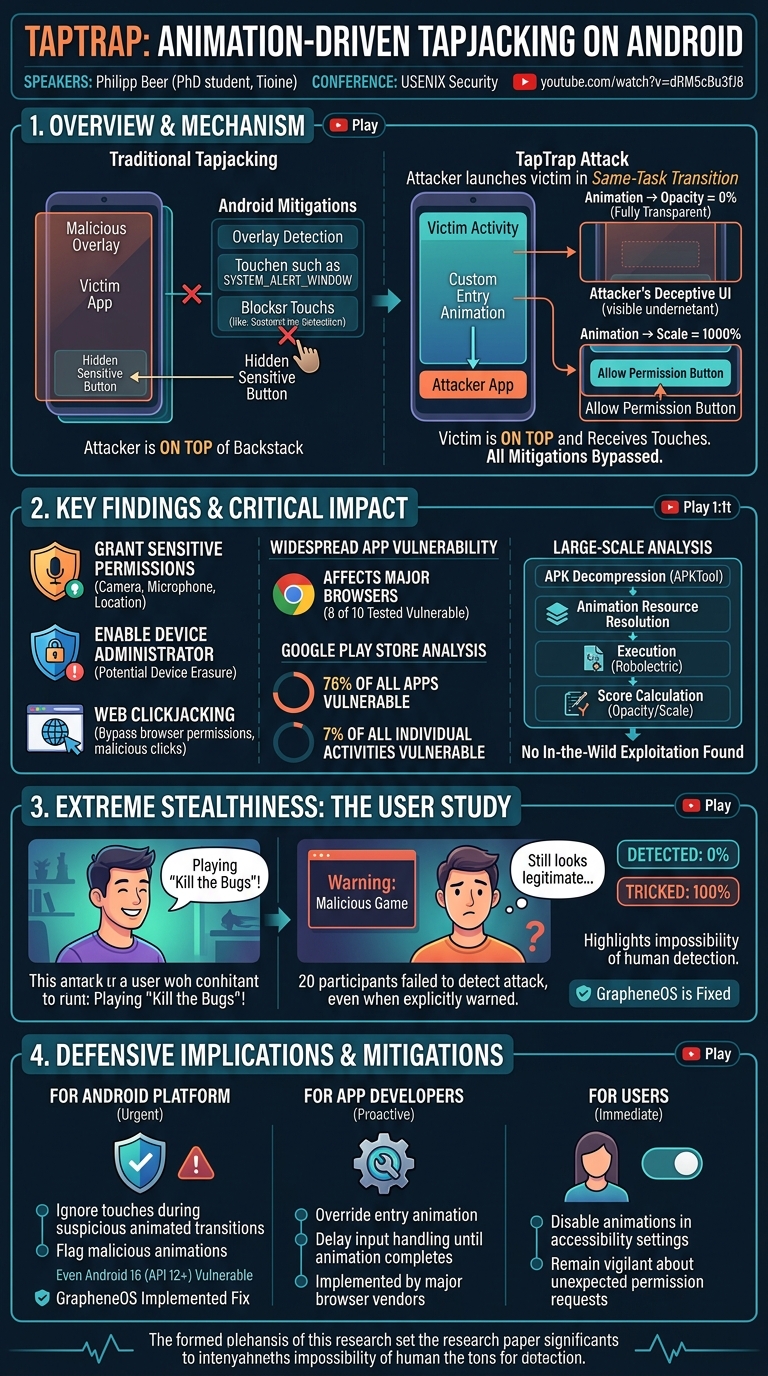
This talk introduces TapTrap, a novel and highly stealthy tapjacking attack vector on Android that leverages custom activity entry animations to manipulate user input. Presented by Philipp Beer, a PhD student at Tioine, this research uncovers a fundamental flaw in how Android handles activity transitions, allowing a malicious application to render a victim activity transparent or scaled while it remains at the top of the activity stack and receives all user touches. Unlike traditional tapjacking attacks that rely on visible overlays, TapTrap operates by making the victim activity itself invisible, effectively bypassing existing Android mitigations designed to detect and prevent overlay-based attacks.
Key moments
- 0:00 Introduction and Android activity concepts
- 2:00 How previous tapjacking attacks worked and mitigations
- 3:44 Introducing TapTrap's novel animation-driven approach
- 4:30 Demonstrating custom entry animation for transparency
- 5:59 TapTrap animation properties: opacity, scaling, duration
- 6:26 Implications: attacking system apps, permissions, browsers
- 7:58 Large-scale analysis of third-party app vulnerabilities
- 8:40 Key findings: 76% of apps vulnerable to TapTrap
TapTrap: Animation-Driven Tapjacking on Android
Speakers: Philipp Beer, PhD student, Tioine
Conference: USENIX Security
YouTube: https://www.youtube.com/watch?v=dRM5cBu3fJ8
Overview
This talk introduces TapTrap, a novel and highly stealthy tapjacking attack vector on Android that leverages custom activity entry animations to manipulate user input. Presented by Philipp Beer, a PhD student at Tioine, this research uncovers a fundamental flaw in how Android handles activity transitions, allowing a malicious application to render a victim activity transparent or scaled while it remains at the top of the activity stack and receives all user touches. Unlike traditional tapjacking attacks that rely on visible overlays, TapTrap operates by making the victim activity itself invisible, effectively bypassing existing Android mitigations designed to detect and prevent overlay-based attacks.
The significance of TapTrap lies in its ability to compromise critical user actions without any visible indication to the user. The attack can coerce users into granting sensitive runtime permissions (like camera or microphone access), enabling device administrator privileges (potentially leading to device erasure), and performing unintended actions within web browsers or third-party applications. The research highlights that a substantial number of Android apps and even major browsers are vulnerable, underscoring a widespread security concern that remains unaddressed in recent Android versions, emphasizing the urgent need for platform-level and developer-specific countermeasures.
Background
▶ Watch: Introduction and Android activity concepts (0:00)
To understand TapTrap, it's essential to first grasp fundamental Android activity management and the history of tapjacking attacks. An Android application typically consists of multiple activities, each representing a single screen in the user interface. For instance, a contacts app might have a "People Activity" to display contact information and an "Editor Activity" to modify it. Activities are launched using intents, which are messages passed between components. The Android system handles these intents, launching the target activity. Activities are arranged in a backstack, where the topmost activity usually receives user input. Related activities can also be grouped into a task, which appears as a single entry in the recent apps list.
Previous tapjacking attacks primarily exploited the ability of a malicious app to draw an overlay over a victim app. These overlays would typically be made partially or fully transparent, with a deceptive UI element (e.g., a "Click Me" button) positioned directly over a sensitive button in the underlying victim app (e.g., a "Don't Click Me" button). The malicious app would then configure its overlay activity to "pass through" touches to the underlying layer, tricking the user into interacting with the hidden sensitive element. Android introduced several mitigations against these overlay-based attacks:
- SYSTEM_ALERT_WINDOW permission: Required for apps to draw over others, with corresponding notifications to inform the user.
- Overlay detection: APIs allowing victim apps to detect if an overlay is present and block touches.
- Default blocking of pass-through touches: Introduced years ago to prevent touches from automatically reaching underlying layers in most scenarios.
Crucially, all these prior mitigations operate under the assumption that the malicious app's overlay is on top of the backstack, obscuring a victim app that is beneath it. TapTrap fundamentally challenges this assumption by manipulating the victim activity itself.
Key Findings
▶ Watch: Introducing TapTrap's novel animation-driven approach (3:44)
The research on TapTrap revealed several critical findings concerning its mechanism, impact, and stealth:
- Novel Attack Vector: TapTrap exploits a vulnerability in Android's handling of same-task transitions and custom entry animations. When an attacker app launches a victim activity within the same task, it can supply a custom entry animation that makes the victim activity transparent or scales it dramatically. This allows the attacker's underlying activity to be visible while the victim activity is technically on top of the backstack and receiving user input.
- Bypass of Existing Mitigations: Because the victim activity itself is on top and rendered transparent, rather than being obscured by a malicious overlay, all previous Android mitigations against tapjacking are rendered ineffective. The system believes the topmost activity is legitimate and visible, while the user perceives the underlying attacker-controlled UI.
- Widespread Impact on System Apps and Dialogs: TapTrap can be used to trick users into granting highly sensitive runtime permissions (e.g., camera, microphone, location) and even the device administrator permission, which could lead to full device erasure. This affects core Android system dialogues and permissions requests.
- Vulnerability in Major Browsers: An analysis of 10 major Android browsers revealed that 8 of them were vulnerable to TapTrap, enabling web permission bypass attacks and web clickjacking (e.g., tricking users into clicking a "Pay Now" button on a shopping site loaded in a Chrome Custom Tab).
- High Vulnerability Rate in Third-Party Apps: A large-scale analysis of approximately 100,000 apps from the Google Play Store found that a staggering 76% of all apps contained at least one activity vulnerable to TapTrap. Furthermore, 7% of all individual activities analyzed were susceptible.
- No In-the-Wild Exploitation (Yet): The analysis of 100,000 apps for existing malicious animations revealed no evidence of TapTrap being actively exploited in the wild at the time of the study. While some apps had animations with high opacity or scale scores, manual analysis confirmed they were benign.
- Extreme Stealthiness: A user study involving 20 participants demonstrated TapTrap's exceptional stealth. None of the participants detected the attack, even after being explicitly warned that the game they were playing was malicious and designed to trick them into granting permissions. This highlights the difficulty users face in recognizing such an animation-driven manipulation.
- Persistence of Vulnerability: As of the presentation, even the newest Android version, Android 16, remained vulnerable to TapTrap. However, the custom Android ROM GrapheneOS had already implemented a fix, demonstrating that a platform-level solution is feasible.
Technical Deep Dive
▶ Watch: TapTrap animation properties: opacity, scaling, duration (5:59)
The core of the TapTrap vulnerability lies in the interplay between Android's activity lifecycle, task management, and animation capabilities. When an app launches another activity, it typically does so via an Intent. If this new activity is launched within the same task as the launching activity (a common default behavior), Android allows the launching activity to specify a custom entry animation for the incoming activity. This is the critical attack vector.
An attacker app, without requiring any special permissions, can launch a victim activity (e.g., a browser loading an attacker-controlled website that requests a sensitive permission). During this same-task transition, the attacker specifies a custom entry animation. This animation is fully controlled by the attacker and can manipulate two key properties of the incoming victim activity:
- Opacity: The animation can make the victim activity completely transparent. This means the victim activity is technically on top of the backstack, but visually, the user sees the underlying attacker activity.
- Scaling: The animation can also scale the victim activity. For instance, an attacker could zoom into a specific sensitive UI element, like an "Allow" button, until it occupies the entire screen. This eliminates the need for precise tap timing or positioning, as any touch on the screen would register as a tap on the targeted button.
The animation can last for up to 6 seconds, and the attacker can repeat the attack by relaunching the activity, providing a sustained window for manipulation. The critical aspect is that because the victim activity is legitimately at the top of the backstack, it receives all user touches, and Android's existing overlay detection and blocking mechanisms are never triggered, as there's no "overlay" in the traditional sense.
To assess the impact on third-party apps, the researchers developed a rigorous analysis methodology:
- Vulnerability Criteria: An activity was deemed vulnerable if it met four conditions:
- Externally launchable: It could be launched by another app.
- Same-task launchable: It could be launched within the same task as the attacker's activity. These first two were checked via simple manifest analysis.
- Does not override custom entry animation: If an activity explicitly overrides the entry animation, it would ignore the attacker's custom animation.
- Does not wait for entry animation to finish: If an activity waits for its animation to complete before processing input, it could mitigate the attack. The last two criteria required bytecode analysis to inspect the app's compiled code.
- Large-Scale Analysis for In-the-Wild Exploitation: To determine if TapTrap was already being used, the team analyzed 100,000 apps from the Play Store. This involved:
- Decompression: Using APKTool to decompress each APK and extract its resources, including XML animation files.
- Reference Resolution: Resolving any internal references within these resource files.
- Animation Object Recreation: Recreating the Android
Animationobjects based on the XML definitions. - Animation Execution: Running these animations in a controlled environment using Robolectric, a testing framework that simulates Android environments without needing a device.
- Property Capture: Capturing the
opacityandtransformation matrixof the animated activity over time. - Score Calculation: Calculating an opacity score and a scale score (both ranging from 0 to 100) to quantify an animation's potential for abuse. A low opacity sustained over a long duration would result in a high opacity score, indicating greater potential for tapjacking.
A notable technical finding during this analysis was a bug in Android's animation duration limit implementation, allowing animations to exceed the theoretical 3-second maximum. While not essential for TapTrap, this bug extends the attack window, making the attack easier to execute.
Demo / Proof of Concept
▶ Watch: Implications: attacking system apps, permissions, browsers (6:26)
While the talk itself did not feature a live, interactive demo, the speaker vividly described several proof-of-concept scenarios and detailed a user study that served as a compelling demonstration of the attack's efficacy and stealth.
The core of the demonstration revolved around tricking users into granting sensitive permissions. For example, an attacker app could launch a victim browser activity (e.g., Chrome Custom Tab) that immediately requests a sensitive permission like camera access. Using TapTrap, the attacker's custom entry animation would render the browser activity completely transparent, making the underlying attacker app visible. The user would then see a deceptive UI from the attacker app, while their taps would actually be directed to the invisible "Allow" button of the legitimate camera permission dialog.
Specific examples highlighted included:
- Camera Permission Bypass: As described above, leading to unauthorized access to the device camera.
- Location Permission Bypass: Similar to camera, enabling an attacker to access the user's precise location.
- Device Administrator Privilege Grant: This is particularly critical, as granting device administrator permissions can allow a malicious app to perform actions like factory reset, change screen lock password, or disable security features, potentially leading to device erasure.
The most compelling "proof of concept" was the user study conducted with 20 participants. The participants played a game called "Kill the Bugs" across three levels. In each level, TapTrap was employed for a different malicious purpose:
- Level 1: Opened a Chrome Custom Tab requesting location permission.
- Level 2: Opened a Chrome Custom Tab requesting camera permission.
- Level 3: Lured users into granting the device administrator permission.
Participants played the game twice. In the first round, they were unaware of the true objective. Before the second round, they were debriefed and informed that the game was malicious and attempting to trick them. Despite this explicit warning, all 20 participants failed to detect the TapTrap attack in both rounds. This robustly demonstrated that TapTrap is not merely a theoretical vulnerability but a highly effective and imperceptible attack vector in real-world user interactions. The researchers also provide a demonstration video on their website, tap.click, for further visual evidence.
Defensive Implications
▶ Watch: Key findings: 76% of apps vulnerable to TapTrap (8:40)
Addressing TapTrap requires a multi-pronged approach involving platform-level fixes, app-developer best practices, and user awareness.
1. Android System-Level Mitigations:
The most effective long-term solution lies with the Android platform itself. The researchers propose that Android could implement a strategy to:
- Ignore touches during activity transitions: Specifically, if the incoming activity's opacity is below a certain threshold (e.g., semi-transparent or fully transparent) or its scaling is above a certain threshold (e.g., zoomed in excessively), touches should be temporarily ignored or redirected.
- Flag suspicious animations: The system could analyze custom entry animations for malicious properties (e.g., making the activity transparent for an extended period) and disallow them or warn the user.
Unfortunately, as of the talk, even Android 16 (referring to Android 12, likely a typo in the transcript at 13:30, as Android 12 was the latest stable release around USENIX Security '21) remained vulnerable. However, the custom Android ROM GrapheneOS has already implemented a fix, demonstrating the feasibility of a platform-level solution. This highlights that Google could, and should, integrate similar protections into stock Android.
2. App Developer Mitigations:
While waiting for platform-level fixes, app developers can take proactive steps to protect their applications:
- Override the entry animation: Developers can explicitly override the default entry animation for sensitive activities. If an activity defines its own custom entry animation, it will ignore any animation passed in by the launching intent, thereby neutralizing the TapTrap attack.
- Wait for entry animation to finish: For activities that handle sensitive user input, developers can implement a delay, ensuring that user input is not processed until the entry animation has fully completed. This prevents touches from being registered during the manipulated animation phase.
The researchers reported the issue to major browser vendors, and these vendors subsequently implemented strategies to protect against TapTrap, showcasing that app-level fixes are effective and achievable.
3. User-Level Mitigations:
Until platform-level fixes are widely available, users have limited but important options:
- Disable animations in accessibility settings: Android provides an option in its accessibility settings to "Remove animations" or "Animation duration scale" (Developer Options). Disabling or reducing animation scales can prevent custom entry animations from fully executing, effectively neutralizing TapTrap. This is a general mitigation that might affect the overall user experience but provides immediate protection.
- Be vigilant about permissions: Users should always be cautious when an app requests sensitive permissions, even if the UI appears to be from a legitimate app. If something feels off, or a permission request appears unexpectedly, it's wise to deny it. However, the user study clearly shows the difficulty of this given TapTrap's stealth.
Key Takeaways
- TapTrap is a novel and highly stealthy tapjacking attack on Android, leveraging custom entry animations during same-task activity transitions to render victim activities transparent or scaled.
- It completely bypasses existing Android mitigations against tapjacking, which are designed for visible overlays, because the victim activity itself is on top of the backstack and receives touches.
- The attack has widespread impact, capable of coercing users into granting sensitive runtime permissions (camera, location), enabling device administrator privileges (leading to device erasure), and performing web clickjacking on 8 out of 10 major Android browsers.
- A large-scale analysis revealed 76% of all apps from the Play Store are vulnerable, indicating a significant ecosystem-wide security issue, although no in-the-wild exploitation was detected at the time of the study.
- User studies confirm TapTrap's extreme stealth, with all participants failing to detect the attack even after being explicitly warned about its malicious nature.
- Mitigations are possible at platform, app, and user levels: Android needs to ignore touches during suspicious animated transitions (as GrapheneOS has done), app developers should override entry animations or delay input handling, and users can disable animations in accessibility settings.
About the Speaker(s)
The primary speaker for this presentation was Philipp Beer, who is a PhD student at Tioine. He presented this work as a joint effort with his collaborators, Marcos Gina, Sebastian Dro, and Martina Lindafa. Their collective research focuses on mobile security, particularly identifying and analyzing novel attack vectors within the Android ecosystem.
Reviews
Dr. Zero (Offensive Security Researcher) — STRONG ACCEPT
Solid, original mobile security research that identifies a genuinely novel bypass of Android's entire tapjacking mitigation architecture. The attack surface — custom entry animations in same-task transitions — is specific, technically grounded, and the 76% Play Store exposure rate with a confirmed user study where even warned participants couldn't detect the attack makes this real, not theoretical.
Heather Calloway (CISO) — WEAK
Technically solid research that credibly demonstrates a real bypass of Android's tapjacking mitigations — 76% of Play Store apps vulnerable, all major browsers affected, zero detection in user studies. But this is PhD mobile security research delivered to a technical audience, with no meaningful bridge to the people who actually need to act on it.
→ Top-rated talks at 34th USENIX Security Symposium (USENIX Security '25)
All talks from 34th USENIX Security Symposium (USENIX Security '25)