SquarePhish 2.0 - Nevada Romsdahl & Kam Talebzadeh
Nevada Romsdahl (Senior Security Researcher · CrowdStrike), Kam Talebzadeh (Security Researcher and Red Teamer · CrowdStrike)
Disobey 2026 · Main Stage
Overview
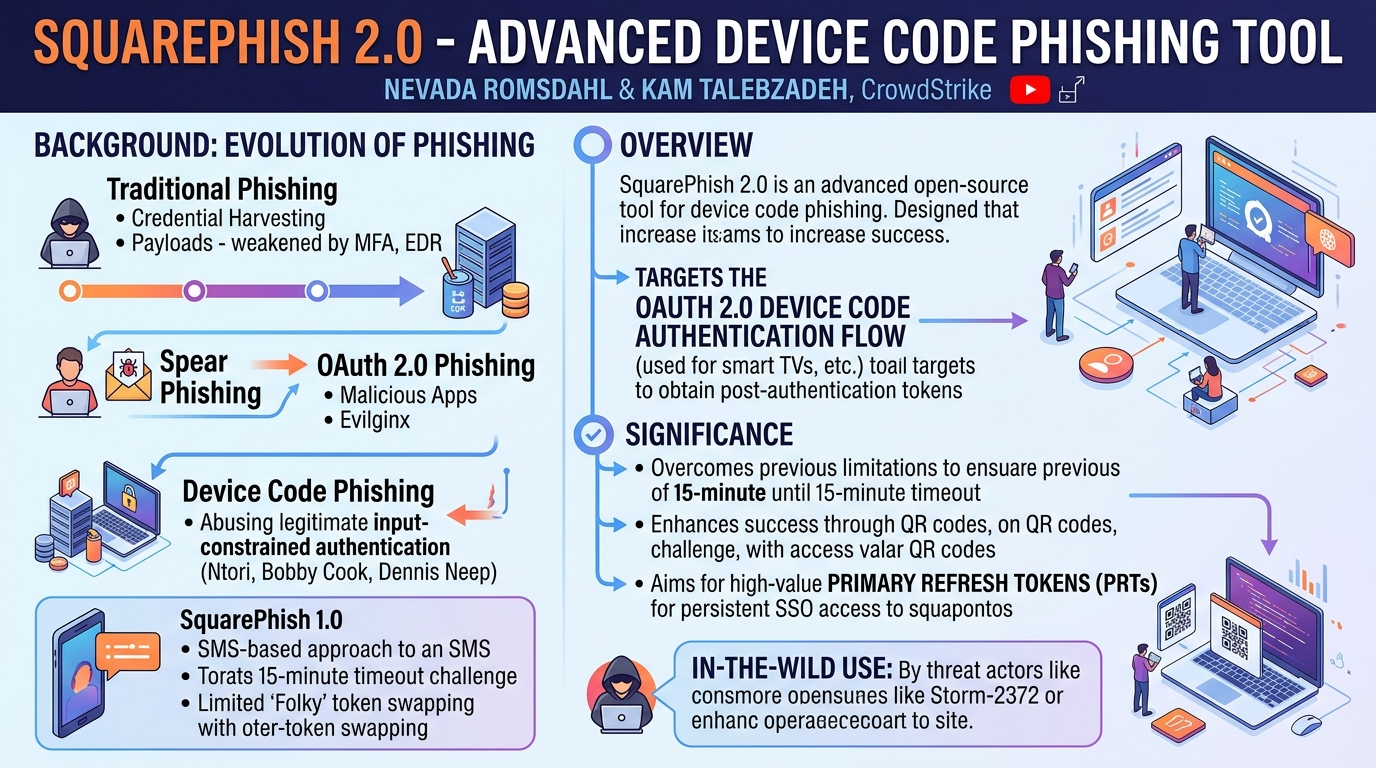
In this Disobey conference talk, CrowdStrike security researchers Nevada Romsdahl and Kam Talebzadeh unveiled SquarePhish 2.0, an advanced open-source tool designed to streamline and enhance device code phishing attacks. The presentation delved into the evolution of phishing techniques, highlighting how traditional credential harvesting and payload delivery have become less effective against modern defenses like Multi-Factor Authentication (MFA) and Endpoint Detection and Response (EDR). SquarePhish 2.0 specifically targets the OAuth 2.0 device code authentication flow, a legitimate mechanism used for logging into devices like smart TVs or gaming consoles, to obtain post-authentication tokens.
Key moments
- 1:35 Evolution of phishing and introduction to device code fishing
- 2:15 Explanation of OAUTH 2.0 device code authentication flow
- 3:05 Legitimate device code uses and prior art in fishing
- 4:20 Advantages and challenges of device code for phishing
- 5:15 How QR codes are utilized to bypass security controls
- 6:00 Detailed walkthrough of the SquarePhish 2.0 attack flow
- 7:35 Expanding access post-phishing using Family of Client IDs (FOCI)
SquarePhish 2.0 - Nevada Romsdahl & Kam Talebzadeh
Speakers: Nevada Romsdahl, Senior Security Researcher, CrowdStrike; Kam Talebzadeh, Security Researcher and Red Teamer, CrowdStrike
Conference: Disobey
YouTube: https://www.youtube.com/watch?v=KHUKtaqUrBo
Overview
In this Disobey conference talk, CrowdStrike security researchers Nevada Romsdahl and Kam Talebzadeh unveiled SquarePhish 2.0, an advanced open-source tool designed to streamline and enhance device code phishing attacks. The presentation delved into the evolution of phishing techniques, highlighting how traditional credential harvesting and payload delivery have become less effective against modern defenses like Multi-Factor Authentication (MFA) and Endpoint Detection and Response (EDR). SquarePhish 2.0 specifically targets the OAuth 2.0 device code authentication flow, a legitimate mechanism used for logging into devices like smart TVs or gaming consoles, to obtain post-authentication tokens.
The significance of SquarePhish 2.0 lies in its ability to overcome critical limitations of earlier device code phishing methods, notably the restrictive 15-minute timeout window and the difficulty of obtaining consent for SMS-based attacks in legitimate engagements. By leveraging a sophisticated, multi-stage phishing process involving QR codes and carefully timed interactions, the tool significantly increases the success rate of acquiring highly valuable Primary Refresh Tokens (PRTs). These tokens grant attackers persistent single sign-on (SSO) access across an organization's cloud applications, making SquarePhish 2.0 a potent threat in the hands of sophisticated adversaries, as evidenced by its observed use in the wild by threat actors like Storm-2372.
Background
▶ Watch: Evolution of phishing and introduction to device code fishing (1:35)
The landscape of phishing has continuously evolved, adapting to enhanced security measures. Early phishing campaigns often relied on straightforward credential harvesting or distributing malicious payloads, but the widespread adoption of MFA and advanced EDR solutions has rendered these methods less effective. Spear phishing remains a potent tactic, but attackers constantly seek new avenues to bypass modern defenses. One such avenue is OAuth 2.0 phishing, which initially involved registering malicious OAuth applications and tricking users into consenting to them. More recently, techniques like Evilginx or Modlishka (invisible proxies) emerged to capture credentials and session tokens in real-time.
Device code phishing represents a further evolution in this space. The OAuth 2.0 device code flow is a legitimate authentication mechanism designed for input-constrained devices. A device displays a short code, which the user then enters on a separate, more capable device (like a phone or computer) to complete authentication. This process typically involves navigating to a legitimate Microsoft or identity provider URL (e.g., login.microsoft.com/devicecode), entering the code, and consenting to the application. The initial public disclosure of this technique came from Ntori Dr. Azure, with subsequent popularization by Bobby Cook's blog. Dennis Neep also contributed a "novel technique" that automates the device code entry.
SquarePhish 1.0 was an early attempt by Romsdahl and Talebzadeh to leverage device code phishing. It focused on SMS-based delivery due to the critical 15-minute timeout imposed by the device code flow, requiring an immediate user response. However, practical experience showed that obtaining consent for SMS phishing in legitimate red team engagements was challenging. Furthermore, SquarePhish 1.0 relied heavily on the Family of Client IDs (Folky) concept, which allowed swapping tokens for different applications but didn't directly target Single Sign-On (SSO) cookies or Primary Refresh Tokens (PRTs). This limitation meant that while tokens could be obtained, gaining full, persistent browser-based SSO access was not straightforward. The need for a more robust, persistent, and user-friendly approach led to the development of SquarePhish 2.0, addressing the 15-minute window, the SMS consent problem, and the desire for direct SSO access.
Key Findings
▶ Watch: Legitimate device code uses and prior art in fishing (3:05)
SquarePhish 2.0 introduces several significant advancements that collectively enhance the efficacy and stealth of device code phishing campaigns, directly addressing the limitations of prior techniques and SquarePhish 1.0. The core findings and contributions are:
- Bypassing the 15-Minute Timeout Window: SquarePhish 2.0 ingeniously sidesteps the restrictive 15-minute device code expiration. It achieves this by sending an initial, non-expiring email containing a QR code. This QR code, when scanned by the user's phone, acts as a trigger, initiating the device code authentication process on the SquarePhish server only after the user has already engaged with the email. This ensures the 15-minute window begins precisely when the user is primed to receive and use the device code, significantly increasing the chances of successful token acquisition.
- Acquisition of Primary Refresh Tokens (PRTs) for Single Sign-On (SSO): A pivotal improvement is SquarePhish 2.0's default targeting of the Microsoft Authentication Broker client ID. This specific client ID, as researched by Durkan Mima, is crucial for obtaining a Primary Refresh Token (PRT). PRTs are highly powerful refresh tokens securely stored on a device, enabling persistent SSO across browser sessions and applications without requiring re-authentication. This elevates the impact of a successful phish from limited application access to comprehensive, device-level SSO compromise.
- Automated Device Registration and PRT Generation: Complementing the PRT acquisition, SquarePhish 2.0 automates the device registration process required to convert a standard refresh token into a PRT. This is facilitated by a companion script,
gimme prt, which handles the creation of necessary device certificates and the registration with Azure AD, leveraging existing libraries from Durkan. This automation simplifies a complex post-exploitation step for attackers.
- Graphical User Interface (GUI) and Golang Rewrite: SquarePhish 2.0 transitions from a Python-based, CLI-only tool to a full-fledged web portal built in Golang. This provides a more standardized, cleaner, and user-friendly experience for managing phishing campaigns, tracking email sends, QR code scans, and captured credentials through a dashboard. The unified interface streamlines setup and operation compared to the "archaic" configuration of SquarePhish 1.0.
- "Auto-Off URL" (Dennis Neep's Novel Technique): The tool incorporates Dennis Neep's innovative technique, which automates the entry of the device code on the user's behalf. For federated users, clicking a specially crafted link directly redirects them to the consent page without requiring manual code input. While Microsoft patched the original method, Dennis released new code that maintains functionality for federated users, and SquarePhish 2.0 includes a branch with this updated patch.
- ASCII QR Code Option: To bypass security controls that scan embedded image QR codes for malicious URLs, SquarePhish 2.0 offers an ASCII QR code option. This renders the QR code using ASCII characters within the email's HTML, making it less susceptible to automated scanning by some email providers.
Technical Deep Dive
▶ Watch: Advantages and challenges of device code for phishing (4:20)
The technical underpinnings of SquarePhish 2.0 represent a sophisticated blend of social engineering and OAuth 2.0 protocol manipulation, designed to overcome common defensive measures and achieve deep compromise.
Device Code Authentication Flow
The OAuth 2.0 device code flow is a standard for authenticating applications on devices with limited input capabilities (e.g., smart TVs). The legitimate process involves:
- The device requests a user code from the authorization server.
- The device displays this code and a verification URI (e.g.,
microsoft.com/devicecode) to the user. - The user navigates to the verification URI on a separate, input-capable device (e.g., phone, computer).
- The user enters the provided code.
- The user authenticates with their credentials (and MFA, if applicable) and grants consent to the requesting application.
- Upon successful authentication and consent, the device receives an access token and a refresh token. The access token grants immediate access to resources, while the refresh token allows the device to obtain new access tokens without re-prompting the user.
SquarePhish 1.0 Workflow
SquarePhish 1.0 laid the groundwork for the current iteration. Its workflow was designed to mitigate the 15-minute device code timeout:
- Initial Email: An email is sent to the target, containing a QR code. Crucially, this email does not immediately initiate the device code flow, so it does not expire. The QR code's URL points back to the SquarePhish server, acting as a trigger.
- QR Code Scan: When the user scans the QR code from their mobile device, the SquarePhish server logs this interaction.
- Invisible Redirect: The user's phone is invisibly redirected to a legitimate Microsoft device code login page (e.g.,
login.microsoft.com/devicecode). The truncation of domain names on mobile displays helps hide any subtle malicious subdomains. - Device Code Initiation: Only after the user interacts by scanning the QR code does the SquarePhish server initiate the legitimate device code authentication process with Microsoft.
- Second Email: The SquarePhish server then sends a second email to the user, containing the actual device code and instructions to enter it on the Microsoft login page. This email arrives when the user is already engaged, reducing the likelihood of the 15-minute timeout expiring.
- User Authentication & Consent: The user enters the device code on the legitimate Microsoft site, authenticates (potentially via SSO if already logged in, bypassing password/MFA entry), and consents to the application (often the legitimate Microsoft Authentication Broker Client).
- Token Capture: Upon consent, the SquarePhish server receives the user's refresh token.
For post-exploitation, SquarePhish 1.0 leveraged Folky (Family of Client IDs), a technique to swap a captured refresh token for access tokens targeting different applications within the same identity provider ecosystem. The companion tool, Refresh, facilitated this token swapping and enabled basic post-exploitation actions like email searching or accessing OneDrive/SharePoint. However, SquarePhish 1.0 did not directly provide a path to Primary Refresh Tokens (PRTs) or full browser-based SSO.
SquarePhish 2.0 Enhancements
The evolution to SquarePhish 2.0 brought substantial changes, primarily driven by the desire for PRT acquisition and a more robust operational framework:
Golang Rewrite and GUI
The entire codebase was migrated from Python to Golang, enhancing performance, concurrency, and maintainability. A web-based Graphical User Interface (GUI) was developed, offering a centralized portal for managing phishing campaigns. This portal includes:
- A dashboard to monitor sent emails, scanned QR codes, and captured tokens.
- Configuration settings for the SquarePhish server, SMTP, and email templates.
- A dedicated page for sending emails, allowing selection of targets, email templates, and QR code options (embedded image, ASCII QR code, or direct URL link).
- Advanced settings for features like the "auto-off URL."
Primary Refresh Token (PRT) Acquisition
Inspired by research from Durkan Mima, SquarePhish 2.0's default client ID for device code flow is the Microsoft Authentication Broker client ID. This is critical because obtaining a refresh token for this specific client ID allows for its subsequent conversion into a Primary Refresh Token (PRT).
- A PRT is a highly privileged refresh token, stored securely on a device, that enables persistent Single Sign-On (SSO) across applications and browser sessions. It effectively makes the compromised device appear as a trusted, enrolled device to Azure AD.
- The
gimme prtscript (written by Cam Talebzadeh, leveraging Durkan's Python libraries) takes the initially captured refresh token, performs device registration with Azure AD, and generates necessary device certificates. This process culminates in the acquisition of the PRT, typically stored in a.txtfile.
"Auto-Off URL" (Dennis Neep Technique)
SquarePhish 2.0 integrates Dennis Neep's "novel technique" for automating device code entry. Instead of requiring the user to manually type the device code:
- The SquarePhish server initiates the device code flow and obtains the code.
- It then crafts a special URL that includes the device code as a parameter.
- When a federated user clicks this "auto-off URL," the device code is automatically submitted on their behalf.
- The user is then directly redirected to the consent page, streamlining the process and reducing user interaction points.
While Microsoft initially patched this technique, Dennis Neep released updated code that maintains its functionality for federated users, and SquarePhish 2.0 includes a branch with this patch.
ASCII QR Code
To counter email security solutions that scan embedded image QR codes for malicious URLs, SquarePhish 2.0 offers an ASCII QR code option. This renders the QR code using ASCII characters directly within the HTML body of the email. While not foolproof, it can sometimes bypass automated URL scanning, as the QR code isn't a traditional image file that can be easily parsed for embedded links.
The combination of these technical advancements makes SquarePhish 2.0 a powerful and adaptable tool for sophisticated phishing operations, particularly in environments leveraging Azure AD and Microsoft 365.
Demo / Proof of Concept
▶ Watch: Detailed walkthrough of the SquarePhish 2.0 attack flow (6:00)
The talk included a comprehensive video demonstration of SquarePhish 2.0 in action, showcasing both its core functionality and advanced features like PRT acquisition and the "auto-off URL" technique. The demo environment consisted of a victim's email inbox on the left and the SquarePhish 2.0 web portal on the right.
The demonstration began by configuring the SquarePhish portal:
- SMTP Server Setup: Details for the SMTP server were entered, as it's required for sending both the initial and follow-up emails.
- Email Template Configuration: HTML templates for both the follow-up email (containing the device code) and the initial phishing email (containing the QR code) were set up. The speaker highlighted where placeholders for the device code and QR code would be inserted. A preview function allowed verification of the email's appearance.
Next, the actual phishing process was initiated:
- Sending the Initial Email: From the SquarePhish portal, the initial phishing email was sent to the victim. This email, designed not to expire, contained a QR code that linked back to the SquarePhish server as a trigger.
- Victim Interaction: The victim opened the email, which had a pretext like "authentication required." The victim then scanned the QR code with their phone.
- Triggering the Flow: Immediately after the QR code scan, the SquarePhish server initiated the device code authentication process with Microsoft. Simultaneously, the second email, containing the legitimate device code, popped up in the victim's inbox. This demonstrated the successful bypass of the 15-minute timeout window.
- User Authentication: The victim used the provided code to authenticate on the legitimate Microsoft login page. If already signed in, they simply selected their account and consented to the Microsoft Authentication Broker client application.
- Token Capture: As soon as the victim consented, the SquarePhish server captured their refresh token, which appeared on the SquarePhish dashboard.
The demo then moved to post-exploitation, specifically PRT acquisition:
gimme prtScript: The captured refresh token was copied and used as input for thegimme prtscript (a standalone Python script at the time of the talk, but planned for integration into the portal).- Device Registration: The script performed several steps, including registering a device with Azure AD and creating necessary certificates. This process transformed the standard refresh token into a highly potent Primary Refresh Token (PRT). The PRT was saved to a
.txtfile. - SSO with PRT: Durkan Mima's
rotxtool was then used to authenticate a browser session using the newly acquired PRT. The commandrotx browser prttt off office.com -p <prt_file.txt>launched a browser that was automatically signed intooffice.comwith the victim's account, demonstrating full single sign-on access across all associated applications.
Finally, the "auto-off URL" technique was briefly demonstrated:
- Auto URL Option: Within the SquarePhish portal, the "auto URL" option was selected. For simplicity, a direct URL link was chosen instead of a QR code for this specific demo.
- Victim Clicks Link: The victim received an email with the auto-off URL. When clicked, the link automatically submitted the device code on the victim's behalf, showing a brief pause as the page loaded and processed the code.
- Direct Consent: The victim was then redirected directly to the consent page. If already signed in, they simply clicked their name and consented to the app, resulting in token acquisition on the attacker's side. This highlighted how the technique further reduces user friction for federated users.
The demo effectively illustrated the end-to-end capabilities of SquarePhish 2.0, from initial compromise to persistent SSO access, and the innovative methods employed to achieve it.
Defensive Implications
▶ Watch: Expanding access post-phishing using Family of Client IDs (FOCI) (7:35)
The capabilities demonstrated by SquarePhish 2.0 underscore the need for robust detection and prevention strategies against advanced phishing techniques targeting OAuth 2.0 device code flows. Defenders should focus on monitoring for anomalies in authentication patterns and implementing strict conditional access policies.
- Monitor for Authentication Broker Client ID with Device Code Flow: The most critical detection point is monitoring for the use of the Microsoft Authentication Broker client ID in conjunction with device code authentication in identity provider logs (e.g., Azure AD logs). While legitimate uses exist, they are often confined to specific user groups or devices.
- Utilize KQL (Kusto Query Language) or CrowdStrike Query Language to search for these specific events. For example, queries looking for
AuthenticationMethodequalsDeviceCodeandClientAppIdmatching the Microsoft Authentication Broker ID. - Establish an allow list for users or devices that legitimately use this flow. Any activity outside this allow list should trigger high-priority alerts.
- Broad Device Code Flow Monitoring: Expand monitoring to include any instance of device code flow authentication, regardless of the client ID.
- Most corporate users should not be regularly using device code flow for day-to-day operations.
- Again, use KQL or CrowdStrike Query Language to identify all instances of
AuthenticationMethodequalsDeviceCode. This provides a broader baseline for unusual activity.
- Implement Conditional Access Policies (CAPs): Azure AD Conditional Access Policies are powerful tools for preventing device code phishing:
- Block Device Code Flow: The most direct prevention is to create a CAP that explicitly blocks the device code flow for all users, or for all users except a tightly controlled allow list. This can be configured to block access to specific cloud apps or all cloud apps when the authentication method is device code.
- Limit Access by Location/Trusted IDs: Restrict access to specific locations (e.g., corporate networks, VPNs) or require authentication from trusted IP ranges. This can mitigate attacks originating from outside the corporate perimeter.
- Require Compliant or Hybrid Azure AD Joined Devices: Enforcing that devices must be compliant with organizational policies or hybrid Azure AD joined can prevent PRT acquisition on attacker-controlled, unmanaged devices. This helps ensure that even if a refresh token is obtained, its conversion to a PRT might be blocked or flagged due to device non-compliance.
- Impossible Travel Alerts: Configure alerts for impossible travel scenarios, where an authentication event occurs in one geographic location, and a subsequent token use (or PRT acquisition/use) occurs in a geographically distant location within an impossibly short timeframe.
- User Education: While technical controls are paramount, continuous user education about the risks of phishing, suspicious QR codes, and the importance of verifying authentication requests remains a foundational defense. Users should be trained to be suspicious of unexpected authentication prompts, especially those asking for device codes.
By combining stringent logging and monitoring with carefully crafted Conditional Access Policies, organizations can significantly reduce their attack surface against advanced device code phishing techniques like SquarePhish 2.0.
Key Takeaways
- Device code phishing is a modern, effective technique that bypasses traditional MFA by leveraging legitimate OAuth 2.0 flows.
- SquarePhish 2.0 overcomes the 15-minute timeout by initiating the device code flow only after user interaction via a QR code, significantly increasing success rates.
- The tool's primary goal is to acquire Primary Refresh Tokens (PRTs) by targeting the Microsoft Authentication Broker client ID, granting persistent Single Sign-On (SSO) access.
- Automation of device registration and PRT acquisition (via
gimme prt) streamlines post-exploitation for attackers. - The "auto-off URL" technique for federated users further reduces friction by automating device code entry, though its effectiveness may vary due to patches.
- Defenders must monitor for device code authentication events, especially those involving the Microsoft Authentication Broker client ID, and implement Conditional Access Policies to block or restrict this flow.
About the Speaker(s)
Nevada Romsdahl is a Senior Security Researcher at CrowdStrike. Drawing on his Nordic heritage (with family roots in Norway and Sweden, and personal ties to Minnesota's Scandinavian communities), Nevada brings a unique perspective to security research. His work often involves offensive security techniques, as demonstrated by his contributions to tools like SquarePhish.
Kam Talebzadeh is a Security Researcher and Red Teamer for CrowdStrike. With a focus on offensive security, Cam has developed several open-source tools. He played a key role in the development of SquarePhish 2.0, particularly in implementing the new Golang-based GUI and streamlining the overall campaign management.
Reviews
Dr. Zero (Offensive Security Researcher) — STRONG ACCEPT
Solid red team research that moves the device code phishing conversation forward in concrete, measurable ways — PRT acquisition via the Auth Broker client ID is the real payload here, not just the QR code timing trick. The work is original, tooled, demoed live, and already observed in the wild (Storm-2372), which closes the loop from research to reality. Not a 5 because the core OAuth device code abuse isn't new, and the defensive section is competent but thin.
Heather Calloway (CISO) — WEAK
Technically rigorous red team research on device code phishing and PRT acquisition, with real-world threat actor validation via Storm-2372. But the defensive section is a bolt-on, not a throughline — and the talk never addresses the institutional conditions that make this attack viable at scale, leaving security leaders with a detection checklist instead of a decision.