Explain How Kubernetes Works With GPU Like I’m 5 - Carlos Santana, AWS
Carlos Santana, AWS
KubeCon + CloudNativeCon Europe 2025 · Session
Overview
In this KubeCon EU session, Carlos Santana, a Solutions Architect at AWS and a CNCF Ambassador, demystifies the intricate process of integrating Graphics Processing Units (GPUs) with Kubernetes. Titled "Explain How Kubernetes Works With GPU Like I’m 5," the talk targets a novice audience, guiding them through the fundamental building blocks required to run GPU-accelerated workloads, particularly focusing on Large Language Models (LLMs), within a Kubernetes environment. While the speaker's personal journey began with setting up a home lab using affordable hardware like Nvidia Jetson devices and old gaming PCs, the principles and components discussed are universally applicable to cloud-based Kubernetes deployments, such as AWS EKS.
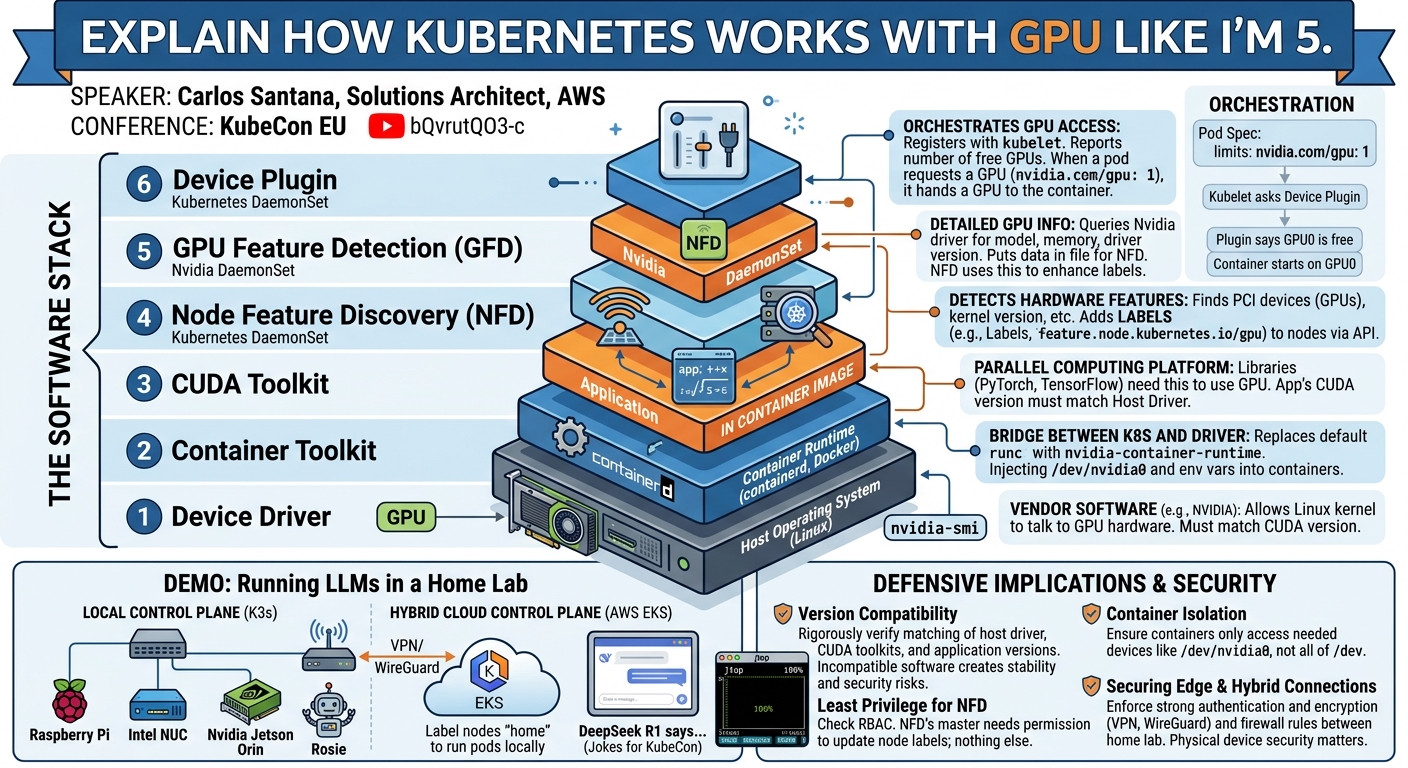
Key moments
- 0:00 Introduction and home lab motivation
- 2:00 Motivation for running GPUs at home for LLMs
- 4:30 Kubernetes-GPU integration components overview
- 6:00 Three main areas: Host OS, CUDA, and Kubernetes
- 7:10 Explaining the device driver and CUDA interaction
Explain How Kubernetes Works With GPU Like I’m 5
Speakers: Carlos Santana, Solutions Architect, AWS
Conference: KubeCon EU
YouTube: https://www.youtube.com/watch?v=bQvrutQO3-c
Overview
In this KubeCon EU session, Carlos Santana, a Solutions Architect at AWS and a CNCF Ambassador, demystifies the intricate process of integrating Graphics Processing Units (GPUs) with Kubernetes. Titled "Explain How Kubernetes Works With GPU Like I’m 5," the talk targets a novice audience, guiding them through the fundamental building blocks required to run GPU-accelerated workloads, particularly focusing on Large Language Models (LLMs), within a Kubernetes environment. While the speaker's personal journey began with setting up a home lab using affordable hardware like Nvidia Jetson devices and old gaming PCs, the principles and components discussed are universally applicable to cloud-based Kubernetes deployments, such as AWS EKS.
The motivation behind this deep dive stems from the high cost of cloud-based GPU resources for experimentation and learning, coupled with the rising interest in local LLM inference. Santana's talk meticulously dissects the "why" and "how" behind each necessary component, moving beyond the common advice of merely executing a helm install command. He emphasizes the importance of understanding the interplay between hardware device drivers, container runtimes, and Kubernetes-specific extensions, providing a foundational knowledge crucial for troubleshooting and optimizing GPU workloads in any setting.
This article provides a detailed technical breakdown of Santana's presentation, outlining the essential software stack from the host operating system level up to Kubernetes orchestration. It serves as a comprehensive guide for anyone looking to leverage GPUs with Kubernetes, whether for personal projects, edge computing, or large-scale cloud deployments, by elucidating the complex interactions that enable efficient GPU resource management.
Background
▶ Watch: Introduction and home lab motivation (0:00)
The surge in interest surrounding Artificial Intelligence (AI), particularly Large Language Models (LLMs) like those powering ChatGPT, has driven many, including seasoned Kubernetes experts, to explore GPU computing. However, the cost associated with running high-end GPUs in cloud environments for learning and experimentation can be prohibitive. Carlos Santana, despite his extensive experience with Kubernetes since 2016 across various cloud providers, found himself facing this challenge when he wanted to experiment with LLMs at home. His wife's aversion to accumulating more cables for new hardware further underscored the need to utilize existing or affordable devices.
Santana's home lab, a collection of Raspberry Pis, NUCs, and old laptops, inspired him to integrate a GPU. Many enthusiasts already possess PCI-based GPU cards in gaming PCs, offering a readily available resource. For his specific project, Santana acquired an Nvidia Jetson development kit, a compact device featuring a System-on-Chip (SoC) GPU, commonly used for manufacturing edge devices. His project, playfully named "Rosie" after the Jetson family robot, aimed to build a smart bot using open-source LLM frameworks like PyTorch and Ollama.
His initial attempts to simply helm install an LLM solution failed, highlighting a common pitfall: abstracting away the underlying complexities often leaves users without the knowledge needed for effective troubleshooting. Embracing Amazon's leadership principle of "learn and be curious," Santana embarked on a mission to understand the fundamental integration points between GPUs and Kubernetes. This pursuit forms the core narrative of his talk, breaking down the often-confusing stack into manageable, understandable components. The talk's "like I'm 5" approach doesn't mean simplifying the technical depth, but rather explaining the why behind each component, a crucial distinction for true comprehension.
Key Findings
▶ Watch: Motivation for running GPUs at home for LLMs (2:00)
Santana's deep dive reveals that successful GPU integration with Kubernetes hinges on a precise understanding and configuration of a multi-layered software stack. The talk systematically identifies and explains five critical components, each playing a distinct role in enabling GPU-accelerated workloads:
- Device Driver: This is the foundational layer, a vendor-specific software installed on the host operating system that allows Linux to communicate directly with the GPU hardware. Compatibility with the CUDA Toolkit is paramount here.
- Container Toolkit: Acting as a shim for container runtimes like
containerdorDocker, this component injects necessary GPU device information and environment variables into containers before they start, allowing them to access the underlying GPU. - CUDA Toolkit: Nvidia's parallel computing platform and programming model. It provides the software interface for applications to leverage the GPU's power. Crucially, the CUDA version within the container image must be compatible with the device driver installed on the host.
- Node Feature Discovery (NFD): An upstream Kubernetes SIG project, NFD runs as a daemon on worker nodes. Its primary role is to detect hardware features, including PCI devices like GPUs, and then label the Kubernetes nodes with this information, making the hardware capabilities discoverable by the scheduler.
- GPU Feature Detection (GFD): This Nvidia-specific component works in conjunction with NFD. It queries the Nvidia device driver for detailed GPU information (e.g., vendor, CUDA capabilities, device driver version) and places this information into a specific directory on the host. NFD then picks up these details and uses them to further enrich node labels.
- Device Plugin: This Kubernetes component, also running on worker nodes, registers with the
kubelet. It's responsible for reporting the number of allocatable GPUs to the Kubernetes API server and, when a pod requests a GPU, handling the actual allocation of the device to that pod. Without it, Kubernetes lacks the ability to schedule and manage GPU resources effectively, leading to all pods having access to all GPUs without proper orchestration.
The central finding is that these components must be installed, configured, and, most importantly, be version-compatible across the entire stack. A mismatch in any layer, particularly between the device driver and the CUDA toolkit, will inevitably lead to failures, a common sticking point for many users. Santana stresses that understanding the interaction and purpose of each piece is far more valuable than simply following generic installation instructions.
Technical Deep Dive
▶ Watch: Kubernetes-GPU integration components overview (4:30)
The integration of GPUs with Kubernetes is a multi-layered challenge, requiring careful coordination between the host operating system, container runtime, and Kubernetes orchestration components. Santana systematically breaks down each layer, explaining its function and interdependencies.
Host Operating System Components
The initial layer of interaction resides directly on the worker node's operating system.
- Device Driver: This is the most fundamental component, provided by the GPU vendor (e.g., Nvidia, AMD). It consists of a kernel-mode driver that allows the Linux kernel to communicate with the physical GPU hardware, and often a user-mode driver that user-space applications can interact with.
- For Nvidia GPUs, this typically includes the CUDA user-mode driver.
- For specialized devices like the Nvidia Jetson line (Nano, Orin), Nvidia provides a pre-configured operating system called Jetpack OS. This OS comes with a specific, compatible device driver and CUDA Toolkit version pre-installed, simplifying initial setup.
- For standard PCs with PCI-based GPUs (like gaming machines), users often need to manually install the appropriate driver. Santana notes that Nvidia offers an operator for this, but for foundational understanding, manual installation is key.
- Version Compatibility: A critical point of failure is mismatching driver versions with other components. Users can check the installed Nvidia driver version using
cat /proc/driver/nvidia/version.
- CUDA Toolkit: While the device driver enables basic hardware communication, the CUDA Toolkit provides the necessary libraries, APIs, and runtime for applications to leverage Nvidia's parallel computing architecture.
- Applications and frameworks like PyTorch, Ollama, Lama.cpp, and VLM are typically compiled with support for specific CUDA versions.
- Crucial Compatibility: The CUDA version that an application expects (often bundled within its container image) must be compatible with the CUDA user-mode driver provided by the host's device driver. Santana highlights online compatibility matrices as essential resources for verifying these relationships. A common error is installing a newer CUDA toolkit in a container that is incompatible with the older host driver.
- Container Toolkit: This component acts as a bridge between the container runtime (e.g.,
containerd,Docker) and the GPU device driver.
- Mechanism: When installed, the container toolkit (e.g., Nvidia Container Toolkit) configures the container runtime (e.g.,
dockerorcontainerd) to use a special runtime shim (e.g.,nvidia-container-runtime). runCHook: This shim intercepts calls torunC(the low-level container runtime). BeforerunCfully starts a container, the Nvidia shim injects information about the available GPUs (e.g., device files like/dev/nvidia0, environment variables likeNVIDIA_VISIBLE_DEVICES) into the container's configuration. This allows the containerized application to "see" and utilize the GPU.- Configuration: This typically involves adding an
nvidiaruntime to thecontainerdordockerconfiguration and potentially setting it as the default. - Pre-Kubernetes Test: Santana strongly advises testing the GPU setup before introducing Kubernetes. If a simple
docker run --runtime nvidia ...command fails, then the problem lies at this lower layer (driver, CUDA, container toolkit) and not with Kubernetes.
Kubernetes Components for GPU Orchestration
Once the host OS and container runtime are correctly configured to expose GPUs to containers, Kubernetes-specific components are needed for intelligent scheduling and resource management. Without these, all pods on a GPU-enabled node would have access to all GPUs, leading to inefficient use and potential resource contention.
- Node Feature Discovery (NFD):
- Purpose: NFD is an open-source project from the Kubernetes SIGs that runs as a DaemonSet on worker nodes. Its primary function is to detect hardware features (like CPU architectures, kernel versions, and PCI devices such as GPUs) and expose them as labels on the Kubernetes nodes.
- Mechanism: NFD scans various system paths and collects information. It then uses a "master" component to apply these labels to the corresponding node objects in the Kubernetes API server. This allows the Kubernetes scheduler to make informed decisions about where to place pods based on their hardware requirements.
- RBAC: NFD's master component requires Role-Based Access Control (RBAC) permissions to update node objects in the API server.
- GPU Feature Detection (GFD):
- Purpose: This is an Nvidia-specific component that complements NFD. GFD specifically queries the Nvidia device driver for detailed information about the installed GPUs.
- Mechanism: GFD extracts granular details such as the GPU vendor, model, CUDA capability, and the exact device driver version. It then writes this information into a predefined directory (e.g.,
/etc/kubernetes/node-feature-discovery/source.d) on the host. NFD, which monitors this directory, then picks up these details and translates them into more specific labels or annotations on the Kubernetes node. - API Server Interaction: Crucially, GFD itself does not directly interact with the Kubernetes API server or require RBAC permissions. It simply populates a local file that NFD consumes.
- Device Plugin:
- Purpose: The Nvidia Device Plugin is a critical component for enabling Kubernetes to manage and allocate GPU resources. It runs as a DaemonSet on GPU-enabled worker nodes.
- Interaction with
kubelet: When the Device Plugin starts, it registers itself with thekubelet(the agent running on each node). Thekubeletthen queries the Device Plugin to discover how many GPUs are available on that node. This information is then reported to the Kubernetes API server. - Resource Allocation: When a pod requests GPU resources (e.g., by specifying
nvidia.com/gpu: 1in its resource limits), thekubeletinteracts with the Device Plugin to allocate a specific GPU (e.g.,GPU0,GPU1) to that pod. The Device Plugin updates thekubeleton available resources, and thekubeletinforms the API server. - Advanced Features: The Device Plugin can also facilitate advanced features like time-slicing (allowing multiple pods to share a single GPU by dividing its time) or Multi-Instance GPU (MIG) (partitioning a physical GPU into multiple smaller, isolated GPU instances). Santana notes that MIG is hardware-specific and may not be supported on smaller devices like the Jetson.
- API Server Interaction: Similar to GFD, the Device Plugin does not directly interact with the API server. It communicates solely with the
kubelet, which then updates the API server.
Orchestration with Helm
Santana notes that the common advice to "just helm install" the Nvidia device plugin often refers to a comprehensive Helm chart. This chart typically bundles the Device Plugin, GFD, and NFD as subcharts, simplifying deployment but potentially obscuring the underlying individual components and their roles. Understanding these distinct components is vital for troubleshooting and advanced configuration.
By meticulously breaking down these layers, Santana provides a clear roadmap for anyone seeking to integrate GPUs with Kubernetes, emphasizing the importance of version compatibility and understanding the "why" behind each piece of the puzzle.
Demo / Proof of Concept
▶ Watch: Three main areas: Host OS, CUDA, and Kubernetes (6:00)
Carlos Santana's talk culminates in a practical demonstration of running LLMs on a Kubernetes cluster built within his home lab. This proof of concept highlights the affordability and feasibility of such a setup for learning and experimentation.
Home Lab Architecture
Santana showcased two primary architectures for his home lab:
- Local Control Plane:
- Control Plane: An Intel NUC hosts the Kubernetes control plane, including the API server and etcd database.
- Worker Nodes: An Nvidia Jetson Orin with its integrated GPU, along with other devices like Touring Pis (which can house multiple Raspberry Pi modules or other ARM-based compute modules) and additional NUCs, serve as worker nodes.
- Networking: All devices are interconnected via a 24-port switch within his home network.
- Kubernetes Distribution: For this setup, Santana leverages K3S, a lightweight Kubernetes distribution. He emphasizes that
K3S-runtime Nvidiasimplifies the setup ofcontainerdand the Nvidia runtime, making it relatively straightforward to get started after the device driver and CUDA are installed. Other Kubernetes distributions likekubeadmorKCOScan also be used, provided the fundamental driver and CUDA requirements are met.
- Hybrid Cloud Control Plane (AWS EKS):
- Control Plane: The Kubernetes control plane resides in the cloud, specifically an AWS EKS cluster.
- Hybrid Nodes: The worker nodes (e.g., Jetson, Touring Pi, NUCs) remain physically in his home.
- Connectivity: These home nodes connect to the EKS control plane in the cloud via a secure VPN connection, utilizing open-source solutions like WireGuard.
- Node Labeling: Santana demonstrates how he labels these home-based nodes (e.g., with
label: home) to allow scheduling specific pods to run on his local hardware, effectively extending his EKS cluster to the edge. This is particularly relevant for customers in manufacturing or edge computing who want to keep data processing local while leveraging a cloud-managed control plane.
Running LLMs on Jetson with Kubernetes
The core of the demo involved running the DeepSeek R1 LLM on his Jetson-powered Kubernetes cluster.
- GPU Monitoring: On Jetson devices, the standard
nvidia-smiutility is not used for GPU monitoring because the GPU is an SoC, not a PCI device. Instead, Santana usesjtop, a utility specifically designed for Jetson, which provides detailed real-time statistics on GPU usage, power consumption, and other system metrics. The demo clearly showed the GPU usage pegged at 100%, indicating active LLM inference. - Power Management:
jtopalso allows adjusting the wattage allocated to the Jetson device, enabling users to fine-tune performance versus power consumption. - LLM Framework: The demo utilized Ollama with an Open Web UI, part of a rich collection of pre-built container images and build systems available on the Jetson Containers GitHub repo. This repository significantly simplifies the process of getting various AI frameworks and LLMs running on Jetson devices.
- Quantization: Santana highlighted the concept of quantization for LLMs. This process reduces the precision of the model's weights (e.g., from 32-bit floating-point to 8-bit integers), making the model smaller and less computationally intensive. Quantized models can fit and run on resource-constrained devices like the Jetson, albeit with a potential slight reduction in accuracy compared to full-precision models running on beefier cloud GPUs. This is a crucial technique for edge AI deployments.
- LLM Inference: The DeepSeek R1 model was tasked with generating five jokes suitable for a KubeCon talk. While the inference took some time, it successfully produced responses, demonstrating the end-to-end functionality of the GPU-accelerated Kubernetes setup.
This demo effectively showcased that with a clear understanding of the underlying components and careful configuration, powerful AI workloads can be run on surprisingly affordable hardware, bridging the gap between cloud-scale capabilities and local, cost-effective learning environments.
Defensive Implications
▶ Watch: Explaining the device driver and CUDA interaction (7:10)
While Carlos Santana's talk primarily focuses on enabling and understanding GPU integration rather than traditional security threats, the detailed breakdown of components and their interactions carries significant defensive implications, particularly in terms of system stability, reliability, and secure configuration.
- Version Compatibility as a Security Posture: The most recurring theme is the absolute necessity of version compatibility across the entire stack—device driver, CUDA Toolkit, and container toolkit. Incompatible versions are not just a source of functional errors but can also lead to unpredictable system behavior, crashes, or performance degradation, which can be exploited or mask other issues. Defenders must maintain a rigorous patching and upgrade strategy, always verifying compatibility matrices before applying updates to any component of the GPU stack. Automating checks for these compatibility layers should be a standard practice in CI/CD pipelines for GPU-accelerated applications.
- Understanding Component Privileges and RBAC: Santana explicitly points out that Node Feature Discovery (NFD) is the only Kubernetes component in the GPU stack that directly interacts with the Kubernetes API server and requires RBAC permissions to label nodes. This is a critical insight for security.
- Principle of Least Privilege: Defenders must ensure that the NFD's service account is granted only the necessary permissions to update node labels and nothing more. Over-privileged components are a common attack vector.
- Supply Chain Security: When deploying components like NFD, GFD, and the Device Plugin via Helm charts, it is imperative to inspect the chart's contents, especially the
ClusterRolesandRoleBindingsit creates. This ensures that no unnecessary or excessive permissions are being granted to any component within the cluster.
- Robust Container Runtime Configuration: The Container Toolkit modifies how the container runtime (
containerdorDocker) interacts with the GPU. Misconfigurations here can lead to containers either failing to access GPUs or, conversely, having unintended access to host resources.
- Isolation: While the Nvidia Container Toolkit is designed to inject specific device files, ensure that containers are not inadvertently granted broader access to the host's
/devdirectory than required. Use specific device mappings where possible, although the toolkit typically handles this. - Testing: The recommendation to test the container runtime's GPU access before Kubernetes (
docker run --runtime nvidia ...) is a crucial defensive step. A properly functioning lower layer reduces the attack surface for misconfiguration at the Kubernetes level and simplifies troubleshooting.
- Edge and Hybrid Cloud Security: For edge deployments or hybrid cloud scenarios (like Santana's EKS Hybrid nodes connected via WireGuard VPN), additional defensive measures are paramount:
- Network Security: The VPN tunnel connecting edge nodes to the cloud control plane must be robustly secured. This includes strong authentication, encryption, and strict firewall rules to limit inbound and outbound traffic to only what is absolutely necessary for
kubeletand other essential services. - Physical Security: Edge devices are often in less secure physical locations than data centers. Physical access controls, secure boot, and disk encryption become more critical to prevent tampering or data exfiltration.
- Identity Management for Edge Nodes: Ensure that only authorized edge nodes can register with the cloud control plane and that their credentials are securely managed and rotated.
- Understanding Resource Allocation and Limits: The Device Plugin enables Kubernetes to allocate specific GPUs to pods. This is not just for efficiency but also for isolation.
- Resource Limits: Properly defining
nvidia.com/gpuresource limits in pod specifications is essential. Without them, the Kubernetes scheduler cannot effectively manage GPU resources, potentially leading to resource exhaustion or denial-of-service for other workloads. - Time-Slicing and MIG: While these features enhance utilization, they also introduce complexity. Ensure these are configured correctly to maintain workload isolation and prevent one workload from monopolizing shared GPU resources.
By adopting a comprehensive understanding of each component's role and potential vulnerabilities, defenders can build more resilient, secure, and performant Kubernetes clusters for GPU-accelerated workloads, whether in the cloud or at the edge.
Key Takeaways
- Deconstruct Before Deploying: Don't just
helm install. Understand the fundamental building blocks of GPU integration (device driver, container toolkit, CUDA, NFD, GFD, Device Plugin) and their individual roles before deploying complex solutions. - Version Compatibility is King: The most critical aspect is ensuring strict version compatibility between the GPU device driver on the host, the CUDA Toolkit used by your applications, and the container toolkit. Mismatches are a primary cause of failure.
- Test the Foundation First: Validate GPU access at the container runtime level (e.g., with
docker run --runtime nvidia) before introducing Kubernetes. If it doesn't work there, Kubernetes won't fix it. - Kubernetes for Orchestration, Not Core Access: Kubernetes components like the Device Plugin, NFD, and GFD are primarily for scheduling, resource management, and node labeling. They don't directly enable GPU access; that's handled by the host OS, driver, and container runtime.
- Home Labs are Powerful Learning Tools: Affordable hardware like Nvidia Jetson devices or old gaming PCs provide an excellent, cost-effective environment to learn and experiment with GPU-accelerated Kubernetes and LLMs, offering insights directly applicable to cloud and edge deployments.
- Security Through Understanding: Inspect Helm charts and understand the RBAC permissions required by Kubernetes components like NFD. Apply the principle of least privilege to ensure your GPU-enabled clusters are secure and stable.
About the Speaker(s)
Carlos Santana is a Solutions Architect for the EKS (Elastic Kubernetes Service) team at Amazon Web Services (AWS), where he helps customers leverage Kubernetes in cloud environments. With extensive experience working with Kubernetes since 2016, including previous roles at other cloud providers, Carlos brings a deep practical understanding of container orchestration. Beyond his professional role, he is a dedicated CNCF Ambassador, a volunteer position that involves promoting cloud-native technologies and educating the community. Carlos is also an avid home lab enthusiast, constantly experimenting with technologies like GPUs and LLMs on personal hardware. He runs a CNCF Kubernetes Book Club, fostering community learning and discussion around Kubernetes and platform engineering topics. His passion for learning and sharing knowledge, exemplified by his "learn and be curious" approach, underpins his engaging and informative presentations.
Reviews
Dr. Zero (Offensive Security Researcher) — STRONG ACCEPT
This session from Carlos Santana provides a brutally honest and deeply technical breakdown of what it actually takes to run GPUs with Kubernetes. Forget the helm install magic; Santana meticulously dissects the multi-layered stack from host drivers to Kubernetes device plugins, emphasizing critical version compatibilities and common pitfalls. It’s a foundational masterclass, cutting through vendor hype to deliver actionable knowledge for anyone serious about GPU-accelerated workloads, whether in the cloud or a home lab. It's the kind of direct, substantive teaching that cuts through the noise.
Heather Calloway (CISO) — STRONG ACCEPT
Carlos Santana's session on integrating GPUs with Kubernetes, particularly for LLMs, provides a refreshingly clear and foundational breakdown of a complex, critical infrastructure stack. While deeply technical, its meticulous deconstruction of components—from device drivers to Kubernetes plugins—is invaluable. For any organization leaning into AI/ML, understanding these interdependencies is not merely an operational detail; it's a direct determinant of cost efficiency, performance, and ultimately, security posture. This isn't just about making things work; it's about understanding why they break, and what institutional accountability is required to prevent it.